Page 1 of 1

Subtitles end up in a different folder when using amc

Posted: 08 Jun 2017, 10:15
by FadeAway12
Hey,

the topic says it all :) When using amc, the subtitles end up in a different folder like this:

Log:

Code: Select all

Run script [dev:amc] at [Wed May 31 00:56:18 CEST 2017]
Parameter: seriesFormat = TV-Shows/{n.ascii()}/{episode.special ? 'Special' : 'Season '+s.pad(2)}/{s00e00} - {t.ascii()}/{fn}
Parameter: movieFormat = {file =~ /(?i)AC3D|AC3LD|AC3M|AC3LineDubbed|AC3.Dubbed|DTSD|Line.dubbed|Dubbed|Line.Dubbed|mic.dub|telesync|WebRip|Web-Rip|Web.Rip|WebDl|Web-Dl|Web.Dl|Web-Hd|WebHd|Web.Hd/ ? 'Cinedubs' : file =~ /(?i)3D|HSBS|H-SBS|HOU|H-OU/ ? '3D-Movies' : 'Movies/Movies 4'}/{n.ascii()} - [{y}] - [{vc}, {vf}, {ac}, {source}{file =~ /3D/ ? file =~ /(?i)AC3D|HSBS|H-SBS|HOU|H-OU/ ? '' : ', 3D' : ''}{file =~/(?i)HSBS|H-SBS/ ? ', 3D-HSBS' : ''}{file =~/(?i)HOU|H-OU/ ? ', 3D-HOU' : ''}]/{n.ascii()} - {y}.{fn}
Parameter: gmail = *****
Parameter: mailto = *****
Parameter: skipExtract = y
Parameter: unsorted = y
Parameter: music = y
Parameter: excludeList = .excludes
Parameter: ut_dir = /media/usbdrive/Downloads/movie_1080p
Parameter: ut_kind = multi
Parameter: ut_title = coincidence-drstrange-1080p
Parameter: ut_label = N/A
Parameter: clean = y
Use excludes: /media/usbdrive/.excludes (1254)
Input: /media/usbdrive/Downloads/movie_1080p/Doctor.Strange.2016.German.DTS.DL.1080p.BluRay.x264-COiNCiDENCE/Subs/coincidence-drstrange-1080p-eng.idx
Input: /media/usbdrive/Downloads/movie_1080p/Doctor.Strange.2016.German.DTS.DL.1080p.BluRay.x264-COiNCiDENCE/Subs/coincidence-drstrange-1080p-eng.sub
Input: /media/usbdrive/Downloads/movie_1080p/Doctor.Strange.2016.German.DTS.DL.1080p.BluRay.x264-COiNCiDENCE/Subs/coincidence-drstrange-1080p-ger.idx
Input: /media/usbdrive/Downloads/movie_1080p/Doctor.Strange.2016.German.DTS.DL.1080p.BluRay.x264-COiNCiDENCE/Subs/coincidence-drstrange-1080p-ger.sub
Input: /media/usbdrive/Downloads/movie_1080p/Doctor.Strange.2016.German.DTS.DL.1080p.BluRay.x264-COiNCiDENCE/coincidence-drstrange-1080p.mkv
coincidence-drstrange-1080p-eng.idx [series: null, movie: Doctor Strange (2016)]
coincidence-drstrange-1080p-eng.sub [series: null, movie: Doctor Strange (2016)]
coincidence-drstrange-1080p-ger.idx [series: null, movie: Doctor Strange (2016)]
coincidence-drstrange-1080p-ger.sub [series: null, movie: Doctor Strange (2016)]
Group: [tvs:null, mov:doctor strange 2016] => [coincidence-drstrange-1080p-eng.idx, coincidence-drstrange-1080p-eng.sub, coincidence-drstrange-1080p-ger.idx, coincidence-drstrange-1080p-ger.sub]
Group: [mov:doctor strange 2016] => [coincidence-drstrange-1080p.mkv]
Rename movies using [TheMovieDB]
Auto-detect movie from context: [/media/usbdrive/Downloads/coincidence-drstrange-1080p/Doctor.Strange.2016.German.DTS.DL.1080p.BluRay.x264-COiNCiDENCE/Subs/coincidence-drstrange-1080p-eng.idx]
Auto-detect movie from context: [/media/usbdrive/Downloads/coincidence-drstrange-1080p/Doctor.Strange.2016.German.DTS.DL.1080p.BluRay.x264-COiNCiDENCE/Subs/coincidence-drstrange-1080p-eng.sub]
Auto-detect movie from context: [/media/usbdrive/Downloads/coincidence-drstrange-1080p/Doctor.Strange.2016.German.DTS.DL.1080p.BluRay.x264-COiNCiDENCE/Subs/coincidence-drstrange-1080p-ger.idx]
Auto-detect movie from context: [/media/usbdrive/Downloads/coincidence-drstrange-1080p/Doctor.Strange.2016.German.DTS.DL.1080p.BluRay.x264-COiNCiDENCE/Subs/coincidence-drstrange-1080p-ger.sub]
[MOVE] From [/media/usbdrive/Downloads/coincidence-drstrange-1080p/Doctor.Strange.2016.German.DTS.DL.1080p.BluRay.x264-COiNCiDENCE/Subs/coincidence-drstrange-1080p-eng.sub] to [/media/usbdrive/Movies/Movies 4/Doctor Strange - [2016] - [, , , ]/Doctor Strange - 2016.coincidence-drstrange-1080p-eng.sub]
[MOVE] From [/media/usbdrive/Downloads/coincidence-drstrange-1080p/Doctor.Strange.2016.German.DTS.DL.1080p.BluRay.x264-COiNCiDENCE/Subs/coincidence-drstrange-1080p-ger.sub] to [/media/usbdrive/Movies/Movies 4/Doctor Strange - [2016] - [, , , ]/Doctor Strange - 2016.coincidence-drstrange-1080p-ger.sub]
[MOVE] From [/media/usbdrive/Downloads/coincidence-drstrange-1080p/Doctor.Strange.2016.German.DTS.DL.1080p.BluRay.x264-COiNCiDENCE/Subs/coincidence-drstrange-1080p-eng.idx] to [/media/usbdrive/Movies/Movies 4/Doctor Strange - [2016] - [, , , ]/Doctor Strange - 2016.coincidence-drstrange-1080p-eng.idx]
[MOVE] From [/media/usbdrive/Downloads/coincidence-drstrange-1080p/Doctor.Strange.2016.German.DTS.DL.1080p.BluRay.x264-COiNCiDENCE/Subs/coincidence-drstrange-1080p-ger.idx] to [/media/usbdrive/Movies/Movies 4/Doctor Strange - [2016] - [, , , ]/Doctor Strange - 2016.coincidence-drstrange-1080p-ger.idx]
Processed 4 files
Rename movies using [TheMovieDB]
[MOVE] From [/media/usbdrive/Downloads/coincidence-drstrange-1080p/Doctor.Strange.2016.German.DTS.DL.1080p.BluRay.x264-COiNCiDENCE/coincidence-drstrange-1080p.mkv] to [/media/usbdrive/Movies/Movies 4/Doctor Strange - [2016] - [x264, 1080p, DTS, BluRay]/Doctor Strange - 2016.coincidence-drstrange-1080p.mkv]
Processed 1 files


Clean clutter files and empty folders
Delete /media/usbdrive/Downloads/coincidence-drstrange-1080p/Doctor.Strange.2016.German.DTS.DL.1080p.BluRay.x264-COiNCiDENCE/Proof/coincidence-drstrange-1080p-proof.jpg
Delete /media/usbdrive/Downloads/coincidence-drstrange-1080p/Doctor.Strange.2016.German.DTS.DL.1080p.BluRay.x264-COiNCiDENCE/coincidence-drstrange-1080p.jpg
Delete /media/usbdrive/Downloads/coincidence-drstrange-1080p/Doctor.Strange.2016.German.DTS.DL.1080p.BluRay.x264-COiNCiDENCE/coincidence-drstrange-1080p.nfo
Delete /media/usbdrive/Downloads/coincidence-drstrange-1080p/Doctor.Strange.2016.German.DTS.DL.1080p.BluRay.x264-COiNCiDENCE/Doctor.Strange.2016.German.DTS.DL.1080p.BluRay.x264-COiNCiDENCE.imdb.html
Delete /media/usbdrive/Downloads/coincidence-drstrange-1080p/Doctor.Strange.2016.German.DTS.DL.1080p.BluRay.x264-COiNCiDENCE/Subs
Delete /media/usbdrive/Downloads/coincidence-drstrange-1080p/Doctor.Strange.2016.German.DTS.DL.1080p.BluRay.x264-COiNCiDENCE/Proof
Delete /media/usbdrive/Downloads/coincidence-drstrange-1080p/Doctor.Strange.2016.German.DTS.DL.1080p.BluRay.x264-COiNCiDENCE
Done ヾ(@⌒ー⌒@)ノ

It must have something to do with the MediaInfo, as filebot obviously can't detect any video or audio format in subtitle files.. what wonders me though is, that at some point in the past it did work as expected and changed recently to the shown behaviour where it creates a separate folder for the subs.

SysInfo

Code: Select all

filebot -script fn:sysinfo
FileBot 4.7.9 (r4984)
JNA Native: 5.1.0
MediaInfo: 0.7.73
7-Zip-JBinding: 9.20
Chromaprint: 1.4.2
Extended Attributes: OK
Unicode Filesystem: OK
Script Bundle: 2017-05-15 (r500)
Groovy: 2.4.10
JRE: Java(TM) SE Runtime Environment 1.8.0_65
JVM: 32-bit Java HotSpot(TM) Client VM
CPU/MEM: 4 Core / 224 MB Max Memory / 11 MB Used Memory
OS: Linux (arm)
Package: DEB
uname: Linux raspberrypi 4.9.24-v7+ #993 SMP Wed Apr 26 18:01:23 BST 2017 armv7l GNU/Linux
Re: Subtitles end up in a different folder when using amc

Posted: 08 Jun 2017, 10:48
by rednoah
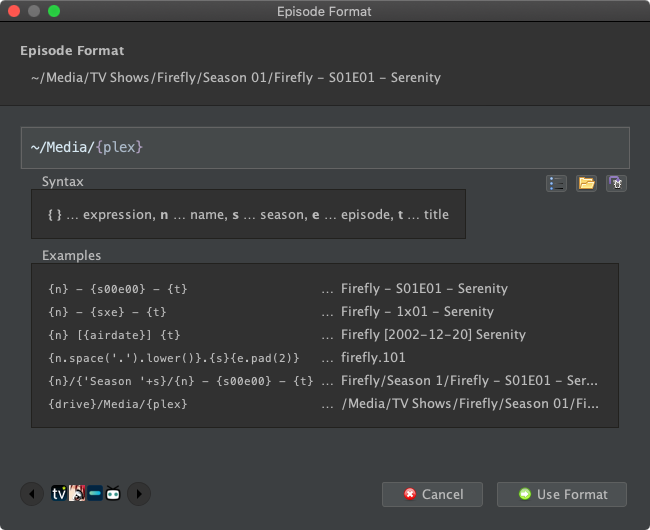
Use the default {plex} format and see what happens. If it works, then you have narrowed down the problem to your custom format.


I recommend using the Format Editor for prototyping and debugging custom formats:
Image

Re: Subtitles end up in a different folder when using amc

Posted: 08 Jun 2017, 11:30
by FadeAway12
Hey rednoah,

is there no chance to keep my custom format this way? Using {plex} just outposts "Moviename (Year)" which is fine but not as handy as the format above. Do you maybe know why it stopped working?

Re: Subtitles end up in a different folder when using amc

Posted: 08 Jun 2017, 12:14
by rednoah
FadeAway12 wrote: 08 Jun 2017, 11:30 Do you maybe know why it stopped working?
No one can just look at your code and know why it's not working. This is what you need to figure out by decomposing and debugging your format step by step. Once you can point out exactly where you format behaves in an unexpected way, then I can help you explain what's going on.

Re: Subtitles end up in a different folder when using amc

Posted: 08 Jun 2017, 21:58
by FadeAway12
Mh..

I don't get it.. Using my script in the editor shows the exact outcome i would like to have (subs in the same folder as the .mkv).

May i ask you to have a look at my log file i posted above? May it have something to do with the "group"-thing? FileBot seems to first process the subs as one group and afterwards the movie itself. This way MediaInfo cannot detect anything like moviecodec, audiocodec etc at the subtitles thus FileBot creates a new Folder with [, , , ,] and one movie folder with [x264, 1080p, DTS, BluRay] at the end.

Is there a command where i can tell FileBot to process them all at once and put it in one folder? When i use my Code in the editor it works.

The code i use is:

Code: Select all

{file =~ /(?i)AC3D|AC3LD|AC3M|AC3LineDubbed|AC3.Dubbed|DTSD|Line.dubbed|Dubbed|Line.Dubbed|mic.dub|telesync|WebRip|Web-Rip|Web.Rip|WebDl|Web-Dl|Web.Dl|Web-Hd|WebHd|Web.Hd/ ? 'Pre-Release' : file =~ /(?i)3D|HSBS|H-SBS|HOU|H-OU/ ? 'Filme(3D)' : 'Filme/Filme(4)'}/{n.ascii()} - [{y}] - [{vc}, {vf}, {ac}, {source}{file =~ /3D/ ? file =~ /(?i)AC3D|HSBS|H-SBS|HOU|H-OU/ ? '' : ', 3D' : ''}{file =~/(?i)HSBS|H-SBS/ ? ', 3D-HSBS' : ''}{file =~/(?i)HOU|H-OU/ ? ', 3D-HOU' : ''}]/{n.ascii()} - {y}.{fn}
Is it maybe because i use dev:amc?

Re: Subtitles end up in a different folder when using amc

Posted: 08 Jun 2017, 22:33
by kim
Your problem is this part:

Code: Select all

[{vc}, {vf}, {ac}, {source}{file =~/(?i)HSBS|H-SBS/ ? ', 3D-HSBS' : ''}{file =~/(?i)HOU|H-OU/ ? ', 3D-HOU' : ''}]
[Doctor Strange - [2016] - [, , , ]/Doctor Strange - 2016.coincidence-drstrange-1080p-eng.sub]
[Doctor Strange - [2016] - [x264, 1080p, DTS, BluRay] /Doctor Strange - 2016.coincidence-drstrange-1080p.mkv]
maybe it will get to same folder if in same folder from the start "/Subs/" to "/" ?

or you need to make your format use the tags from the path and filename then it WILL work ;)
e.g. fn.matchAll(/1080p|BluRay|x264|DTS/)

Re: Subtitles end up in a different folder when using amc

Posted: 08 Jun 2017, 22:41
by rednoah
MediaInfo bindings such as {vc} must be based on the corresponding media file for each subtitle file. This may not always work depending on how your files are organized. Generally speaking, subtitle file must have the same name as the corresponding video file and must be in the same folder or processed in the same batch.

Presumably, files not being in the same group or batch is the culprit here:

Code: Select all

Group: [tvs:null, mov:doctor strange 2016] => [coincidence-drstrange-1080p-eng.idx, coincidence-drstrange-1080p-eng.sub, coincidence-drstrange-1080p-ger.idx, coincidence-drstrange-1080p-ger.sub]
Group: [mov:doctor strange 2016] => [coincidence-drstrange-1080p.mkv]
Rename movies using [TheMovieDB]
Forcing Movie Mode via --def ut_label as recommended in the manual would probably be a solution here.

Re: Subtitles end up in a different folder when using amc

Posted: 09 Jun 2017, 13:31
by FadeAway12
But using --def ut_label would result in everything being recognised as a movie, right? I process lots of TV-Shows as well. Is there no way i can stop FileBot grouping subtitles and .mkvs in two different groups?

Re: Subtitles end up in a different folder when using amc

Posted: 09 Jun 2017, 13:46
by rednoah
Setting labels correctly is probably something that can (and should have been) automated upstream when adding downloads. If you rely on auto-detection then you will run into occasional issues, such as this one.

Re: Subtitles end up in a different folder when using amc

Posted: 09 Jun 2017, 14:25
by FadeAway12
So in case i can't change it when adding the download (as its a .rar container where the subs are in a subfolder) then there is nothing i can do besides changing the whole format? Thats strange as it worked that way for quite some time :(

Re: Subtitles end up in a different folder when using amc

Posted: 09 Jun 2017, 14:31
by rednoah
How do rar files make it impossible to set the label appropriately? Please explain.


Evidently, you can easily tell what label is appropriate based on the parent folder:

Code: Select all

Parameter: ut_dir = /media/usbdrive/Downloads/movie_1080p
Parameter: ut_label = N/A

Now you just need to set the label appropriately in your glue logic script.

Re: Subtitles end up in a different folder when using amc

Posted: 09 Jun 2017, 14:47
by FadeAway12
"movie_1080p" is just a placeholder. I use your jDownloader Script and this script automatically adds the folder name of the download to media/usbdrive/Downloads/nameofthedownloadsetbythejdownloader-script.

What i am trying to say: I have no folder that is called "movie1080p" where all 1080p movies will be downloaded to.

My whole script is:

Code: Select all

#!/bin/sh

# org.jdownloader.extensions.eventscripter.EventScripterExtension.scripts.json
# [{"eventTrigger":"ON_PACKAGE_FINISHED","enabled":true,"name":"Execute FileBot (PackageFinished)","script":"var script = 'Users/xxxx/Documents/jdownloader-postprocess.sh'\n\nvar path = package.getDownloadFolder()\nvar name = package.getName()\nvar label = package.getComment() ? package.getComment() : 'N/A'\n\nvar command = [script, path, name, label, 'PACKAGE_FINISHED']\n\nlog(command)\nlog(callSync(command))\n","eventTriggerSettings":{}} ]

# Input Parameters
ARG_PATH="$1"
ARG_NAME="$2"
ARG_LABEL="$3"

# Configuration
CONFIG_OUTPUT="/media/usbdrive"

filebot -script dev:amc --output "$CONFIG_OUTPUT" --action move --conflict skip -non-strict --log-file amc.log --def "seriesFormat=TV-Serien/{n.ascii()}/{episode.special ? 'Special' : 'Season '+s.pad(2)}/{s00e00} - {t.ascii()}/{fn}" "movieFormat={file =~ /(?i)AC3D|AC3LD|AC3M|AC3LineDubbed|AC3.Dubbed|DTSD|Line.dubbed|Dubbed|Line.Dubbed|mic.dub|telesync|WebRip|Web-Rip|Web.Rip|WebDl|Web-Dl|Web.Dl|Web-Hd|WebHd|Web.Hd/ ? 'Pre-Release' : file =~ /(?i)3D|HSBS|H-SBS|HOU|H-OU/ ? 'Filme(3D)' : 'Filme/Filme(4)'}/{n.ascii()} - [{y}] - [{vc}, {vf}, {ac}, {source}{file =~ /3D/ ? file =~ /(?i)AC3D|HSBS|H-SBS|HOU|H-OU/ ? '' : ', 3D' : ''}{file =~/(?i)HSBS|H-SBS/ ? ', 3D-HSBS' : ''}{file =~/(?i)HOU|H-OU/ ? ', 3D-HOU' : ''}]/{n.ascii()} - {y}.{fn}" gmail=xxxxx mailto=xxxxx pushbullet=xxxx skipExtract=y unsorted=y music=y excludeList=".excludes" ut_dir="$ARG_PATH" ut_kind="multi" ut_title="$ARG_NAME" ut_label="$ARG_LABEL" clean=y plex=xxxx

Re: Subtitles end up in a different folder when using amc

Posted: 09 Jun 2017, 15:42
by rednoah
:idea: This is the first time you mention jDownloader. That should probably have been mentioned in your very first post.


The ON_PACKAGE_FINISHED hook does pass in the package comment as label:

Code: Select all

var label = package.getComment() ? package.getComment() : 'N/A'
You can set the label via jDownloader by setting the comment appropriately, e.g. "movie". This can probably be automated. You'll have to ask the jDownloader developers about that.

Re: Subtitles end up in a different folder when using amc

Posted: 09 Jun 2017, 16:18
by FadeAway12
Ok will do, thanks! BUT did you change something on dev:amc recently? I did not change anything but get this error right now:

Code: Select all

Illegal usage: output folder [/media/usbdrive] must be separate from input folder [dir:/media/usbdrive/Unsorted, kind:multi, title:null, label:null]

Re: Subtitles end up in a different folder when using amc

Posted: 09 Jun 2017, 16:28
by rednoah
I did fix some of the sanity checks. The input folder must not be inside the output folder and vice versa.

e.g.

Code: Select all

--output /media/usbdrive/InputFolder --output /media/usbdrive/Media

Re: Subtitles end up in a different folder when using amc

Posted: 09 Jun 2017, 16:29
by FadeAway12
But i didn't change anything on my scripts at all... now i replaced dev:amc with fn:amc and it works again. Thats why i thought you might have changed something. My code remained exactly the same.

Re: Subtitles end up in a different folder when using amc

Posted: 09 Jun 2017, 16:30
by rednoah
Yes, I did fix the sanity checks. However, the documentation was always clear on separating input/output folders. If it worked before, then it was a bug that has now been fixed.

Re: Subtitles end up in a different folder when using amc

Posted: 09 Jun 2017, 16:33
by FadeAway12
And the bug still exists in fn:amc then? Just asking because i fear i have to invest some serious amount of time to relearn everything i did (with a huge amount of your help) over a year ago if everything falls apart.

Re: Subtitles end up in a different folder when using amc

Posted: 09 Jun 2017, 16:41
by rednoah
The stable branch (e.g. fn:amc) is only updated once a month, so you will have to do things correctly eventually.

I don't see how slightly adjusting --output would end up in everything falling apart though. That makes no sense.

Re: Subtitles end up in a different folder when using amc

Posted: 09 Jun 2017, 16:47
by FadeAway12
Falling apart because i still don't fully understand FileBot in all of its glory. As a non native speaker that has nothing to do with java and only learns via try and error (on a remote VNC machine that is slow is hell) its quite hard to understand everything correctly.

As far as this new issue:
I didn't change my code.. thats why i still don't understand why it doesn't work anymore with dev:amc. As far as i understand my code the output folder is set this way to /media/usbdrive

Code: Select all

CONFIG_OUTPUT="/media/usbdrive"
The Input folder is set by jDownloader to /media/usbdrive/Downloads/nameofdownload

So technically (and as far as i understand) those to folders are not identical. Thats why i don't understand the error message and have the feeling of losing everything i got working earlier ;)

Re: Subtitles end up in a different folder when using amc

Posted: 09 Jun 2017, 17:36
by rednoah
dev:amc means that you'll be using the latest version of the amc script, so the amc script filebot is executing can change even if you don't touch the filebot command-line call.


/media/usbdrive/Downloads/.. is inside /media/usbdrive. It's about being separate, not about being not-identical.

Separate:

Code: Select all

/A
/B
Not Separate:

Code: Select all

/A
/A/B

Re: Subtitles end up in a different folder when using amc

Posted: 09 Jun 2017, 17:40
by FadeAway12
Okay, but how can it lead to the error posted above and below:

Code: Select all

Illegal usage: output folder [/media/usbdrive] must be separate from input folder [dir:/media/usbdrive/Unsorted, kind:multi, title:null, label:null]
When those folders are not inside each other or identical? In fact it still works with fn:amc as i stated above and tried to explain why.

Output is: /media/usbdrive/
Input is /media/usbdrive/Downloads/namethatjdownloadersgivesthefolder

Re: Subtitles end up in a different folder when using amc

Posted: 09 Jun 2017, 17:41
by rednoah
Change this:

Code: Select all

CONFIG_OUTPUT="/media/usbdrive"
to this:

Code: Select all

CONFIG_OUTPUT="/media/usbdrive/Media"
Create folder /media/usbdrive/Media. Done. Separate folders. /media/usbdrive/Media is not inside /media/usbdrive/Downloads and /media/usbdrive/Downloads is not inside /media/usbdrive/Media.

Re: Subtitles end up in a different folder when using amc

Posted: 09 Jun 2017, 17:42
by FadeAway12
Ok got it! Thx!

Re: Subtitles end up in a different folder when using amc

Posted: 09 Jun 2017, 18:14
by FadeAway12
Ok here is an idea.. will this work?

In jDownloader you have this Event-Scripter where you input your script with the trigger "on archive unpacked".

What if i enter your script twice but once edit the line

Code: Select all

var label = package.getComment() ? package.getComment() : 'N/A'
to

Code: Select all

var label = package.getComment() ? package.getComment() : 'MOVIE'
for Movies

and once to

Code: Select all

var label = package.getComment() ? package.getComment() : 'SERIES'
for TV Shows

and activate/deactivate before i start downloading?


Will this work? This way i will lose a lot of comfort/automation as it worked before completely independent (the thing i absolutely love FileBot for) but i guess this is the best way to go, correct? Now i would have to VNC into my Raspberry each time (painful while on the go) and activate/deactivate the script.

I just have to ask it one more time: Why does FileBot process those subtitles as a separate group? Its not a one time error or issue but happens every single time the subs are in a dedicated subtitles folder.
If i recall it right, earlier in the days it did not group them but processed them in one group each time. I can remember that you made a change to your amc script upon my question if you could include subs that are in a dedicated subtitles folder as FileBot did not include them at the beginning.

Re: Subtitles end up in a different folder when using amc

Posted: 09 Jun 2017, 18:37
by rednoah
1.
The solution you propose sounds really stupid to me. I'd just switch between Series / Movie mode depending on the files (e.g. Alias 1x01 => series because 1x01 pattern). Or have jDownloader set comments automatically depending on the download source. There should be a way to put files into different folders depending on where the download is coming from.


2.
FadeAway12 wrote: 09 Jun 2017, 18:14 Why does FileBot process those subtitles as a separate group?
I don't know. I'm not a computer. :lol:
FadeAway12 wrote: 09 Jun 2017, 18:14 include subs that are in a dedicated subtitles folder as FileBot did not include them at the beginning
Yep, looks like dedicated subtitle folders are still not fully supported.

Re: Subtitles end up in a different folder when using amc

Posted: 09 Jun 2017, 18:44
by FadeAway12
Short update.. When setting it to "MOVIE" it processed the subtitles in the sub folder perfectly fine.

Re: Subtitles end up in a different folder when using amc

Posted: 09 Jun 2017, 18:46
by rednoah
If you were using a torrent client, I'd have the torrent client setup with RSS feeds for Movies, TV Shows, etc and label new downloads automatically.

I'd be very surprised if jDownloader can't to something very similar. It's really not that hard. There's a million ways to do things. You just need to be smart and find a good solution for how you do things.

Re: Subtitles end up in a different folder when using amc

Posted: 09 Jun 2017, 18:49
by FadeAway12
Sadly torrenting is not possible where i live (high penalties...). Actually jDownloader is not that advanced as many torrent clients. I still have to surf to a specific website, fetch the share-online or uploaded link and load it into jdownloader. The application itself is pretty dumb as it just downloads .rar files not knowing where they come from (beside from knowing its from uploaded.to or share-online).

Re: Subtitles end up in a different folder when using amc

Posted: 09 Jun 2017, 18:54
by FadeAway12
In case you are curious: The Output of the Log when i force MOVIE mode:

Code: Select all

Input: /Volumes/Plex/Media/Unsorted/cinevision-john wick 2 1080p/John.Wick.Kapitel.2.2017.German.DL.DTS.1080p.BluRay.x264-CiNEViSiON/Subs/cinevision-john.wick.2.1080p-eng-forced.idx
Input: /Volumes/Plex/Media/Unsorted/cinevision-john wick 2 1080p/John.Wick.Kapitel.2.2017.German.DL.DTS.1080p.BluRay.x264-CiNEViSiON/Subs/cinevision-john.wick.2.1080p-eng-forced.sub
Input: /Volumes/Plex/Media/Unsorted/cinevision-john wick 2 1080p/John.Wick.Kapitel.2.2017.German.DL.DTS.1080p.BluRay.x264-CiNEViSiON/Subs/cinevision-john.wick.2.1080p-forced.idx
Input: /Volumes/Plex/Media/Unsorted/cinevision-john wick 2 1080p/John.Wick.Kapitel.2.2017.German.DL.DTS.1080p.BluRay.x264-CiNEViSiON/Subs/cinevision-john.wick.2.1080p-forced.sub
Input: /Volumes/Plex/Media/Unsorted/cinevision-john wick 2 1080p/John.Wick.Kapitel.2.2017.German.DL.DTS.1080p.BluRay.x264-CiNEViSiON/Subs/cinevision-john.wick.2.1080p.idx
Input: /Volumes/Plex/Media/Unsorted/cinevision-john wick 2 1080p/John.Wick.Kapitel.2.2017.German.DL.DTS.1080p.BluRay.x264-CiNEViSiON/Subs/cinevision-john.wick.2.1080p.sub
Input: /Volumes/Plex/Media/Unsorted/cinevision-john wick 2 1080p/John.Wick.Kapitel.2.2017.German.DL.DTS.1080p.BluRay.x264-CiNEViSiON/cinevision-john.wick.2.1080p.mkv
Group: [mov:john wick chapter two 2017] => [cinevision-john.wick.2.1080p-eng-forced.idx, cinevision-john.wick.2.1080p-eng-forced.sub, cinevision-john.wick.2.1080p-forced.idx, cinevision-john.wick.2.1080p-forced.sub, cinevision-john.wick.2.1080p.idx, cinevision-john.wick.2.1080p.sub, cinevision-john.wick.2.1080p.mkv]
Rename movies using [TheMovieDB]
It groups everything into one group.

Re: Subtitles end up in a different folder when using amc

Posted: 09 Jun 2017, 18:59
by rednoah
Can you tell, based on the download name or link, if it's a movie or a tv series?

Presumably, any episode will contain a pattern such as S01E01 or 1x01 and that's extremely easy to check for.

You can also add the movie comment whenever you add a movie. The web interface will probably suggest that the second time around. If you're adding links to jDownloader yourself anyway, why not spend an extra 1 second to select the comment text field and select "movie" from the form auto-completion?

I don't use jDownloader, but it seems pretty straight-forward to me.

Re: Subtitles end up in a different folder when using amc

Posted: 09 Jun 2017, 19:04
by FadeAway12
There is now way in telling what is what from the name of the link.. at least not in 50% of all cases as the uploaders here have to hide their uploads under strange names.

But what do you exactly mean with

"You can also add the movie comment whenever you add a movie. The web interface will probably suggest that the second time around. If you're adding links to jDownloader yourself anyway, why not spend an extra 1 second to select the comment text field and select "movie" from the form auto-completion?"

What do you exactly mean with "comment text field" where i can select "movie"?

Re: Subtitles end up in a different folder when using amc

Posted: 09 Jun 2017, 19:16
by FadeAway12
Oh i guess you mean the "Comments" field in the "Link gathering" section. This is not available via my.jdownloader.com (their web portal i use to add links while on the go)

Re: Subtitles end up in a different folder when using amc

Posted: 09 Jun 2017, 19:20
by rednoah
This is what I see. Seems pretty obvious to me. You will need to include screenshot in the future, because I can't magically see what you see.

Image

You can figure out the rest yourself. I'm off.

Re: Subtitles end up in a different folder when using amc

Posted: 09 Jun 2017, 19:35
by FadeAway12
This is what i see on my.jdownloader.com (their remote application):

Image

There is no comment section available

Re: Subtitles end up in a different folder when using amc

Posted: 09 Jun 2017, 19:47
by rednoah
You can:
* Set the name
* Set the download path
* Set the priority

You could set the label based on any of these properties.


rednoah wrote:You can (and should) force Movie/Series/Anime mode or force ignore files via labels, e.g. label as Movie to force TheMovieDB, Series to force TheTVDB, Anime to force AniDB, or other to ignore all files. Alternatively, folder names such as Movies/TV Shows/Anime may also be used to force a specific mode.
So what's preventing you from setting download path to /path/to/Downloads/Movies for movies and /path/to/Downloads/TV Shows for TV shows? Looks like that's supported out of the box, by both JD and FileBot.

Re: Subtitles end up in a different folder when using amc

Posted: 09 Jun 2017, 19:57
by FadeAway12
That sounds like a solution :o

Now bear with me but here is my final question: Where do i have to change the label and into what exactly?

I got your jDownloader Script in Event-Scripter -> Thats where i just changed "N/A" to "Movies". Will i have to change it there?

Or in my jdownloader-postprocess.sh?

And how would the --def ut_label command exactly need to look like?

I just found this page from you while researching but could only figure out that i can change it to MOVIE, SERIES, ANIME and OTHER (which i did a couple of minutes ago).

Thx for all your effort.. its not easy, i know :|

Re: Subtitles end up in a different folder when using amc

Posted: 09 Jun 2017, 20:03
by rednoah
1.
Change absolutely nothing. Revert all changes you made. Everything will work out of the box.


2.
Make sure to download movies into a folder called "Movies". Same TV Shows. If folders are well-named, then you won't need --def ut_label at all.


3.
FadeAway12 wrote: 09 Jun 2017, 19:57 Thx for all your effort.. its not easy, i know :|
Just remember to include as much information and screenshots as possible upfront whenever asking for help online. If you had posted that screenshot hours ago, we would have arrived at a solution right then and there.

Re: Subtitles end up in a different folder when using amc

Posted: 10 Jun 2017, 12:47
by FadeAway12
Thank you so much! Everything works now :) And of course i will take screenshots next time :)