
FWIW this is what the Canonical dev's said regarding theme support (i.e. why the file select dialog uses the ancient, broken old GTK style):
allowing snap packages to use system themes has been discussed at the snappy sprint in london last week, it is still a bit until this feature will be fully ...
Search found 8 matches
- 04 Jul 2017, 09:55
- Forum: Feature Requests and Bug Reports
- Topic: Broken file select dialog in Filebot Ubuntu snap package version
- Replies: 12
- Views: 6821
- 03 Jul 2017, 08:10
- Forum: Feature Requests and Bug Reports
- Topic: Broken file select dialog in Filebot Ubuntu snap package version
- Replies: 12
- Views: 6821
Re: Broken file select dialog in Filebot Ubuntu snap package version
The VM was a clean install from the Ubuntu Server ISO image. I just installed kubuntu-desktop instead of ubuntu-desktop after installation. Anyway, I'll see if the canonical Devs say anything on those bugs
- 03 Jul 2017, 07:35
- Forum: Feature Requests and Bug Reports
- Topic: Broken file select dialog in Filebot Ubuntu snap package version
- Replies: 12
- Views: 6821
- 03 Jul 2017, 07:19
- Forum: Feature Requests and Bug Reports
- Topic: Broken file select dialog in Filebot Ubuntu snap package version
- Replies: 12
- Views: 6821
Re: Broken file select dialog in Filebot Ubuntu snap package version
I've just tested again, this time in a freshly installed Kubuntu VM. I still get the same problem - the file dialog is the old style one, see 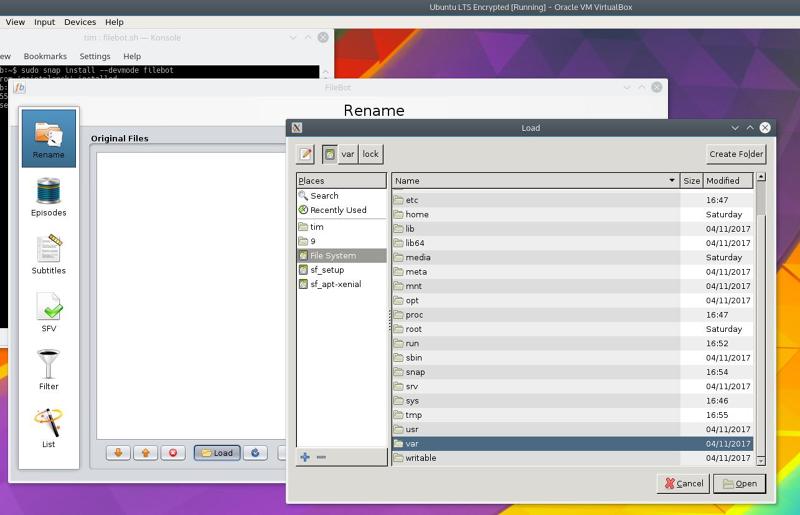
I'll raise a bug with Canonical
I'll raise a bug with Canonical
- 01 Jul 2017, 06:38
- Forum: Feature Requests and Bug Reports
- Topic: Broken file select dialog in Filebot Ubuntu snap package version
- Replies: 12
- Views: 6821
Re: Broken file select dialog in Filebot Ubuntu snap package version
For 1., yes the path definitely exists and yes I'm definitely using --devmode. If I wasn't then I wouldn't be able to access any directories in that file selection dialog apart from what's under my home directory (I've tested). There should be no permissions problem since the files under /TIMSDATA ...
- 28 Jun 2017, 23:12
- Forum: Feature Requests and Bug Reports
- Topic: Broken file select dialog in Filebot Ubuntu snap package version
- Replies: 12
- Views: 6821
Re: Broken file select dialog in Filebot Ubuntu snap package version
Unfortunately drag-and-drop doesn't work with the Snap version if I'm trying to drag in files from that directory (/TIMSDATA) which the file select dialog can't see. The error printed in the terminal is:
GVFS: file:///TIMSDATA/Video/TV/Breaking%20Bad/Season%201 => java.io.FileNotFoundException ...
GVFS: file:///TIMSDATA/Video/TV/Breaking%20Bad/Season%201 => java.io.FileNotFoundException ...
- 28 Jun 2017, 13:16
- Forum: Feature Requests and Bug Reports
- Topic: Broken file select dialog in Filebot Ubuntu snap package version
- Replies: 12
- Views: 6821
Re: Broken file select dialog in Filebot Ubuntu snap package version
I should've mentioned but I installed the filebot snap with --devmode. So the problem isn't permissions - I can browse into any directory under / that my user has access too. The problem is the file select dialog ignores certain directories
- 28 Jun 2017, 12:55
- Forum: Feature Requests and Bug Reports
- Topic: Broken file select dialog in Filebot Ubuntu snap package version
- Replies: 12
- Views: 6821
Broken file select dialog in Filebot Ubuntu snap package version
I tried using Filebot from the Ubuntu Snap package today. Unfortunately I couldn't because the file select dialog (which pops up when you click 'Load' in Filebot) is broken in the Snap package version.
My TV and movie show files are under a partition mounted at /srv/TIMSDATA, and symlinked ...
My TV and movie show files are under a partition mounted at /srv/TIMSDATA, and symlinked ...