
Command line OSX
Command line OSX
Hi there, firstly thanks for developing such an amazing piece of software. However I'm having trouble running scripts or executing the program from the command line. Could you please provide a brief instruction on how to install filebot for OSX so I can execute it from the terminal/run a script. I want to automate moving from my downloads folder into /Volumes/TV\ Shows/'show name'/'season #'/...

Re: Command line OSX
Well, since an app bundle is not an installer the "filebot" command can't be setup automatically. But there is an install script in FileBot.app/MacOS/bin
Run FileBot.app/MacOS/bin/install.sh to link "filebot" into /bin
Run FileBot.app/MacOS/bin/install.sh to link "filebot" into /bin
Re: Command line OSX
Thanks, however the directory in my .app (downloaded from the SF page a few hours ago
Filebot.app/Contents/MacOS/install.sh
Before I was trying to run things as Finebot.app -script =P
Filebot.app/Contents/MacOS/install.sh
Before I was trying to run things as Finebot.app -script =P
Re: Command line OSX
Yep that folder then. 
That would be cool but Apple says app bundles must be GUI apps so no console. But I did ready in newer OSXs you can do something like "start Filebot.app -arguments <appl.args>" but that's kinda crap. Better just install the command.
That would be cool but Apple says app bundles must be GUI apps so no console. But I did ready in newer OSXs you can do something like "start Filebot.app -arguments <appl.args>" but that's kinda crap. Better just install the command.
Re: Command line OSX
Any possible assistance with this:
Does a script have to be loaded from the HTTP?192-168-1-6:~ dewy$ filebot -script "~/Downloads/sort.groovy"
FileNotFoundException: ~/Downloads/sort.groovy
java.io.FileNotFoundException: ~/Downloads/sort.groovy
at net.sourceforge.filebot.cli.ArgumentBean.getScriptLocation(Unknown Source)
at net.sourceforge.filebot.cli.ArgumentProcessor.process(Unknown Source)
at net.sourceforge.filebot.Main.main(Unknown Source)
Failure (?_?)
Re: Command line OSX
Basically at the moment I have uTorrent set up using RSS to download to "/Volumes/Drobo/Downloads/" automatically.
So I want a script to watch this directory, then rename and file into
"/Volumes/Drobo/TV Shows/[showname]/..."
So I know I want my output format to be:
So I want a script to watch this directory, then rename and file into
"/Volumes/Drobo/TV Shows/[showname]/..."
So I know I want my output format to be:
Code: Select all
/Volumes/Drobo/TV Shows/{n}/Season {s}/{n} - {s00e00} - {t}Re: Command line OSX
Be careful about the ~/ you put it into "" so your shell won't resolve it to /home/me/. Use absolute paths for simplicity.
Re: Command line OSX
Check out the housekeeping.groovy script. Modify to the way you need it and it should work fine. Better have utorrent move completed/seeded downloads into a separate "watched" folder so u don't get conflicts with open file handles / missing files / etc
Re: Command line OSX
Thanks.
So far I have the current terminal command working:
Is there a way I can automate this to watch the directory and not have to open terminal?
So far I have the current terminal command working:
Code: Select all
filebot -rename /Volumes/Drobo/Downloads/ --format "/Volumes/Drobo/TV Shows/{n}/Season {s}/{n} - {s00e00} - {t}" --db thetvdbRe: Command line OSX
Housekeeping script looks good. Any idea how to automate it?
Edit: By Automate it I mean - can we have it run without a terminal window?
Edit: By Automate it I mean - can we have it run without a terminal window?
Re: Command line OSX
It's just a command. MacOS should have faculties to just launch stuff in background on startup. Or you can have utorrent initiate a rename after a completed download.
Re: Command line OSX
Running my command of
I now get the following error:
[quote]192-168-1-6:Downloads dewy$ filebot -rename /Volumes/Drobo/Downloads/* --format "/Volumes/Drobo/TV Shows/{n}/Season {s}/{n} - {s00e00} - {t}" --db thetvdb
Rename episodes using [TheTVDB]
Exception: Unable to auto-select query: [How to Make It in America, Hustle]
Failure (?_?)
192-168-1-6:Downloads dewy$ [quote]
It works without issue when there is only one file in the folder. But when more than one file exists I have no luck.
Code: Select all
filebot -rename /Volumes/Drobo/Downloads/* --format "/Volumes/Drobo/TV Shows/{n}/Season {s}/{n} - {s00e00} - {t}" --db thetvdbp[quote]192-168-1-6:Downloads dewy$ filebot -rename /Volumes/Drobo/Downloads/* --format "/Volumes/Drobo/TV Shows/{n}/Season {s}/{n} - {s00e00} - {t}" --db thetvdb
Rename episodes using [TheTVDB]
Exception: Unable to auto-select query: [How to Make It in America, Hustle]
Failure (?_?)
192-168-1-6:Downloads dewy$ [quote]
It works without issue when there is only one file in the folder. But when more than one file exists I have no luck.
Re: Command line OSX
Not because it's one file but because it's multiple shows from the same folder. Cmdline is strict by default, so you won't mess up your files.
Enable fuzzy logic via -non-strict and it'll "most probably" get things right the way u want it.
Enable fuzzy logic via -non-strict and it'll "most probably" get things right the way u want it.
Re: Command line OSX
I had some trouble getting the command line Filebot application to run. Thought I would share my solution.
I have never worked with Java before, so be gentle if this is all wrong.
I'm using a stock install of OSX Lion with all updates run.
1. ran install.sh from inside the Filebot.app
$ filebot -script "~/Downloads/sort.groovy"
produces this error
ClassNotFoundException: java.nio.file.FileVisitor
java.lang.ClassNotFoundException: java.nio.file.FileVisitor
Missing a class?
$java -version
java version "1.6.0_29"
Java(TM) SE Runtime Environment (build 1.6.0_29-b11-402-11M3527)
Java HotSpot(TM) 64-Bit Server VM (build 20.4-b02-402, mixed mode)
Java 7 needs to be installed, you can find it and instruction here...
http://code.google.com/p/openjdk-osx-bu ... MACOSXPORT
It is easy, just a dmg containing one package, then run the following command:
$ export JAVA_HOME=/Library/Java/JavaVirtualMachines/1.7.0.jdk/Contents/Home
Works fine now.
Hope this helps someone.
I have never worked with Java before, so be gentle if this is all wrong.
I'm using a stock install of OSX Lion with all updates run.
1. ran install.sh from inside the Filebot.app
$ filebot -script "~/Downloads/sort.groovy"
produces this error
ClassNotFoundException: java.nio.file.FileVisitor
java.lang.ClassNotFoundException: java.nio.file.FileVisitor
Missing a class?
$java -version
java version "1.6.0_29"
Java(TM) SE Runtime Environment (build 1.6.0_29-b11-402-11M3527)
Java HotSpot(TM) 64-Bit Server VM (build 20.4-b02-402, mixed mode)
Java 7 needs to be installed, you can find it and instruction here...
http://code.google.com/p/openjdk-osx-bu ... MACOSXPORT
It is easy, just a dmg containing one package, then run the following command:
$ export JAVA_HOME=/Library/Java/JavaVirtualMachines/1.7.0.jdk/Contents/Home
Works fine now.
Hope this helps someone.
Re: Command line OSX
Java 7 on OSX?? Awesome! Just had people complaining that it's really difficult to install. Thanks for sharing!
Actually scripting should work with Java 6 as well but something got messed up in 2.4, my fault sry
Actually scripting should work with Java 6 as well but something got messed up in 2.4, my fault sry
Re: Command line OSX
Okay guys, I have created something that works well. Using Automator I created a "Folder Action" on my downloads directory. So the moment my torrent application is finished with the file it dumps it into this directory. The Folder Action watches for any new items in this folder and immediately runs the shell command:

Hopefully this helps give people an alternative to the confusing scripting method.
Ps. Thanks for the fuzzy logic argument.
Code: Select all
filebot -rename /Volumes/Drobo/Downloads/* --format "/Volumes/Drobo/TV Shows/{n}/Season {s}/{n} - {s00e00} - {t}" --db thetvdb -non-strictHopefully this helps give people an alternative to the confusing scripting method.
Ps. Thanks for the fuzzy logic argument.
Re: Command line OSX
that is beautiful, thank you. now do i just save the folder action anywhere and from now on when a file is added it will automatically run the command?dewy wrote:Okay guys, I have created something that works well. Using Automator I created a "Folder Action" on my downloads directory. So the moment my torrent application is finished with the file it dumps it into this directory. The Folder Action watches for any new items in this folder and immediately runs the shell command:
Code: Select all
filebot -rename /Volumes/Drobo/Downloads/* --format "/Volumes/Drobo/TV Shows/{n}/Season {s}/{n} - {s00e00} - {t}" --db thetvdb -non-strict
command not found
I've installed filebot.sh but keep getting: command not found, what could I be doing wrong?
-
thequestion
- Posts: 8
- Joined: 18 Dec 2011, 17:52
Re: Command line OSX
did you chmod 755 filebot.sh? it has to be executable
Re: Command line OSX
Hi...
I'm really new (as in never done before) to anything CLI, but I want to install filebot.sh, so I can enter script to automate moving and re-naming files. Whenever I try to post in anything on Terminal (the OS X CLI app) I get the following message:
-bash: filebot: command not found
I want to be able to automate naming files, then moving them into another folder (I have an app called Hazel which handles everything but the re-naming process).
Any help from anyone who knows what's up would be greatly appreciated.
Really like what you're doing here, this software is amazing.
I'm really new (as in never done before) to anything CLI, but I want to install filebot.sh, so I can enter script to automate moving and re-naming files. Whenever I try to post in anything on Terminal (the OS X CLI app) I get the following message:
-bash: filebot: command not found
I want to be able to automate naming files, then moving them into another folder (I have an app called Hazel which handles everything but the re-naming process).
Any help from anyone who knows what's up would be greatly appreciated.
Really like what you're doing here, this software is amazing.
Re: Command line OSX
Replace "filebot" with /Applications/path/to/app/FileBot.app/MacOS/filebot.sh
Re: Command line OSX
And then I just type in the rest of the code I want?
Re: Command line OSX
start with filebot -version first anyway, and then once you confirmed it works try more complex things
Re: Command line OSX
This what I have (I think it is the way I'm supposed to). Does this script make sense?
/Applications/imac/Downloads/Filebot.app/MacOS/filebot.sh -rename "$1" --format {n} S{s}E{e} --db thetvdb
/Applications/imac/Downloads/Filebot.app/MacOS/filebot.sh -rename "$1" --format {n} S{s}E{e} --db thetvdb
Re: Command line OSX
Just try. Add --action test just in case.
Re: Command line OSX
I'm using the app Automator, (which creates Workflows for you to automate tasks), and whenever I try to run the following shell script:
/Applications/imac/Downloads/Filebot.app/MacOS/filebot.sh -rename "$1" --format {n} S{s}E{e} --db thetvdb --action test -non-strict
I get the error:
-: /Applications/imac/Downloads/Filebot.app/MacOS/filebot.sh: No such file or directory.
Am I doing something wrong? It looks to be correct (I think, I'm a bit of a noob to this sort of stuff).
/Applications/imac/Downloads/Filebot.app/MacOS/filebot.sh -rename "$1" --format {n} S{s}E{e} --db thetvdb --action test -non-strict
I get the error:
-: /Applications/imac/Downloads/Filebot.app/MacOS/filebot.sh: No such file or directory.
Am I doing something wrong? It looks to be correct (I think, I'm a bit of a noob to this sort of stuff).
Re: Command line OSX
And you never ever even tried to just open that path? It clearly says "No such file or directory" => PATH DOES NOT EXIST.
Maybe?
/path/to/FileBot.app/Contents/MacOS/filebot
But ignore that, figure it out yourself, open the .app folder, look for an executable called filebot, open the console and play with it. It's not rocket science.
You're on Mac, you see everything, I'm on Windows, I have no idea, yet I these things are so obvious... Learn how to use the console. Just ls, cd etc, execute programs. VERY BASIC.
Maybe?
/path/to/FileBot.app/Contents/MacOS/filebot
But ignore that, figure it out yourself, open the .app folder, look for an executable called filebot, open the console and play with it. It's not rocket science.
You're on Mac, you see everything, I'm on Windows, I have no idea, yet I these things are so obvious... Learn how to use the console. Just ls, cd etc, execute programs. VERY BASIC.
Re: Command line OSX
I did finally get it working after much experimentation.
It turns out I needed to use a sudo command to install the contents of the bundle. Now I can access it. I do appreciate all your help, even if I pissed you off
It turns out I needed to use a sudo command to install the contents of the bundle. Now I can access it. I do appreciate all your help, even if I pissed you off
Re: Command line OSX
Level +1, experimenting is how you do these things, now you got basic commandline skills. 

Re: Command line OSX
When I run FileBot I get:
For the record, I run Java 7 Update 65 on my machine.
Any ideas?
PS: I'm on 10.10.
Code: Select all
Exception in thread "main" java.lang.UnsupportedClassVersionError: net/filebot/Main : Unsupported major.minor version 51.0
	at java.lang.ClassLoader.defineClass1(Native Method)
	at java.lang.ClassLoader.defineClassCond(ClassLoader.java:637)
	at java.lang.ClassLoader.defineClass(ClassLoader.java:621)
	at java.security.SecureClassLoader.defineClass(SecureClassLoader.java:141)
	at java.net.URLClassLoader.defineClass(URLClassLoader.java:283)
	at java.net.URLClassLoader.access$000(URLClassLoader.java:58)
	at java.net.URLClassLoader$1.run(URLClassLoader.java:197)
	at java.security.AccessController.doPrivileged(Native Method)
	at java.net.URLClassLoader.findClass(URLClassLoader.java:190)
	at java.lang.ClassLoader.loadClass(ClassLoader.java:306)
	at sun.misc.Launcher$AppClassLoader.loadClass(Launcher.java:301)
at java.lang.ClassLoader.loadClass(ClassLoader.java:247Any ideas?
PS: I'm on 10.10.
Re: Command line OSX
For the record, you are running Java 6.
This might help: http://www.filebot.net/forums/viewtopic ... 652#p10683
This might help: http://www.filebot.net/forums/viewtopic ... 652#p10683
Re: Command line OSX
That's so strange… my shell indeed outputs:
… despite my control panel telling me:
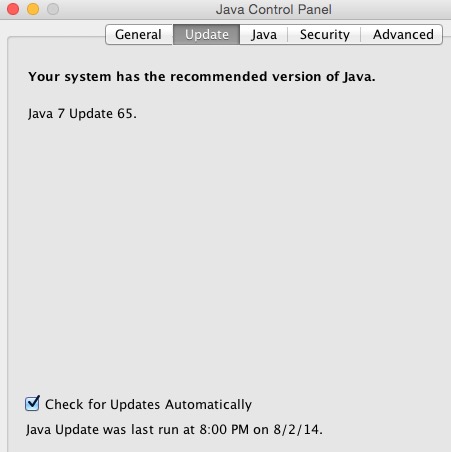
And the latest build from Oracle won't install no matter what they say here. I guess I just have to be patient and wait until the release something that works.
Code: Select all
java version "1.6.0_65"
Java(TM) SE Runtime Environment (build 1.6.0_65-b14-466.1-11M4716)
Java HotSpot(TM) 64-Bit Server VM (build 20.65-b04-466.1, mixed mode)
And the latest build from Oracle won't install no matter what they say here. I guess I just have to be patient and wait until the release something that works.
Re: Command line OSX
Only took 2 commands to switch Java on my 10.10 Yosemite dev box:
BEFORE:
COMMANDS:
AFTER:
Hope this helps.
BEFORE:
Code: Select all
->$ java -version
java version "1.6.0_65"
Java(TM) SE Runtime Environment (build 1.6.0_65-b14-466.1-11M4716)
Java HotSpot(TM) 64-Bit Server VM (build 20.65-b04-466.1, mixed mode)Code: Select all
sudo rm /usr/bin/java
sudo ln -s /Library/Internet\ Plug-Ins/JavaAppletPlugin.plugin/Contents/Home/bin/java /usr/binCode: Select all
->$ java -version
java version "1.7.0_60"
Java(TM) SE Runtime Environment (build 1.7.0_60-b19)
Java HotSpot(TM) 64-Bit Server VM (build 24.60-b09, mixed mode)Re: Command line OSX
sorry ,
i'm trying to learn how to work with CLI using filebot.app in osx because my synology cant run filebot7filebot node cause low ram and cpu
I'm searching for install.sh but in my filebot.app content it isn't
can you help me ?
thxs
i'm trying to learn how to work with CLI using filebot.app in osx because my synology cant run filebot7filebot node cause low ram and cpu
I'm searching for install.sh but in my filebot.app content it isn't
can you help me ?
thxs
Re: Command line OSX
i have just pay for filebot on mac app store
Re: Command line OSX
Your contribution is much appreciated. Make sure to give me a 5-star rating. Thank you!
Re: Command line OSX
Hi there, I'm using FileBot a while with GUI and today I wanted to test FileBot with CLI, but I'm getting
"-bash: filebot: command not found"
I have bought FileBot on Mac AppStore and I don't have "filebot.sh" in ../FileBot.app/Contents/MacOS
How can I use FileBot with CLI?
Thank you...
"-bash: filebot: command not found"
I have bought FileBot on Mac AppStore and I don't have "filebot.sh" in ../FileBot.app/Contents/MacOS
How can I use FileBot with CLI?
Thank you...
Re: Command line OSX
 Apple doesn't allow command-line tools in Mac App Store bundles.
You can install the filebot command-line tools via brew:
viewtopic.php?t=2049