
POSTBUCKET - where random posts in unrelated topics go
-
ironcity1861
- Posts: 3
- Joined: 08 Aug 2016, 18:23
Re: [SNAP] Grant access to /media
Re: Q&A for n00bs
I have been using Filebot for some time now but only drag and drop style. So now im moving on to the automated worlds. Please bear with me.
I have started off gently by creating a .bat-file that gets run atomatically when my files get extracted by another software im using. So when the extraction is complete is calls the .bat-script and executes the line below.
This is what i have started out with
Code: Select all
filebot -script fn:amc --output "N:\Done" --action copy -non-strict "N:\TV-IN" --log-file amc.log --def skipExtract=y --def excludeList=amc.txt1. Can I define the script to use any of my presets I have made in Filebot? Some of my swedish TV-Shows get named in english. I want them in Swedish. At the moment i have 2 presets. TV and Movie.
2. Is it possible to make the script to copy the files directly to N:\Done\TV Shows. Instead of how its doing now N:\Done\Tv Shows\ Tvshowname\Season13\
I think that will be good for now.
Thanks in advanced!

Re: Q&A for n00bs
Yes, you can set custom formats and language preferences via command-line options.
2.
I think you're talking about a custom format that might look something like this:
Code: Select all
N:\Done\{plex.name}Re: Q&A for n00bs
Thanks for you fast reply!rednoah wrote: 05 Oct 2017, 20:10 1.
Yes, you can set custom formats and language preferences via command-line options.
2.
I think you're talking about a custom format that might look something like this:Code: Select all
N:\Done\{plex.name}
I will check up on the custom formats and language.
Regarding the custom formats, I did a little test and edited my line as you proposed.
Code: Select all
filebot -script fn:amc --output "N:\Done\{plex.name}" --action copy -non-strict "N:\TV-IN" --log-file amc.log --def skipExtract=y --def excludeList=amc.txtIllegal usage: output folder must exist and must be a directory: N:\Done\{plex.name}
Re: Q&A for n00bs
--output and --format have distinctively different meanings and functions.
e.g.
Code: Select all
-rename --output N:\Done --format {plex.name}2.
Since you're using the amc script, you'll want to read Change how files will be organized and renamed because you'll need to pass in a custom format for each media type via the --def <type>Format options.
Re: Batch Rename any type of file
I use the same format and code as the example
Re: Batch Rename any type of file

If you start by learning how to parse JSON, then you're on the right track:
http://docs.groovy-lang.org/latest/html ... urper.html
 You can hire me though, but you'd need to write down exactly what you need, with examples and example data.
Re: Batch Rename any type of file
Code: Select all
def fnn = fn
xml = new XmlSlurper().parse(folder+'/mov.xml')
xml.'**'.find { it.name() == 'scid' && it.text() == fnn}*.parent()*.title*.text()

Re: Batch Rename any type of file
You can prototype and debug these things in the Format Editor in minutes. Just try things and narrow down which exact piece of code isn't working as expected.
Re: [SNAP] Grant access to /media
Im using
/etc/fstab with the config
Code: Select all
//192.168.1.14/nas /media/nas cifs uid=user,gid=user,iocharset=utf8,file_mode=0660,dir_mode=0770,username=username,password=password 0 0and
Code: Select all
sudo snap connect filebot:removable-media
sudo snap connect filebot:network
sudo snap connect filebot:network-bindRe: Batch Rename any type of file
-
yodaspowart
- Posts: 16
- Joined: 02 Jun 2017, 01:04
Re: How about sharing our format expressions?
Code: Select all
#!/bin/bash

export LANG=en_US.UTF-8
export LANGUAGE=en_US.UTF-8
export LC_CTYPE="en_US.UTF-8"

TORRENT_PATH="$TR_TORRENT_DIR/$TR_TORRENT_NAME"
TORRENT_NAME="$TR_TORRENT_NAME"
TORRENT_LABEL="N/A"

# Subtitle language
SUBLANG=en
SKIP_EXTRACT=n
MUSIC=y

filebot -script /opt/filebot/scripts/amc.groovy \
    --output "$HOME/media" \
    -non-strict --encoding utf8 --log all --log-file amc-transmission.log --action copy --conflict override \
    --def artwork=false ut_kind=multi "ut_dir=$TORRENT_PATH" "ut_title=$TORRENT_NAME" subtitles=$SUBLANG \
    --def "movieFormat={fn =~ /2160p/ ? 'Movies 4K' : 'Movies'}/{n} ({y})/{n} {hd} {vc} {vf} ({y}){' CD'+pi}{'.'+lang}" \
    --def "seriesFormat={fn =~ /2160p/ ? 'TV Shows 4K' : 'TV Shows'}/{n}/{episode.special ? 'Special' : 'Season '+s.pad(2)}/{n} - {episode.special ? 'S00E'+special.pad(2) : s00e00} - {hd} - {vc} - {vf} - {t.replaceAll(/[\`´''ʻ]/, /'/).replaceAll(/[!?.]+$/).replacePart(', Part \$1')}{'.'+lang}" \
extractFolder="$HOME/files/_extracted" music=$MUSIC skipExtract=$SKIP_EXTRACT &Re: How about sharing our format expressions?
Code: Select all
{fn =~ /3D|2160p/ ? 'Movies 4K' : 'Movies'}-
yodaspowart
- Posts: 16
- Joined: 02 Jun 2017, 01:04
Re: How about sharing our format expressions?
This is useful to know that the "OR" can be used like that if i needed to trigger variants for the Folder Movies 4K or Movies 3D.
Was thinking the "OR" could be used like:
IF filename has 3D it goes to folder named "Movies 3D" (1920x1080P)
IF filename has 2160p it goes to folder named "Movies 4K" (3840x2160P)
ELSE it goes to folder named "Movies" (< 1920x1080P)
Would it be this work?
Code: Select all
--def "movieFormat={fn =~ /2160p|4K|4k|UHD/ ? 'Movies 4K' : 'Movies'}{fn =~ /3D|3d|3dhsbs|H-SBS|3dhou|H-OU/ ? 'Movies 3D' : 'Movies'}/{n} ({y})/{n} {hd} {vc} {vf} ({y}){' CD'+pi}{'.'+lang}" \-
pyropunk2006
- Posts: 1
- Joined: 14 Dec 2017, 16:48
Re: [SNAP] Grant access to /media
Re: [SNAP] Grant access to /media
Re: How about sharing our format expressions?
Code: Select all
fn =~ /2160p/ ? 'Movies 4K' : fn =~ /3D/ ? 'Movies 3D' : 'Movies'-
yodaspowart
- Posts: 16
- Joined: 02 Jun 2017, 01:04
Re: How about sharing our format expressions?
My new script:
Code: Select all
#!/bin/bash

export LANG=en_US.UTF-8
export LANGUAGE=en_US.UTF-8
export LC_CTYPE="en_US.UTF-8"

TORRENT_PATH="$TR_TORRENT_DIR/$TR_TORRENT_NAME"
TORRENT_NAME="$TR_TORRENT_NAME"
TORRENT_LABEL="N/A"

# Subtitle language
SUBLANG=en
SKIP_EXTRACT=n
MUSIC=y

filebot -script /opt/filebot/scripts/amc.groovy \
    --output "$HOME/media" \
	-non-strict --encoding utf8 --log all --log-file amc-transmission.log --action copy --conflict override \
	--def artwork=false ut_kind=multi "ut_dir=$TORRENT_PATH" "ut_title=$TORRENT_NAME" subtitles=$SUBLANG \
    --def "movieFormat={fn =~ /2160p|4K|4k|UHD/ ? 'Movies 4K' : fn =~ /3D|3d|3dhsbs|H-SBS|3dhou|H-OU/ ? 'Movies 3D' : 'Movies'}/{n} ({y})/{n} {hd} {vc} {vf} ({y}){' CD'+pi}{'.'+lang}" \
    --def "seriesFormat={fn =~ /2160p|4K|4k|UHD/ ? 'TV Shows 4K' : 'TV Shows'}/{n}/{episode.special ? 'Special' : 'Season '+s.pad(2)}/{n} - {episode.special ? 'S00E'+special.pad(2) : s00e00} - {hd} - {vc} - {vf} - {t.replaceAll(/[\`´‘’ʻ]/, /'/).replaceAll(/[!?.]+$/).replacePart(', Part \$1')}{'.'+lang}" \
extractFolder="$HOME/files/_extracted" music=$MUSIC skipExtract=$SKIP_EXTRACT &Re: Exclude Blacklist & Series-Mappings
A new series by Amazon is not in tvdb, "Jean-Claude Van Johnson" : http://www.imdb.com/title/tt6682754/
Am I at the correct place to request this ? Thanks a lot,
Re: Exclude Blacklist & Series-Mappings
https://www.thetvdb.com/
This thread is for adding abbreviations that are not in TheTVDB.
Re: How about sharing our format expressions?
I mainly use FileBot for movies and nothing else. I've essentially used bits from already posted and kind of made it work for my own needs.
Code: Select all
W:\Movies ({vf})\{genre}\{primarytitle} ({y}){' ['+fn.replaceAll(/(?i)directors|theatrical|ultimate/,'$0 Cut').matchAll(/UNRATED|REMASTERED|EXTENDED|UNCUT|DIRECTORS.CUT|THEATRICAL.CUT|ULTIMATE.CUT|SPECIAL.EDITION/).join('][').upperInitial().lowerTrail()+']'} [{vf}] [{ac}{fn.match("-HD.MA.")+af}]/{primarytitle} ({y}) {vc}{" (CD$pi)"}{' '+lang}Code: Select all
{['C:', 'D:', 'E:'].collect{ (it+'/TV/'+n) as File }.sort{ a, b -> a.exists() <=> b.exists() ?: a.diskSpace <=> b.diskSpace }.last()}/{episode}Code: Select all
{['Y:', 'W:'].collect{ (it+'/Movies ({vf})/'+n) as File }.sort{ a, b -> a.exists() <=> b.exists() ?: a.diskSpace <=> b.diskSpace }.last()}/{episode}\{genre}\{primarytitle} ({y}){' ['+fn.replaceAll(/(?i)directors|theatrical|ultimate/,'$0 Cut').matchAll(/UNRATED|REMASTERED|EXTENDED|UNCUT|DIRECTORS.CUT|THEATRICAL.CUT|ULTIMATE.CUT|SPECIAL.EDITION/).join('][').upperInitial().lowerTrail()+']'} [{vf}] [{ac}{fn.match("-HD.MA.")+af}]/{primarytitle} ({y}) {vc}{" (CD$pi)"}{' '+lang}Anyone mind correcting me on this? I'd appreciate any help I can get to make this right. I also am curious about the drive size code, does it only scan the drives on the initial scan of the movie titles and move them into the same folder or does it take into account each movie as it fills up the drive?
Re: How about sharing our format expressions?
Code: Select all
{['Y:', 'W:'].collect{ (it+'/Movies') as File }.sort{ a, b -> a.exists() <=> b.exists() ?: a.diskSpace <=> b.diskSpace }.last()} ({vf})\{genre}\{primarytitle} ({y}){' ['+fn.replaceAll(/(?i)directors|theatrical|ultimate/,'$0 Cut').matchAll(/UNRATED|REMASTERED|EXTENDED|UNCUT|DIRECTORS.CUT|THEATRICAL.CUT|ULTIMATE.CUT|SPECIAL.EDITION/).join('][').upperInitial().lowerTrail()+']'} [{vf}] [{ac}{fn.match("-HD.MA.")+af}]/{primarytitle} ({y}) {vc}{" (CD$pi)"}{' '+lang}-
Hercules40
- Posts: 33
- Joined: 15 Jun 2017, 00:46
Re: How about sharing our format expressions?
For example, Anime:
Code: Select all
G:\My Videos\Anime\{n.replace(':',' -').replaceAll(/[!?.]+$/).replaceAll(/[`´‘’ʻ]/, " -").replaceTrailingBrackets()}\{'Season '+s}\{n.replace(':',' -').replaceTrailingBrackets()} - {s+'x'}{e.pad(2)} - {t.replace(':',' -').replaceAll(/[!?.*]+$/).replaceAll(/[`´‘’ʻ]/, "'").lowerTrail().replacePart(', Part $1')}"World End: What do you do at the end of the world? Are you busy? Will you save us?"
Thanks.
Re: How about sharing our format expressions?
Code: Select all
t.replace('?', '')-
Hercules40
- Posts: 33
- Joined: 15 Jun 2017, 00:46
Re: How about sharing our format expressions?
Code: Select all
\Anime\{n.replace(':',' -').replace('?','').replaceAll(/[!?.]+$/).replaceAll(/[`´‘’ʻ]/, " -").replaceTrailingBrackets()}\{'Season '+s}\{n.replace(':',' -').replaceTrailingBrackets()} - {s+'x'}{e.pad(2)} - {t.replace(':',' -').replace('?','').replaceAll(/[!?.*]+$/).replaceAll(/[`´‘’ʻ]/, "'").lowerTrail().replacePart(', Part $1')}Re: How about sharing our format expressions?
Test Case:
Code: Select all
{'Is this a test?'.replace('?', '')}Re: How about sharing our format expressions?
this is easier to see like so/Anime/World End - What Do You Do at the End of the World Are You Busy Will You Save Us/Season 1/World End - What Do You Do at the End of the World? Are You Busy? Will You Save Us? - 1x12 - The Happiest Girl in the World
for every n (folder or filename) of t you need to remove/replace e.g. '?' from the full path, you see ?/Anime/ = folder
World End - What Do You Do at the End of the World Are You Busy Will You Save Us = n (folder)
/
Season 1 = folder
/
World End - What Do You Do at the End of the World? Are You Busy? Will You Save Us? = n (filename)
-
1x12 = s00e00 / sxe.pad(2)
-
The Happiest Girl in the World = t
Code: Select all
{n.replace(':',' -').replaceAll(/[?]/).replaceAll(/[!?.]+$/).replaceAll(/[`´‘’ʻ]/, " -").replaceTrailingBrackets()}\{'Season '+s}\{n.replace(':',' -').replaceAll(/[?]/).replaceTrailingBrackets()} - {sxe.pad(2)} - {t.replace(':',' -').replace('?','').replaceAll(/[!?.*]+$/).replaceAll(/[`´‘’ʻ]/, "'").lowerTrail().replacePart(', Part $1')}https://www.thetvdb.com/?tab=episode&se ... 3518&lid=7
btw:
Code: Select all
.replaceAll(/[!?.]+$/)before
afterWorld End - What Do You Do at the End of the World? Are You Busy? Will You Save Us?
https://regexr.com/World End - What Do You Do at the End of the World? Are You Busy? Will You Save Us
-
oneguynick
- Posts: 7
- Joined: 06 Jan 2018, 13:45
Re: Metadata and Extended Attributes
Code: Select all
filebot -rename *.mp4 --db TVDB -non-strict
Illegal Argument: java.nio.file.InvalidPathException: Illegal char <*> at index 0: *.mp4 (*.mp4)
Failed to read xattr: InvalidPathException: Illegal char <*> at index 0: *.mp4
Failed to read xattr: InvalidPathException: Illegal char <*> at index 0: *.mp4
Failed to read xattr: InvalidPathException: Illegal char <*> at index 0: *.mp4
Failed to read xattr: InvalidPathException: Illegal char <*> at index 0: *.mp4Example filename: Penoza - S01E02 - Unpleasant Surprises HDTV-720p.mkv
Re: Metadata and Extended Attributes
@see https://mywiki.wooledge.org/glob
-
oneguynick
- Posts: 7
- Joined: 06 Jan 2018, 13:45
Re: Metadata and Extended Attributes
-
oneguynick
- Posts: 7
- Joined: 06 Jan 2018, 13:45
Re: Metadata and Extended Attributes
Code: Select all
docker run -it -v /tv:/volume1 -v /opt/docker/filebot:/data rednoah/filebot -script fn:xattr -r *
docker run -it -v /tv:/volume1 -v /opt/docker/filebot:/data rednoah/filebot -script fn:duplicates -r --action test *I had considered that maybe it was the ZFS pool. I verified the pool is enabled for xattr:
Code: Select all
NAME                                                    PROPERTY  VALUE  SOURCE
share xattr on defaultRe: Metadata and Extended Attributes
If you're using docker with some host folder mounted into the docker, then there's a good chance xattr won't work. I remember filesystem events not working either. Not sure if that's something that can be enabled or if it's just not supported.
If you care about xattr, then the best solution is usually to process files on the NAS or server where reading/writing xattr usually works out of the box. FileBot generally doesn't require xattr, it just stores some xattr info if possible, but will work just fine without. It's just that the duplicates script requires them to work, so it'll instantly know which file is which movie/episode without having to bother any web services.
Re: [SNAP] Grant access to /media
Re: [SNAP] Grant access to /media
Please provide screenshots and the absolute paths of some of the files that don't work. The SNAP developers are probably the best source for advice in this case.Re: Batch Rename any type of file
Is there any way to remap the shortcut to a different key?
Re: Batch Rename any type of file
Re: Fetch Artwork and Nfo for TV Shows
i'm trying to write a drag'n'drop bat file for some shows that need to get names with spaces such as "Pop Team Epic"rednoah wrote: 06 Jan 2012, 11:46 Description:Usage:
- Download artwork for all your TV Shows from TheTVDB. Fetch tvshow nfo, series and season artwork and save files according to XBMC standards.
- Disable confirmation dialogs via -non-strict option (on headless machines this is the default).
Options:Code: Select all
filebot -script fn:artwork.tvdb /path/to/tvshows/
--q name to force search query manually instead of auto-detection
--conflict override to fetch artwork from scratch and not just missing artwork
-non-strict to disable user-interaction and run headless
Notes:
- Episodes are expected to be organized into Show/Season N/Episode XY structure. The TV Show will be auto-detected from files and the folder structure.
which regularly would only get TEAM... but i'm failing to get the dragged folder PATH.
Here is what i got so far:
Code: Select all
for %%a in (.) do set currentfolder=%%~na
echo %currentfolder%
filebot -script fn:artwork.tvdb %1 --q '%currentfolder%'
timeout /t -1
Re: How about sharing your CLI scripts?
?
Code: Select all
for %%a in (%1) do echo %%~nxa
for %%a in (%1) do echo %%~na-
darkvinill
- Posts: 15
- Joined: 23 Feb 2018, 23:35
Re: Fetch subtitles for all files
rednoah wrote: 02 Apr 2014, 10:30 Description:
If you want to download subtitles for more than just a single folder then -get-subtitles -r in one batch with many many files can be a bad bad idea. This script will fetch subtitles folder per folder to make fetching large amounts of subtitles more reliable. Files may be included or excluded based on file creation date, last modified date, file size, video length, embedded subtitles, etc
If you call this script repeatedly on the same folders or files then you MUST SET --def maxAgeDays to 30 days or less and call it no more than once per day.
Fetch subtitles for all files that have recently been created:Fetch subtitles for all files:Code: Select all
filebot -script fn:suball /path/to/media -non-strict --def maxAgeDays=7
You must not lookup subtitles for all files repeatedly in any kind of automated setup, or you will get banned. If you use the suball script in an automated setup then you MUST SET --def maxAgeDays to 30 days or less.Code: Select all
filebot -script fn:suball /path/to/media
Files will be ignored and excluded from processing if one of the following conditions holds true:Options:
- file path matches your --def ignore pattern
- time passed since file last-modified date is more than --def maxAgeDays
- time passed since file last-modified date is less than --def minAgeDays
- file size is less than --def minFileSize
- video duration is less than --def minLengthMS
- video file already contains embedded subtitles in a language matching your --def ignoreTextLanguage pattern (by default, if files contain subtitles of any language, no additional subtitles will be downloaded)
--lang zho set preferred subtitle language (default: eng)
--def maxAgeDays=7 set a max-age for files that will be processed, older files will be ignored
--def minAgeDays=1 set a min-age for files that will be processed, newer files will be ignored (so better subtitles can be downloaded later)
--def minFileSize=0 set a minimum file size, smaller files will be ignored (default: 50 MB)
--def minLengthMS=0 set a minimum video duration, shorter videos will be ignored (default: 10 min)
--def ignore=regex set an ignore pattern for paths that should be ignored
--def ignoreTextLanguage=regex set an ignore pattern for video files that already contain embedded subtitles in certain languages (default: .+)
Ho is this script different from the one that comes with filebot ?
Re: How about sharing your CLI scripts?
Re: FileBot for Windows 7 and Windows Server
I have in the past contributed atleast 2 donations for filebot, and was wondering how to go about gaining access to the private builds. I am currently still running win7, with no plans to move to win10 until cannon lake desktop chips are stable.
Re: FileBot for Windows 7 and Windows Server
EDIT:
2 recent donations that barely cover the price of the Microsoft Store retail version, is not enough for extended support custom builds. These builds are intended for companies or professional users that know the value of software and don't blink twice about 2-3 digit EUR software licenses.
-
ooga123459
- Posts: 1
- Joined: 29 Mar 2018, 15:15
Re: Batch Rename any type of file

Re: [Mac] brew cask install filebot
With current version of brew this will install java9. filebot uses java8. I suggest this should now be
Code: Select all
brew cask install java8Re: Presets
Re: Presets
Re: Presets
Do select files will give you additional input fields, so you can do things like "Load all *.mkv files from D:/Downloads/Movies and then process them with TheMovieDB" so you don't have to drag the files into FileBot yourself every time.
Hidden files / folders are indeed ignored by default. The Filter option can only be used to Filter out files (e.g. non-mkv files) but it cannot be used to "filter in" files. If you have files in a hidden folder, then you can specify that folder directly, and then load all the non-hidden files within that folder into FileBot.
Re: [Mac] brew cask install filebot
Does installing the FileBot package using brew write over the AppStore Version? I notice it's installing into the Applications folder.
Re: [Mac] brew cask install filebot
Code: Select all
brew cask install filebot --force --appdir=~/Applications-
RafaelSantos
- Posts: 3
- Joined: 12 Aug 2016, 14:40
Re: [Mac] brew cask install filebot
Re: [Mac] brew cask install filebot
https://github.com/caskroom/homebrew-ca ... filebot.rb
Re: [Mac] brew cask install filebot
I installed successfully and ran the test and curious about something I see in the results:
- It says `UPDATE AVAILABLE: FileBot 4.8 (r5280)` but I did get the latest AFAIK. Is there another way to update?
Code: Select all
~/Downloads$ filebot -script fn:sysinfo
FileBot 4.7.9 (r4984)
JNA Native: 5.1.0
MediaInfo: 0.7.93
7-Zip-JBinding: 9.20
Chromaprint: 1.4.2
Extended Attributes: OK
Unicode Filesystem: OK
Script Bundle: 2018-03-16 (r516)
Groovy: 2.4.10
JRE: Java(TM) SE Runtime Environment 1.8.0_172
JVM: 64-bit Java HotSpot(TM) 64-Bit Server VM
CPU/MEM: 4 Core / 1 GB Max Memory / 15 MB Used Memory
OS: Mac OS X (x86_64)
Package: APP
uname: Darwin macbook-air.local 17.4.0 Darwin Kernel Version 17.4.0: Sun Dec 17 09:19:54 PST 2017; root:xnu-4570.41.2~1/RELEASE_X86_64 x86_64

-------------------- UPDATE AVAILABLE: FileBot 4.8 (r5280) ---------------------

Done ヾ(@⌒ー⌒@)ノ
Re: [Mac] brew cask install filebot
Re: Discord / Slack / IRC Channel
Re: Discord / Slack / IRC Channel
Re: [Anime] Convert Absolute to SxE numbers
-
DarkVodka34
- Posts: 13
- Joined: 22 May 2018, 15:56

Re: [GUIDE] How to install FileBot on Debian Linux
dpkg-deb: error: `filebot.deb' is not a debian format archive
dpkg: error processing filebot.deb (--install):
subprocess dpkg-deb --control returned error exit status 2
Errors were encountered while processing:
filebot.deb
Any ideas why?
Re: [GUIDE] How to install FileBot on Debian Linux
You can download the most recent deb package from the SF.net download section.
macOS cli license
I'm trying to get the cli working, but am having trouble getting it registered. I run
Code: Select all
filebot --license *.psmCode: Select all
License Error: UNREGISTEREDRe: [Mac] brew cask install filebot
1.
The Mac App Store does not support / allow command-line tools:
viewtopic.php?f=12&t=5983
The MAS version does not have a CLI.2.
You seem to have installed [BETA] FileBot 4.8.2 (with support for all platforms with cross-platform license system) which is completely different and licensed separately from the Mac App Store version.
This version requires a license file and is completely separate from the Mac App Store. You will not be able to use your MAS purchase to unlock the non-MAS version of FileBot.Re: [Mac] brew cask install filebot
Re: [Mac] brew cask install filebot
Re: Installing FileBot on QNAP NAS
I installed Filebot but it doesn't open. What needs to be done ?
Re: Installing FileBot on QNAP NAS
 What do you expect to happen when you click Open? The FileBot package will install the filebot command-line tool. You have to login via SSH to run commands.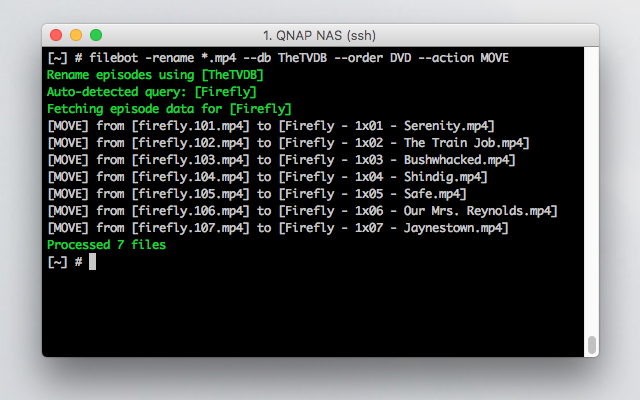
Re: Conditional Structures (if-then-else)
e.g.,
IF movie is part of a collection
name it `collection/plex`
ELSE
name it `plex`
If I use this
Code: Select all
{if (collection != null) {collection/plex} else {plex}}Code: Select all
ExpressionException: No signature of method: java.lang.String.div() is applicable for argument types: (File) values: [Movies/The Purge (2013)/The Purge (2013)]
Possible solutions: div(java.lang.String), is(java.lang.Object), wait(), trim(), size(), find()Re: Conditional Structures (if-then-else)
If you just want to add the collection in front of the plex path, then you don't need if-then-else:
Code: Select all
{collection+'/'}{plex}Code: Select all
{any{collection}{'No Collection'}/{plex}2.
However, the error message you posted is completely unrelated to if-then-else and just tells us that we can't use the / operator between a String object and a File object.
Re: FileBot on the Mac App Store
I feel...defrauded clearly
will for sure inform others on both stores
Re: FileBot on the Mac App Store
You can ask Apple / Microsoft for a refund if you're not happy with the product. Not much I can do if Apple decided not not allow subtitle tools some 2 years ago. The Windows Store version is fully featured.
2.
FileBot 4.8.2 (early access, in beta, not officially released yet) requires a license for the rename feature only. If you use it just for OpenSubtitles, then that'll work even without purchasing a license. The FileBot Subtitles for Mac is still available, but deprecated.
Re: FileBot on the Mac App Store
Regards
Re: FileBot on the Mac App Store
Re: [JDownloader] Setup for Windows, Linux and Mac OS X
My setup: DS218play, jDownloader headless + my.jdownloaderorg as GUI + filebot.
This is a screen capture of the GUI that I have. I fail to enter the scripts (e.g. https://github.com/filebot/plugins/blob ... inished.js) via c&p (plus modifying path) into that window. I get an error (failed to set new value).

My question: Is that even the right way? Or do I need to follow the headless path that you describe above?
In that case,
- where do I put that script?
- can you provide the second script as JSON as well please? The provided one only works for "ON_PACKAGE_FINISHED", but not for ArchiveExtracted.
Thanks!
Re: [JDownloader] Setup for Windows, Linux and Mac OS X
You can try to just copy the raw JSON:
https://github.com/filebot/plugins/blob ... ripts.json
The easiest way is probably to log in via SSH, find the configuration files, and then write them directly, and restart JD:
Code: Select all
find /volume1 -iname '*EventScripterExtension*'Re: [JDownloader] Setup for Windows, Linux and Mac OS X
You _will_ need the `jq` package, which is readily available on both macOS (via brew) or any Linux distribution.
-
plittlefield
- Posts: 101
- Joined: 09 Mar 2014, 19:15
Re: Exclude Blacklist & Series-Mappings
Re: [DEB] Debian package
Code: Select all
W: Skipping acquire of configured file 'main/binary-i386/Packages' as repository 'https://get.filebot.net/deb stable InRelease' does not seem to provide it (sources.list entry misspelt?)
Re: [DEB] Debian package
The Portable TAR package can work on armv7l / aarch64 / i386 / amd64 so you might want to consider that if you're stuck on 32-bit Linux for some reason.Re: [FAQ] How do I activate my license?
Re: [FAQ] How do I activate my license?
What does "not register" mean? FileBot is crashing on startup? License activation not working? Some other error when you try to process files?satori83 wrote: 16 Aug 2018, 10:02 I purchased the regular mac app, not through store. I have tried double clicking, opening with app, even uninstalling and reinstalling the app but the app will not register. I am guess thats why its not recognizing recent popular movies that just need to be cleaned up a little bit...because the old version I used to use handled the simple plex scheme fine.
Please share screenshots so I can see what you see:
https://snag.gy/
Re: [DEB] Debian package
Code: Select all
Linux fileserver 4.15.0-32-generic #35-Ubuntu SMP Fri Aug 10 17:58:07 UTC 2018 x86_64 x86_64 x86_64 GNU/Linux
Re: [FAQ] How do I activate my license?
Re: [DEB] Debian package
Maybe setting arch=amd64 will make the warning go away:
Code: Select all
deb [arch=amd64] https://get.filebot.net/deb/ stable mainRe: [FAQ] How do I activate my license?
Re: [JDownloader] Setup for Windows, Linux and Mac OS X
sorry for being silent for a bit, I have been on a short trip. In the meantime, my setup is now working and I wanted to report back my specifics, so that others may benefit, but also so that I can learn in case I have missed something important.
This is what is working for me:
1. jDownloader Event Scripter calls this script
Code: Select all
[{"eventTrigger":"ON_PACKAGE_FINISHED", "enabled":true, "name":"FileBot", "script":"var amcFile = '/volume1/Downloads/jdtofilebotv2.sh';var path = '/volume1/Downloads/'; callAsync(function() {}, amcFile, path);", "eventTriggerSettings":{}, "id":123654}]- The above is the exact "text" that you can see in the jDownloader UI. Compare this screenshot: https://snag.gy/kYHCEN.jpg
- id:123654 is a random number I thought of. The way I understand it this is the ID the process runs under and I would be able to find it under this ID, if I had to look for it.
2. the jdtofilebotv2.sh script that is called above
Code: Select all
#!/bin/sh
export JAVA_OPTS="-Xmx256m"
/var/packages/filebot/target/filebot.sh -script 'fn:amc' /volume1/Downloads --output /volume1/Media/ --conflict auto --lang en --def 'clean=y' 'skipExtract=y' 'excludeList=.excludes'One issue I have is that I still do not find the filebot log file created by this setup.
Re: [JDownloader] Setup for Windows, Linux and Mac OS X
filebot should work just fine instead of /var/packages/filebot/target/filebot.sh but should you need an absolute path for some reason, then /usr/local/bin/filebot is recommended.
2.
-non-strict is generally used in all my examples, since strict mode tends to be too strict for what people use the amc script for usually.
3.
--log-file /path/to/log is recommended so you know exactly where the FileBot log is. This option will make sure that logs are written to both console and file.
Re: [DEB] Debian package
Re: Exclude Blacklist & Series-Mappings
Could you please map survivor.au to Australian Survivor, the auto-detect sets it to american survivor by default ...
Re: Exclude Blacklist & Series-Mappings
Re: Exclude Blacklist & Series-Mappings
Code: Select all
survivor.au.s05e09.hdtv.x264-fqm.mkvCode: Select all
Parameter: ut_title = Survivor.AU.S05E09.HDTV.x264-FQM
Parameter: ut_kind = multi
Parameter: ut_file =
Parameter: ut_dir = D:\Completed\tv shows\Survivor.AU.S05E09.HDTV.x264-FQM
Read archive [survivor.au.s05e09.hdtv.x264-fqm.rar] and extract to [D:\Completed\tv shows\Survivor.AU.S05E09.HDTV.x264-FQM\survivor.au.s05e09.hdtv.x264-fqm\Survivor.AU.S05E09.HDTV.x264-FQM]
Extracting files [D:\Completed\tv shows\Survivor.AU.S05E09.HDTV.x264-FQM\survivor.au.s05e09.hdtv.x264-fqm\Survivor.AU.S05E09.HDTV.x264-FQM\survivor.au.s05e09.hdtv.x264-fqm.mkv]
Input: D:\Completed\tv shows\Survivor.AU.S05E09.HDTV.x264-FQM\survivor.au.s05e09.hdtv.x264-fqm\Survivor.AU.S05E09.HDTV.x264-FQM\survivor.au.s05e09.hdtv.x264-fqm.mkv
Group: [tvs:survivor] => [survivor.au.s05e09.hdtv.x264-fqm.mkv]
Get [English] subtitles for 1 files
Looking up subtitles by hash via OpenSubtitles
No matching subtitles found: D:\Completed\tv shows\Survivor.AU.S05E09.HDTV.x264-FQM\survivor.au.s05e09.hdtv.x264-fqm\Survivor.AU.S05E09.HDTV.x264-FQM\survivor.au.s05e09.hdtv.x264-fqm.mkv
Rename episodes using [TheTVDB]
Auto-detected query: [Survivor, survivor au]
Fetching episode data for [Survivor]
Fetching episode data for [#Survivor]
Fetching episode data for [Survivor (UK)]
Fetching episode data for [Survivor (BG)]
Fetching episode data for [Survivor (TR)]
Fetching episode data for [Survivor (GR)]
[COPY] From [D:\Completed\tv shows\Survivor.AU.S05E09.HDTV.x264-FQM\survivor.au.s05e09.hdtv.x264-fqm\Survivor.AU.S05E09.HDTV.x264-FQM\survivor.au.s05e09.hdtv.x264-fqm.mkv] to [F:\TV Shows\Survivor\Survivor Season 05\Survivor S05E09 - Desperate Measures.mkv]
Processed 1 filesRe: Exclude Blacklist & Series-Mappings
Works for me right out of the box:
Code: Select all
Input: …/Survivor.AU.S05E09.HDTV.x264-FQM.mkv.mp4
Group: [tvs:survivor au] => [Survivor.AU.S05E09.HDTV.x264-FQM.mkv.mp4]
Rename episodes using [TheTVDB]
Auto-detected query: [Survivor AU]
Fetching episode data for [Australian Survivor]
…
[TEST] from […/Survivor.AU.S05E09.HDTV.x264-FQM.mkv.mp4] to […/TV Shows/Australian Survivor/Season 05/Australian Survivor - S05E09 - Episode 9.mp4]
…Re: Exclude Blacklist & Series-Mappings
Re: Exclude Blacklist & Series-Mappings
Re: How about sharing our format expressions?
I'd really appreciate it if you could send me your music script for MusicBrainz
Many Thanks,


Re: Presets
EDIT:
I found it on my own
 :
: Code: Select all
{s.pad(2)}x{e.pad(2)}Re: [FAQ] How do I activate my license?
Re: [FAQ] How do I activate my license?
-
angryunibrow
- Posts: 2
- Joined: 05 Sep 2018, 20:04
Re: [FAQ] How do I activate my license?
I purchased through PayPal and have yet to receive any emails regarding my license.
Nevermind, I see and have replied in the other thread reagrding the slow license issue rollout.
Re: [FAQ] How do I activate my license?
however I have a problem, I bought filebot on the microsoft store under windows 10 (directly activated after installation) on March 28th and I would like to install filebot also on my mac (macosx), but apart from a microsoft email with the invoice of my purchase, I have no trace of any email with a license.
Could you do something, please?
Thank you in advance
Translated with www.DeepL.com/Translator
Re: [FAQ] How do I activate my license?
https://new.paddle.com/
Please let me know if you still haven't received your license.