[Windows] Context Menu w/ Folder Watcher+Scripts Pack [1.8]

How-to guides, frequently asked questions, not-so-obvious features, etc
User avatar
Ithiel
Power² User
Posts: 204
Joined: 11 Jul 2013, 14:58

[Windows] Context Menu w/ Folder Watcher+Scripts Pack [1.8]

Post by Ithiel »

SCRIPT UPDATED 2014/02/24 (v1.7) | INSTRUCTIONS UPDATED 2014/02/24
-----------------------------------------------------------------------------------------------

Advanced Context Menu & Cool Scripts Pack for Windows
Image

Image

Image


Features Include:
- Single file download automated live installer/uninstaller
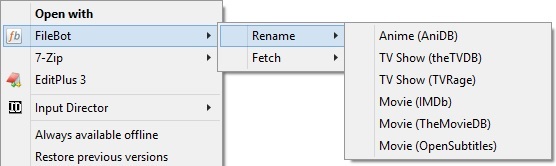
- Anime Rename (AniDB) via file or folder
- TV Show Rename (theTVDB) via file or folder
- TV Show Rename (TVRage) via file or folder
- Movie Rename (IMDb) via file or folder
- Movie Rename (theMovieDB) via file or folder
- Movie Rename (OpenSubtitles) via file or folder
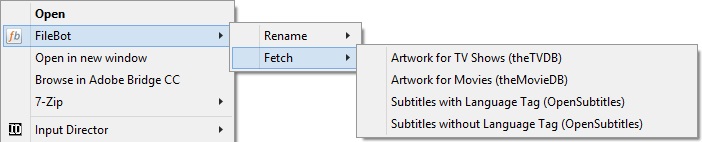
- Fetch Artwork for TV Shows (theTVDB) via file or folder
- Fetch Artwork for Movies (theMovieDB) via file or folder
- Fetch one or multiple Subtitle languages (from OpenSubtitles) per file or per folder with or without language tag
- Schedule Folder Watch for Automated Subtitle Downloads in Multiple Languages (NEW!)
- Includes support for UNC paths (network shares)
- All rename schemes based on "Ithiel's super crazy renaming scheme for perfectionists!" (http://www.filebot.net/forums/viewtopic ... &t=2#p7320)
- Option to use a cloud based (centrally updated) naming scheme or your own internam scheme
- Cloud Based Naming scheme is pulled directly from GitHub source files, meaning that it is always the most up to date version (when I fix/improve things, etc)
- Easy setup process allowing you to configure things the way you want without needing to edit registry or settings files.
- Improved compatibility for machines with multiple different security configurations

Bundled Tools (the Cool Scripts):
- OpenSubtitles login script v1.0 (simply double click, then enter your login details)
- Subtitle Language Tag removal scripts v1.0 (drag and drop files on the script for magic)
- Subtitle Fetch Multi-Language Language Selector v1.2 (allows you to quickly change what language(s) 'Fetch Subtitles' and 'Watch' sources). Updated!
- Filebot Auto Jar Updater v1.4 (just double click and it will download and swap out your filebot.jar for the latest version)


Prerequisites:
- Requires Windows 7 or higher
- Requires Powershell (should already be installed as standard on Windows 7 and 8)
- Requires FileBot version of 3.8-r1968 or newer
- Must be logged in from an administrator account
- Assumes FileBot is installed in C:\Program Files\FileBot\


Required Files:
Live Installer:
- Download: https://github.com/CapriciousSage/cmdle ... taller.cmd
- Preview: https://github.com/CapriciousSage/cmdle ... taller.cmd


Install Instructions:
- Download the live installer from the link above
- Right click on the file, go to properties, click 'Unblock' on the general tab, then click 'OK'.
- If using an 'active' antivirus that prevents registry changes (some versions of Norton and the like), please temporarily deactivate it.
- Double click the file and wait a few seconds while it downloads the latest installer.
- Select 'Yes' to install.
- When prompted, follow the instructions and enter the output path where you want to save your Anime, TV Shows, and Movies.
- If you would like to use the cloud based naming scheme, select 'yes' when prompted.
- If you would prefer to manage your own naming scheme, select 'no' and default files will be downloaded to "c:\program files\filebot\cmdlets"
- When prompted, input the number of languages you want the subtitle downloader to fetch (default is 1, there is no limit)
- When prompted, input the two character language code for the primary subtitle language (default is en, for English)
- If you requested more than 1 language, the input box will prompt you for each subsequent language individually.
- Once the setup is complete, the log file will open. Once the log file is closed, the command window will close as well.
- If you deactivated your antivirus, please be sure to reactivate it
- You're good to go!


- If/when stuff breaks or doesn't act the way you want, let me know here so I can fix it :-)


Uninstall Instructions:
- Download the live installer from the link above.
- Right click on the file, go to properties, click 'Unblock' on the general tab, then click 'OK'.
- If using an 'active' antivirus that prevents registry changes (some versions of Norton and the like), please temporarily deactivate it.
- Double click the file and wait a few seconds while it downloads the latest installer.
- Select 'No' to uninstall
- Follow the prompts to either just remove the context menu or the local cmdlets and folder watch tasks as well.
- If you deactivated your antivirus, please be sure to reactivate it


Troubleshooting:
- Make sure you actually installed FileBot in "C:\Program Files\FileBot" and that it otherwise 'works'.
- You will need to be logged into an Administrator account for this to work.
- If the script doesn't open/run correctly, try right clicking on it and selecting 'Run as Administrator'.
- If using the live installer, it will try and download the latest setup file each time it is run, but if you have any problems, you can download the full context_menu_setup.cmd file from GitHub directly.


Optional Instructions:
- Subtitles can be downloaded either with or without a language tag (ie. "show name s01e01.eng.srt"), however a language tag removal script will also be created in your cmdlets folder during the install. To remove the language tag from existing subtitles, you can either use the rename context menu or drag/drop the srt files onto remove-language-tag.cmd to remove the '.eng' bit automatically.
- If you want to download a lot of subtitles, run opensubtitles_login.cmd before fetching the subtitles (it is created in cmdlets folder during setup). This will let you log into OpenSubtitles.org with your account (if you don't have one, signup there for free). Logged in users have a higher anti-leech limit (and VIP Logged in users more-so).
- Remember that you can set/change your subtitle download language by running 'change_subtitle_fetch_language.cmd', which will be created in 'C:\Program Files\FileBot\cmdlets'.
- Want to be able to use the context menu for selecting more than 15 files from an explorer window? Follow this guide (or just run the desired function on the parent folder, which will affect all sub folders and sub files anyway).


Installing Updates:
- If upgrading from an earlier release (or went tweaking and want to reset), please be sure to uninstall before reinstalling.
- Remember that if you select the option to remove cmdlets during the uninstall, it will also remove the locally created groovy/scheme files.
- If using the GitHub source for the rename schedule (default), you'll always be pulling the most up to date code every time you rename a file.


DISCLAIMER: These scripts (all ~2200 lines of 'em!) have been provided 'as is', with no warranty given or implied. Use at your own risk.
Always personally inspect a reg file before running, regardless of who wrote it, where it came from, or what it is meant to do.


PLEASE NOTE: For users running 1.6.0 or earlier, please ensure that you re-download the live installer before updating as the live installer has also been changed (performance improvement).

KNOWN BUGS:
- Folder watcher currently does not support paths with ampersands in them.

--------------------------------------------------------------
Like what you see? Donate to FileBot via PayPal

There can be only one Power² User
User avatar
rednoah
The Source
Posts: 24649
Joined: 16 Nov 2011, 08:59
Location: Taipei
Contact:

Re: [Windows] Advanced Explorer Context Menu (GitHub Integra

Post by rednoah »

HOW DID YOU DO THE SUB MENUS !?!?!? I could never figure that out, I thought for that I'll need implement some C# interfaces.


EDIT:
btw if you maintain these scripts on GitHub you can directly execute from there so people don't need to download anything:

Code: Select all

filebot -script https://raw.github.com/CapriciousSage/scripts/master/anime.groovy -trust-script ...
And you're doing that for the formats already. Very Good! :)

EDIT2:
Also it's better if you just define a relative path in the format. And pass in some --output folder for each call so the format remains generic while the --output can change.
:idea: Please read the FAQ and How to Request Help.
Ambroisie
Supporter
Posts: 19
Joined: 06 Dec 2013, 22:08

Re: [Windows] Advanced Explorer Context Menu (GitHub Integra

Post by Ambroisie »

Will there be a way to use our own format, I don't need something as complicated as you do...
User avatar
rednoah
The Source
Posts: 24649
Joined: 16 Nov 2011, 08:59
Location: Taipei
Contact:

Re: [Windows] Advanced Explorer Context Menu (GitHub Integra

Post by rednoah »

Just edit the groovy scripts and use your own format.
:idea: Please read the FAQ and How to Request Help.
User avatar
Ithiel
Power² User
Posts: 204
Joined: 11 Jul 2013, 14:58

Re: [Windows] Advanced Explorer Context Menu (GitHub Integra

Post by Ithiel »

HOW DID YOU DO THE SUB MENUS !?!?!?
Believe me when I say that getting this to work correctly took a very VERY long time, lol. The MSDN documentation on this is total $#*&, lol.

Have a bit of a dig through the reg file to see how the magic works :-)
if you maintain these scripts on GitHub you can directly execute from there so people don't need to download anything
I was originally experimenting with that, but people will need to change the first part of the storage location (which is mentioned in the groovy). I was thinking of tweaking it so that it calls two text files instead - the first text file being local (saying the //mynas/media/whatever part), and the second text file being remote (with the full naming scheme).
Also it's better if you just define a relative path in the format. And pass in some --output folder for each call so the format remains generic while the --output can change.
Maybe it's because it's 2:30am, but I'm not quite following what you mean by that. Can you give me an example?

Are you saying I'm able to go something like (not in code block as it's untested, I have nfi if it works, and don't want anyone to try it out by accident):

cmd /c filebot -script "https://raw.github.com/CapriciousSage/s ... ime.groovy -trust-script "%1" --db AniDB -non-strict --log-file context.log --output "\\mynas\media\anime\"

and then have the groovy go:
def format = '''//mynas/media/Anime/''' + new URL('https://raw.github.com/CapriciousSage/s ... /anime.txt').getText()

--------------------------------------------------------------------
Will there be a way to use our own format, I don't need something as complicated as you do...
yuup - you'll notice that the groovy files follow this pattern:

Code: Select all

def format = '''//mynas/media/Anime/''' + new URL('https://raw.github.com/CapriciousSage/schemes/master/anime.txt').getText()
// def format = '''//mynas/media/Anime/''' + new File('C:\\Program Files\\FileBot\\cmdlets\\anime.txt').getText()
the first line is calling the GitHub, the second line calls a local file but is commented out. Simply add a // to the start of the first line, remove it from the start of the second line, create a file called "anime.txt" in your "C:\Program Files\FileBot\cmdlets\", and put your own naming scheme in there.

NOTE: As the first part of the path is defined in the groovy file (remember to update this), you don't need to put that part in the txt file. To view an example, load https://raw.github.com/CapriciousSage/s ... /anime.txt if your web browser to see what's in there.
There can be only one Power² User
User avatar
rednoah
The Source
Posts: 24649
Joined: 16 Nov 2011, 08:59
Location: Taipei
Contact:

Re: [Windows] Advanced Explorer Context Menu (GitHub Integra

Post by rednoah »

Actually you have a point. If you use --output we have to edit the .reg commands, while if you have the scripts local it's easy to edit.

You can do this:

Code: Select all

rename(..., format:'{n}/...', output:'//mynas/media')
Not much different, but slightly easier to manage if the root path and format is different. If format is relative it'll be resolved against --output.
:idea: Please read the FAQ and How to Request Help.
User avatar
Ithiel
Power² User
Posts: 204
Joined: 11 Jul 2013, 14:58

Re: [Windows] Advanced Explorer Context Menu (GitHub Integra

Post by Ithiel »

hm... with it calling from a file, rather than reading the whole file, does groovy support reading a specific line?

I can have it load the groovy from GitHub, and set the "output:" call a local text file, but rather than having a bunch of them, create a single (local) text file like this:
Anime://mynas/media/anime
TV_Shows://mynas/media/anime
Movies://mynas/media/movies
Then I'd just need groovy to load either line 1 (anime), 2 (tv shows), or 3 (movies), grabbing everything after the : symbol...

i.e. something like
def input = args[0].isDirectory() ? args[0].listFiles() : args[0]
def format = '''//mynas/media/Anime/''' + new URL('https://raw.github.com/CapriciousSage/s ... /anime.txt').getText()
def output = ('some sort of magic line selection and scan for the semi-colon code' for C:\Program Files\FileBot\cmdlets\output.txt)

rename(file:input, format:format, output:format)


Would that work (and do you know the required magic groovy wizardry), lol

P.S. what is -trust-script for? is that just required when the groovy isn't local?

Edit: To allow people to have local or remote, once I get the above working, I'll create 2 variations of the groovy file (one that calls github naming scheme, one that calls local scheme, but both allowing the groovy to be run from github), and then offering 2 reg file options. This gives everyone the best of both worlds (but as it's now 3am, that's a task for tomorrow haha.) :-)
Last edited by bonelifer on 02 Jan 2014, 20:16, edited 1 time in total.
Reason: Fixed quote ending tag
There can be only one Power² User
User avatar
rednoah
The Source
Posts: 24649
Joined: 16 Nov 2011, 08:59
Location: Taipei
Contact:

Re: [Windows] Advanced Explorer Context Menu (GitHub Integra

Post by rednoah »

Actually having local groovy script files isn't a bad idea, makes it easy to edit. The the script itself is extremely simple anyway.

-trust-script works like you said. You may not need it with basic filebot tasks but if you were to fetch artwork were the groovy script needs to write files it's required.

Simple local scripts are the way to go I think.

I think one option where people just need to edit the script a little bit is perfectly acceptable. Two reg files seems troublesome. I would just set the --output variable to reasonable default. Either the user home folder or maybe some via some environment variable like for example FILEBOT_OUTPUT.
:idea: Please read the FAQ and How to Request Help.
User avatar
Ithiel
Power² User
Posts: 204
Joined: 11 Jul 2013, 14:58

Re: [Windows] Advanced Explorer Context Menu (GitHub Integra

Post by Ithiel »

I've got a few ideas for an installer that may make everything a lot easier, but some more research will be required. Ideally, it would be a cmd file you run that asks questions and builds the reg/required local files for you automatically depending on the options you gave. This way, there would only be one file to download, and it would always be setup just the way you want it :-)

Can you point me in the direction of anywhere that might shed some light on the advanced file reading I mentioned before?
There can be only one Power² User
User avatar
rednoah
The Source
Posts: 24649
Joined: 16 Nov 2011, 08:59
Location: Taipei
Contact:

Re: [Windows] Advanced Explorer Context Menu (GitHub Integra

Post by rednoah »

I'm sure Groovy has lots of nifty ways to read config or Java Property Files.

Though for quickly reading CSV data I have a helper:

props.txt (tab-separated)

Code: Select all

a	1
b	2
c	3
Groovy:

Code: Select all

def map = csv('D:/props.txt', '\\t')
println map
:idea: Please read the FAQ and How to Request Help.
User avatar
rednoah
The Source
Posts: 24649
Joined: 16 Nov 2011, 08:59
Location: Taipei
Contact:

Re: [Windows] Advanced Explorer Context Menu (GitHub Integra

Post by rednoah »

With the next revision you can do this:

Code: Select all

-get-subtitles --format MATCH_VIDEO
:idea: Please read the FAQ and How to Request Help.
User avatar
Ithiel
Power² User
Posts: 204
Joined: 11 Jul 2013, 14:58

Re: [Windows] Advanced Explorer Context Menu (GitHub Integra

Post by Ithiel »

Though for quickly reading CSV data I have a helper:
hm.. interesting. I shall have a play and will let you know where I get :-)
With the next revision you can do this:
Awesome! *does a little dance before running off to update reg files*
There can be only one Power² User
User avatar
Ithiel
Power² User
Posts: 204
Joined: 11 Jul 2013, 14:58

Re: [Windows] Advanced Explorer Context Menu (GitHub Integra

Post by Ithiel »

Righto... out with the old, in with the new...

I've updated the script and created a single setup file that prompts you for the required settings, allows you to choose between a cloud and locally managed format, and automatically downloads all required files accordingly.

The setup also serves as an uninstall as well. OP should be updated momentarily :-)

Edit: OP Updated :-)
There can be only one Power² User
User avatar
Ithiel
Power² User
Posts: 204
Joined: 11 Jul 2013, 14:58

Re: [Windows] Advanced Explorer Context Menu (GitHub Integra

Post by Ithiel »

Update: v1.1b - updated OpenSubtitle Login Script with new command (replacing legacy command that's about to be removed)
Update: v1.1c - updated Language Tag Removal Script to fix a typo.

I think it all works now :-)
There can be only one Power² User
User avatar
rednoah
The Source
Posts: 24649
Joined: 16 Nov 2011, 08:59
Location: Taipei
Contact:

Re: [Windows] Advanced Explorer Context Menu (GitHub Integra

Post by rednoah »

That installer cmd scripts is a really good idea! Must have been a bitch getting that working with only bat scripting! :D
:idea: Please read the FAQ and How to Request Help.
User avatar
Ithiel
Power² User
Posts: 204
Joined: 11 Jul 2013, 14:58

Re: [Windows] Advanced Explorer Context Menu (GitHub Integra

Post by Ithiel »

Must have been a bitch getting that working with only bat scripting!
um.. yes... but I wanted to keep it as open, transparent, and universally accessible as possible, as well as keep it all simple enough that I can pull all the parts from GitHub, lol

Speaking of bee's with itches....

Update: v1.1d - updated Language Tag Removal Script to catch an escaping % that tried to ran away, and fixed a typo in the reg that prevented the 'with lang tag' sub download on single files.
There can be only one Power² User
User avatar
Ithiel
Power² User
Posts: 204
Joined: 11 Jul 2013, 14:58

Re: [Windows] Advanced Explorer Context Menu (GitHub Integra

Post by Ithiel »

UPDATED 2014/01/06

- Fixed file encoding error on several of the groovy config files (were Unicode when ANSI was expected)
- Updated groovy 'def input' to now correctly get all files of sub folders when renaming directories
- Updated naming scheme's certification check to try and get a little more consistency

Files Updated:
- anime.groovy
- anime_local.groovy
- movies.groovy
- movies_local.groovy
- tv_shows.groovy
- tv_shows_local.groovy
- anime.txt
- movies.txt
- tv_shows.txt

Update Instructions:
- People using the locally managed option should run the uninstall (removing cmdlets) and then reinstall to download newest files (or can update files manually).
--- If you have changed the locally stored rename scheme files (the 3 txt files), be sure to take a backup of them first, as they will be removed/replaced during the upgrade
- People using the cloud managed option will automatically retrieve the most up to date files the next time they use the context menu functions.

Installer Update:
- Additionally, the master installer file (context_menu_setup.cmd) has been updated to also create a FileBot Jar Updater script in your cmdlets folder.
- The live installer will automatically pull the updated master installer during install/uninstall. To get the new script, simply reinstall :-)

NOTE: Always uninstall before reinstalling!
There can be only one Power² User
User avatar
rednoah
The Source
Posts: 24649
Joined: 16 Nov 2011, 08:59
Location: Taipei
Contact:

Re: [Windows] Advanced Explorer Context Menu (GitHub Integra

Post by rednoah »

- Fixed file encoding error on several of the groovy config files (were Unicode when ANSI was expected)
The only reason it may expect ANSI is because it's set as default encoding on Windows, it'll probably be UTF-8 on other systems. I recommend forcing UTF-8 whenever reading / writing anything.
:idea: Please read the FAQ and How to Request Help.
User avatar
Ithiel
Power² User
Posts: 204
Joined: 11 Jul 2013, 14:58

Re: [Windows] Advanced Explorer Context Menu (GitHub Integra

Post by Ithiel »

Fair 'nuff... but being that this context menu only works on Windows, using the Windows default probably isn't a bad thing, lol.
There can be only one Power² User
romano
Posts: 35
Joined: 11 Jan 2014, 12:26

Re: [Windows] Advanced Explorer Context Menu (GitHub Integra

Post by romano »

Thank you Ithiel.


Great work Ithiel, works great.
romano
Posts: 35
Joined: 11 Jan 2014, 12:26

Re: [Windows] Advanced Explorer Context Menu (GitHub Integra

Post by romano »

Where do i change the subtitles Language?
now says: 401 unauthorized
chest069
Posts: 24
Joined: 01 Jan 2014, 11:09

Re: [Windows] Advanced Explorer Context Menu (GitHub Integra

Post by chest069 »

Hello,

I am using the live installer that you posted and when I right click on it and say run as admin in Win 7 64bit I get a quick terminal windiow that closes and nothing else happens.

What am I doing wrong?

thanks for any help.
romano
Posts: 35
Joined: 11 Jan 2014, 12:26

Re: [Windows] Advanced Explorer Context Menu (GitHub Integra

Post by romano »

chest069 wrote:Hello,

I am using the live installer that you posted and when I right click on it and say run as admin in Win 7 64bit I get a quick terminal windiow that closes and nothing else happens.

What am I doing wrong?

thanks for any help.
Try and first remove the old install, and then reinstall, it worked for me.
User avatar
Ithiel
Power² User
Posts: 204
Joined: 11 Jul 2013, 14:58

Re: [Windows] Advanced Explorer Context Menu (GitHub Integra

Post by Ithiel »

@romano

Currently subtitle language is fixed at english, however you can change this via a quick registry tweak after you've installed it.

1. Open regedit and go to:
HKEY_CLASSES_ROOT\FileBot\File_Menu\shell\002Fetch\003Subtitles\command\

2. On the right, double click (Default) to change this:
cmd /c filebot -get-subtitles "%1" -non-strict --lang en --log-file context.log

3. All you need to do is change the --lang en to be --lang xx (where xx is the code for your language of choice).

4. Repeat steps 2 & 3 for the following locations as well:
HKEY_CLASSES_ROOT\FileBot\File_Menu\shell\002Fetch\004Subtitles\command\
HKEY_CLASSES_ROOT\FileBot\Folder_Menu\shell\002Fetch\003Subtitles\command\
HKEY_CLASSES_ROOT\FileBot\Folder_Menu\shell\002Fetch\004Subtitles\command\

---------------------------------

The language during the setup is fixed at English, but I can create another little script that will allow you to change the language from a message box, and then add that to the list of scripts that the installer loads into your cmdlets folder. This means that once you've installed the tool, you would quickly and easily be able to toggle the language to whatever you want by just running the script and entering a new language code when prompted. Note that this would just be changing the language for new subtitle downloads.

@Everyone: would this help, would you use it, and is there anything else you can think of that you need it to do?

---------------------------------

@chest069

Are you still having this problem? If so, please let me know. Also, if just double clicking fails, does right clicking and running as administrator work?
Akki highlighted a compatibility tweak for the method I use to make the script seek admin privileges that I was planning on working into my next update.
There can be only one Power² User
chest069
Posts: 24
Joined: 01 Jan 2014, 11:09

Re: [Windows] Advanced Explorer Context Menu (GitHub Integra

Post by chest069 »

romano wrote:
chest069 wrote:Hello,

I am using the live installer that you posted and when I right click on it and say run as admin in Win 7 64bit I get a quick terminal windiow that closes and nothing else happens.

What am I doing wrong?

thanks for any help.
Try and first remove the old install, and then reinstall, it worked for me.
I haven't been able to install the script yet so I don't have a previous one to uninstall, or do you mean uninstall filebot?
chest069
Posts: 24
Joined: 01 Jan 2014, 11:09

Re: [Windows] Advanced Explorer Context Menu (GitHub Integra

Post by chest069 »

Ithiel wrote:@chest069

Are you still having this problem? If so, please let me know. Also, if just double clicking fails, does right clicking and running as administrator work?
Akki highlighted a compatibility tweak for the method I use to make the script seek admin privileges that I was planning on working into my next update.
I tried double clicking and that didn't work and I tried right clicking on it and choosing run as administrator as well and that didn't work. So I am at a loss on what to do to get this installed.

Also where is this located? "Akki highlighted a compatibility tweak for the method I use to make the script seek admin privileges that I was planning on working into my next update."
Last edited by bonelifer on 13 Jan 2014, 15:09, edited 1 time in total.
Reason: Fixed quote beginning tag
User avatar
Ithiel
Power² User
Posts: 204
Joined: 11 Jul 2013, 14:58

Re: [Windows] Advanced Explorer Context Menu (GitHub Integra

Post by Ithiel »

UPDATE: FileBot Advanced Context Menu v1.3

New Features:
- Now Includes "FileBot Context Menu Subtitle Fetch Language Selector v1.1", which will be created in c:\program files\filebot\cmdlets

Improvements:
- Several compatibility fixes and improvements, particularly in regards to seeking elevated privileges.
- Tidied log files and coding up a little

----------------------------------------------

The script for upgrading the file to take admin privileges is now over 100 lines long in and of itself.

Process works a little like this:

Am I running as admin?
- If yes, continue
- If no, go check if I can write to the current directory
- Can I write to the temp directory?
-- If yes, write upgrade permissions script
-- Can I execute the script?
---- If yes, upgrade then continue
---- If no, go check if I can write to profile directory
-- If no, go check if I can write to profile directory
- Can I write to profile directory?
-- If yes, write upgrade permissions script
-- Can I execute the script?
---- If yes, upgrade then continue
---- If no, go check if I can write to temp directory
-- If no, go check if I can write to temp directory
- Can I write to the temp directory?
-- Can I execute the script?
---- If yes, upgrade then continue
---- If no, go to upgrade failure message
-- If no, go to upgrade failure message
- Display message informing users they must right click and run the file as an admin

... now, assuming I haven't made a hash of it somewhere, hopefully that should keep all the various incarnations of Windows happy :-)
There can be only one Power² User
chest069
Posts: 24
Joined: 01 Jan 2014, 11:09

Re: [Windows] Advanced Explorer Context Menu (GitHub Integra

Post by chest069 »

Thanks for the update.

So here is my situation on installing this. I did get it installed but with a dirty way.

This is what I did to finally get it working since the other way would still not run for me.
I went to https://github.com/CapriciousSage/cmdlets and downloaded the zip file.
I then unzipped it and ran all the command files inside of it and then everything showed in the context menus of my Windows 7 64bit OS.

I tried downloading this again context_menu_live_installer.cmd but I ran into the same problems.
If I doubled clicked thefile I got a quick cmd window that popped up then closed and if I right clicked on it and said run as administrator I got a quick cmd window that popped up then closed and nothing else happened.

I also tried running this in a command window that was being run as administrator and got the following in the terminal window:
C:\>context_menu_live_installer.cmd <----- command I ran
The syntax of the command is incorrect. <-------- error it gave me
C:\><!DOCTYPE html>

So based on me running this in the cmd window it looks like it thinks it is a html file instead of a cmd file and it is possible that is why it wont run. I had to right click on the file to download it, is that the wrong way to download the file or am I missing some other step? Do I need git hub, etc.

I am at a loss on this but it is working for me but like I said I had to do it a dirty way to get it working. Thanks for any help on this.
User avatar
Ithiel
Power² User
Posts: 204
Joined: 11 Jul 2013, 14:58

Re: [Windows] Advanced Explorer Context Menu (GitHub Integra

Post by Ithiel »

@chest069

That's not quite the way to download it, lol.

Righto...
1. Click this link: https://github.com/CapriciousSage/cmdle ... taller.cmd
2. It should ask you to save the file context_menu_live_installer.cmd somewhere.. Put it in your downloads directory or where ever (anywhere should be fine, just as long as it's away from wherever you tried to extract that zip file, lol)
3. Right click the file, go to properties, click 'Unblock', then 'OK'.
4. Double click the file and follow the prompts (it should run through the rest of the installer then).

When the first prompt comes up, I would recommend clicking the option to UNINSTALL first, just to clear out any guff that was created during previous attempts. :-)

After that, run it again, and it should all work ok.

Cheers,

~Ithiel

Edit: I've updated the instructions in the OP a little as well.
There can be only one Power² User
Ztrust
Posts: 69
Joined: 21 Dec 2013, 17:04

Re: [Windows] Advanced Explorer Context Menu (GitHub Integra

Post by Ztrust »

This is very nice and easy setup ;)
would it be possible to tell it to download both english and danish subs at the same time ?
User avatar
Ithiel
Power² User
Posts: 204
Joined: 11 Jul 2013, 14:58

Re: [Windows] Advanced Explorer Context Menu (GitHub Integra

Post by Ithiel »

Hi Ztrust,

The FileBot CLI does not natively support downloading two subtitles in a single command, so you would need to modify the registry entries that are created to have it run two sequential commands. As the script doesn't support this 'out of the box', after installing, you will need to change the following two registry settings as follows:

Go To: HKEY_CLASSES_ROOT\FileBot\File_Menu\shell\002Fetch\shell\003Subtitles\command
Change the value of (default)..
From This: cmd /c filebot -get-subtitles "%1" -non-strict --lang en --log-file context.log
To This: cmd /c filebot -get-subtitles "%1" -non-strict --lang en --log-file context.log && filebot -get-subtitles "%1" -non-strict --lang da --log-file context.log

Go To: HKEY_CLASSES_ROOT\FileBot\Folder_Menu\shell\002Fetch\shell\003Subtitles\command
Change the value of (default)..
From This: cmd /c filebot -script fn:suball "%1" -non-strict --lang en --log-file context.log
To This: cmd /c filebot -script fn:suball "%1" -non-strict --lang en --log-file context.log && filebot -script fn:suball "%1" -non-strict --lang da --log-file context.log

Results: The "FileBot -> Fetch -> Subtitles with Language Tag" context menu for both file and folder scanning will download both English and Dainish subs and place them in the same folder as the media. Please note that both files will include their applicable language tag.

---------------------

Question: How big a need is multi-language subtitle downloads? What options do you need? Does there need to be an option to have the primary language not include a language tag?

I could extend the subtitle language tool to include multi-language support and what not, but it's a good couple of hours work to make sure all the options menus are working correctly, that the error handling goes the way its meant to, and that all the variations function and options work correctly... so I'd want to be certain its actually gonna get used, lol
There can be only one Power² User
Ztrust
Posts: 69
Joined: 21 Dec 2013, 17:04

Re: [Windows] Advanced Context Menu & Cool Scripts Pack

Post by Ztrust »

hey Ithiel

thanks for the reply.
your answer is something i can actually do by myself so I am very happy. Since everything about filebot is so very new to me all this coding and scripts its very complicated for me.

Regarding your question.
For me it is absolute I need both English and danish subtitles since I hate using Danish subtitle I always use English subs by myself, But most of my friends and family dont do english very well so i need Danish subs for when they are here.

And regarding tags me personelly I always append the .English and .Danish to my subs and set my players up to use the english sub.
But it might be a good idea as you say to have no tag on the primary subs. so it will always be loaded by default.
But I use my own naming scheme with your nifty tool so it handels the tagging. Btw Thanks for making it so easy to use own scheme ;)

But i think it would nice to be able to set secondary subtitle so when you do a fetch it gets both. But I dont know if dual subs is wiedely used. I have no understanding of coding or how hard it would be to implement but posible add it as an option in the installer.
chest069
Posts: 24
Joined: 01 Jan 2014, 11:09

Re: [Windows] Advanced Explorer Context Menu (GitHub Integra

Post by chest069 »

Thanks for the help, this worked for me and now every thing is working as it should.
Ithiel wrote:@chest069

That's not quite the way to download it, lol.

Righto...
1. Click this link: https://github.com/CapriciousSage/cmdle ... taller.cmd
2. It should ask you to save the file context_menu_live_installer.cmd somewhere.. Put it in your downloads directory or where ever (anywhere should be fine, just as long as it's away from wherever you tried to extract that zip file, lol)
3. Right click the file, go to properties, click 'Unblock', then 'OK'.
4. Double click the file and follow the prompts (it should run through the rest of the installer then).

When the first prompt comes up, I would recommend clicking the option to UNINSTALL first, just to clear out any guff that was created during previous attempts. :-)

After that, run it again, and it should all work ok.

Cheers,

~Ithiel

Edit: I've updated the instructions in the OP a little as well.
User avatar
Ithiel
Power² User
Posts: 204
Joined: 11 Jul 2013, 14:58

Re: [Windows] Advanced Context Menu & Cool Scripts Pack

Post by Ithiel »

Ztrust wrote:your answer is something i can actually do by myself so I am very happy ... But i think it would nice to be able to set secondary subtitle so when you do a fetch it gets both.
Glad it's working for you Ztrust :-)

If I get a chance this weekend, I'll try and extend the language changer script to also include support for additional subtitles. I've got a few ideas on how I can extend it to allow people to specify how many subtitle languages they want, but coding it in cmd is going to be a little interesting, haha. Oh well, that's what Saturday's are for, I guess ^.^
chest069 wrote:Thanks for the help, this worked for me and now every thing is working as it should.
Awesome! Thanks for letting me know it worked, the feedback is appreciated.
There can be only one Power² User
romano
Posts: 35
Joined: 11 Jan 2014, 12:26

Re: [Windows] Advanced Context Menu & Cool Scripts Pack

Post by romano »

Still give me the 401 unauthorized
Image
romano
Posts: 35
Joined: 11 Jan 2014, 12:26

Re: [Windows] Advanced Context Menu & Cool Scripts Pack

Post by romano »

Ithiel something is wrong with the cmd, it keeps opening and closing always, looking for "administrative privileges"

i had to download the zip to update. i did read instructions. :D but no harm done its installed :P
User avatar
Ithiel
Power² User
Posts: 204
Joined: 11 Jul 2013, 14:58

Re: [Windows] Advanced Context Menu & Cool Scripts Pack

Post by Ithiel »

Hi Romano,

With the first error (401 Unauthorized), that is an error with OpenSubtitles, not with the script itself. Can you try running the OpenSubtitles login script (would have been made in your cmdlets folder during install) and see if that makes a difference? You will need to register a free account on the OpenSubtitles.org website first though.

The error sounds like you may have either hit your daily limit or your IP had been banned. Hopefully logging into an account first may fix your problems.

Regarding the admin privileges issue - are you logged into your computer from an admin account? Also, does right clicking the file and going "run as administrator" help?

Can you please send me a PM with screenshots or a screen cast what steps you are taking, where you are running the files from, errors you see, and so on? The admin privileges upgrade script should work in just about every conceivable setup, so its most likely another program getting in the way, lol.

On that note, what antivirus are you using, and have you tried temporarily disabling it during install?
There can be only one Power² User
romano
Posts: 35
Joined: 11 Jan 2014, 12:26

Re: [Windows] Advanced Explorer Context Menu (GitHub Integra

Post by romano »

Ithiel wrote:Hi Ztrust,

The FileBot CLI does not natively support downloading two subtitles in a single command, so you would need to modify the registry entries that are created to have it run two sequential commands. As the script doesn't support this 'out of the box', after installing, you will need to change the following two registry settings as follows:

Go To: HKEY_CLASSES_ROOT\FileBot\File_Menu\shell\002Fetch\shell\003Subtitles\command
Change the value of (default)..
From This: cmd /c filebot -get-subtitles "%1" -non-strict --lang en --log-file context.log
To This: cmd /c filebot -get-subtitles "%1" -non-strict --lang en --log-file context.log && filebot -get-subtitles "%1" -non-strict --lang da --log-file context.log

Go To: HKEY_CLASSES_ROOT\FileBot\Folder_Menu\shell\002Fetch\shell\003Subtitles\command
Change the value of (default)..
From This: cmd /c filebot -script fn:suball "%1" -non-strict --lang en --log-file context.log
To This: cmd /c filebot -script fn:suball "%1" -non-strict --lang en --log-file context.log && filebot -script fn:suball "%1" -non-strict --lang da --log-file context.log

Results: The "FileBot -> Fetch -> Subtitles with Language Tag" context menu for both file and folder scanning will download both English and Dainish subs and place them in the same folder as the media. Please note that both files will include their applicable language tag.
Thank you it worked great, if the Portuguese Language isnt there it gets the English one, or both. :D
The 401 error is gone. Dont now why :roll:
romano
Posts: 35
Joined: 11 Jan 2014, 12:26

Re: [Windows] Advanced Context Menu & Cool Scripts Pack

Post by romano »

Ithiel can you put the rename music on the context also?
User avatar
Ithiel
Power² User
Posts: 204
Joined: 11 Jul 2013, 14:58

Re: [Windows] Advanced Context Menu & Cool Scripts Pack

Post by Ithiel »

UPDATE: 'Change Subtitle Fetch Language' v1.1
- Now includes support for multiple languages.

INSTRUCTIONS:
- When run, the script will ask how many subtitle languages you want. The default is 1.
- If you type in a number greater than one, you will be asked for their languages one at a time.
- First language entered is the 'primary' language, which will be the one 'without the language tag' if you so select that option.

HOW TO GET IT:
Option 1: Install/Reinstall using the live installer. The newest version of the script will be created in your cmdlets folder automatically.
Option 2: Download just the updated file from GitHub here - https://github.com/CapriciousSage/cmdle ... nguage.cmd

PLEASE NOTE: If you download the updated file directly, you will have to 'right click -> properties -> unblock' before use.

-------------------------------

@romano,

Re music integration - As FileBot doesn't really have a lot of support for music at the moment, I haven't done any testing at all on my end, so I wouldn't be confident that it would work reliably enough if I just 'stuck it in there'. Until there's a little more music integration built into FileBot, and I've had a little more time to fuddle about with it (both in building and testing schemes and in integrating them into a context menu), I won't be adding music support. Sorry :-/

-------------------------------

For those wondering - this context menu and scripts bundle has just just broken the 1700 lines mark. *yay!
So much for a quick "hey, I wonder if I can make a right click menu?" afternoon project, haha :-)

If anyone notices any bugs or runs into any errors installing/uninstalling or running any of the included scripts, please let me know the details on what happened/how, and I'll try and sort it out for you ASAP ^.^

Also, if you have found this script collection (or FileBot in general), please consider making a donation to FileBot via PayPal. Your contributions help keep the site alive, fund future development, help solve world hunger (one hungry uni-student at a time anyway), and enable rednoah to provide all that awesome support he's been dishing out over the last few years :-)
There can be only one Power² User
Ztrust
Posts: 69
Joined: 21 Dec 2013, 17:04

Re: [Windows] Advanced Context Menu & Cool Scripts Pack

Post by Ztrust »

wow fast update thanks alot ;D
User avatar
Ithiel
Power² User
Posts: 204
Joined: 11 Jul 2013, 14:58

Re: [Windows] Advanced Context Menu & Cool Scripts Pack

Post by Ithiel »

No worries mate - was an interesting problem to solve. It should support an unlimited number of languages, however I'd imagine if you tried setting it to 100 or something that the registry might get a bit snotty with a value that long, lol.

Basically, it updates the registry each time on the loop (ads the first language when you set that, adds the second when you set that, etc) rather than doing it all at the end in case the process is interrupted.

Test it out, see how it works, and let me know if you run into any issues. It does more than the manual edits I sent through the other day, and will replace the old values, so you're right to run this as long as the main script is 'installed'.

I went to send you a PM when I uploaded it, but was half asleep by that stage, and accidently sent it to Romano instead, lol. Oops >.<

-----------------------------------------------

Righto, aside from music (which isn't really on the cards for the time being - sorry) are there any other feature requests out there, or requests for other scripts to be included in the cmdlets collection? Also, has anyone come across any bugs in the latest version that need to be addressed?
There can be only one Power² User
SFW
Posts: 2
Joined: 23 Jan 2014, 15:14

Re: [Windows] Advanced Context Menu & Cool Scripts Pack

Post by SFW »

hey ithiel

how do i rename without having to move the file to another output folder

thanks to you and renoah for improving the app all the time
User avatar
Ithiel
Power² User
Posts: 204
Joined: 11 Jul 2013, 14:58

Re: [Windows] Advanced Context Menu & Cool Scripts Pack

Post by Ithiel »

Hi SWF,

It wasn't ever really designed with that in mind, but there are two ways you can make it work (both require some manual tinkering though):

OPTION 1: If you're renaming local files, the easiest way is to just edit output.txt file and change the first 3 lines to this:

Code: Select all

.\
.\
.\
This will work for LOCAL FILES ONLY. If you try UNC or Network Path, funky things will happen. You can either edit output.txt (in c:\program files\FileBot\cmdlets\) directly, or uninstall/reinstall, and enter <em>.\</em> when prompted for the three paths.

OPTION 2: If you want it to work for UNC paths as well, you'll need to uninstall/install with the 'local' option (to create the .groovy files in your c:\program files\FileBot\cmdlets\ folder), then edit the newly created movies.groovy, anime.groovy, and tv_shows.groovy and change line 13:

From this:

Code: Select all

rename(file:input, format:format, output:output)
To this:

Code: Select all

rename(file:input, format:format)
This seems to work for both local and UNC paths, but it might be a bit hit-or-miss with mapped network drives.
There can be only one Power² User
romano
Posts: 35
Joined: 11 Jan 2014, 12:26

Re: [Windows] Advanced Context Menu & Cool Scripts Pack

Post by romano »

Thank you best tool ever.
One thing if i put pt(Portuguese language) it will fetch all of Portuguese languages or only from Portugal? i will liked to fetch from Brasil also.
katates
Power User
Posts: 24
Joined: 26 Jan 2014, 18:41

Re: [Windows] Advanced Context Menu & Cool Scripts Pack

Post by katates »

Hey, i just installed it but I am having some troubles

It's not removing language tag. Only when I drag srt to the bat file.

Also I cant login to opensubtitles when I click bat file It showes up and closes itself

and is it possible to hide the cmd window when fetching subtitle? thanks
User avatar
Ithiel
Power² User
Posts: 204
Joined: 11 Jul 2013, 14:58

Re: [Windows] Advanced Context Menu & Cool Scripts Pack

Post by Ithiel »

@romano,

To fetch multiple subtitle languages, after you have installed the script (doesn't matter what you set the Lang as during install), go to c:\program files\cmdlets and run the new file there called change_subtitle_fetch_language.cmd.

This will ask you how many subtitle languages you want to fetch, then it will ask you for the language codes of each language you want. First language code will be the "primary" (the one without the language tag if you select the no language tag version).

@katates,

Easiest way to avoid the language tag is to select the 'Without language tag' option when fetching subtitles. If you have setup multiple languages, when selecting 'without language tag', the primary language will have no language tag, but others will (otherwise you would have duplicate files).

The drag and drop script in the cmdlets folder will try and rename files with the tag when you drag and drop the srt files on the bat file in explorer, but it will fail on conflict (I.e. Same file name already exists), and explorer limitations cap it at renaming about 15 at once. If you need to remove the language tag from a massive number of files, I came up with a slightly-ham-handed (but still effective) way of doing that here (I used this for over 5000 files.. Took hours, but it worked):

http://www.filebot.net/forums/viewtopic ... +tag#p7442

For the open subtitles login file, try right clicking -> run as administrator.

As for the cmd window, sorry, can't really hide it - but that has a silver lining.. You can tell what's happening, and tell if it worked, lol.
There can be only one Power² User
katates
Power User
Posts: 24
Joined: 26 Jan 2014, 18:41

Re: [Windows] Advanced Context Menu & Cool Scripts Pack

Post by katates »

@Ithiel

Without language tag option is not working. Its downloading with language tag.
And tried run as administrator but still same also it says failed or something I couldn't read it.
User avatar
Ithiel
Power² User
Posts: 204
Joined: 11 Jul 2013, 14:58

Re: [Windows] Advanced Context Menu & Cool Scripts Pack

Post by Ithiel »

Ah.. That probably means you're not running the latest jar, lol

There should have been an filebot auto jar updater cmf file included in the cmdlets folder after installing the context menu - please try running that, and it will download the newest build of FileBot for you.

Try that and let me know how it works after that :-)
There can be only one Power² User
katates
Power User
Posts: 24
Joined: 26 Jan 2014, 18:41

Re: [Windows] Advanced Context Menu & Cool Scripts Pack

Post by katates »

Its working now thanks! Is it possible to add primary language and secondary language.
If filebot couldn't found primary, I want it to download secondary language?
User avatar
Ithiel
Power² User
Posts: 204
Joined: 11 Jul 2013, 14:58

Re: [Windows] Advanced Context Menu & Cool Scripts Pack

Post by Ithiel »

Hi Katates,

Multi language support was added to the language changer tool during the last update :-)
http://filebot.net/forums/viewtopic.php ... 7825#p7711

Simply run the language changer, say you want 2 languages, enter the code for each (first is primary), and you're good to go. If it can only find one, you get the one it can find, if it can get both, you get both. :-)
There can be only one Power² User
SFW
Posts: 2
Joined: 23 Jan 2014, 15:14

Re: [Windows] Advanced Context Menu & Cool Scripts Pack

Post by SFW »

@Ithiel

Thanks
romano
Posts: 35
Joined: 11 Jan 2014, 12:26

Re: [Windows] Advanced Context Menu & Cool Scripts Pack

Post by romano »

Power² User, if we make an error creating the folders, we need to unistall and then install again? i ask because i have done this. :)

I get this error all the time now, it it normal?
Image
User avatar
Ithiel
Power² User
Posts: 204
Joined: 11 Jul 2013, 14:58

Re: [Windows] Advanced Context Menu & Cool Scripts Pack

Post by Ithiel »

Hi romano,

The paths are written to C:\Program Files\FileBot\cmdlets\output.txt

To change it, you can either edit output.txt directly (notes below) or uninstall/reinstall and enter the new details again (and the script will create the file again).

If changing output.txt, please note the following:
- The script specifically looks for the first 3 lines
- Line 1 is for Anime
- Line 2 is for TV Shows
- Line 3 is for Movies

Everything after line 3 is instructions and what not, which you don't need to edit.

Cheers,

~Ithiel
There can be only one Power² User
Ztrust
Posts: 69
Joined: 21 Dec 2013, 17:04

Re: [Windows] Advanced Context Menu & Cool Scripts Pack

Post by Ztrust »

Hey Ithiel

I have been using this for a while now along with the amc and both works like a dream.
I have utorrent set up to download my shows as soon as they are uploaded but this means there are no subtitles yet, the problem is if I use the right click to fetch subtitles the next day it uses the renamed name, any way to get it to used the cashed name from the log in fb to get the correct subtitles ?
katates
Power User
Posts: 24
Joined: 26 Jan 2014, 18:41

Re: [Windows] Advanced Context Menu & Cool Scripts Pack

Post by katates »

Hey, Is it possible to make this automated, for example checking the desired folders for missing subtitles every 2 hours?
User avatar
Ithiel
Power² User
Posts: 204
Joined: 11 Jul 2013, 14:58

Re: [Windows] Advanced Context Menu & Cool Scripts Pack

Post by Ithiel »

@Ztrust,

I don't think so - this just tells filebot "go look for files here, then find me subtitles for those files". Whatever the files are called when you use the context menu, that's what it will search for.

The good thing is though that Filebot will initially try searching for the hash instead of the name, which means that even if your file was called "Monkey Eating a Banana in a Tree", if my understanding is corret, it should still be able to detect it as "Show XYZ S01E12" if the hash is right. Of course, if the hash lookup fails, then it uses the filename.. but as long as you have a decent naming scheme, you should still get back 'something'.

Hope that helps :-/


@Katates,

This context menu script is designed to be run 'on demand'. To setup something like what you have described, you will most likely need an amc (automated media centre) script.

There's a number of these that are available across the forums, each with their own feature-sets or tailored to specific platforms. We've compiled many of these (along with lots of other nifty stuff) in an awesome thread over here:
-----------------------

Side Note: When I have some time up my sleeves, I'm hoping to update the main installer to include the multiple subtitle download options (so you don't need to run the separate script after the install). I had planned to do it a few weeks ago, but work has been a little crazy, lol.
There can be only one Power² User
Synthauri
Posts: 1
Joined: 15 Feb 2014, 18:34

Re: [Windows] Advanced Context Menu & Cool Scripts Pack

Post by Synthauri »

Hi,

great tool, thanks for the work :-) Unfortunately the explorer context menu only appears if I mark less than 16 directories at once in the Windows Explorer. Can this be fixed?
User avatar
Ithiel
Power² User
Posts: 204
Joined: 11 Jul 2013, 14:58

Re: [Windows] Advanced Context Menu & Cool Scripts Pack

Post by Ithiel »

Hi Synthauri,

I've run into this issue myself.. I think I know what causes it - I'm currently working on an update at the moment, and I'll see if I can figure out a fix to this issue and build it in. :-)

Easiest work-around at the moment is to use the context menu on the parent folder the files are in.

I.e. rather than trying to scan for subtitles on 100 episodes of 'Show XYZ' from within the 'Show XYZ' folder, go up a level, right click on the 'Show XYZ' folder itself, and do it from there :-)

Cheers,

~Ithiel

Edit: It looks like it's an intentional limitation set by Windows 7/8, which can be disabled by following instructions here:
http://www.sevenforums.com/tutorials/13 ... ected.html

So far, my efforts to have it bypass this limitation for just this context menu have come up empty. I could have the script disable the limit globally, but I think that would be rather poor form of me to do that as it would have other/wider consequences.. So, at this point, the limit remains :-/
There can be only one Power² User
User avatar
Ithiel
Power² User
Posts: 204
Joined: 11 Jul 2013, 14:58

Re: [Windows] Advanced Context Menu & Cool Scripts Pack

Post by Ithiel »

UPDATE: FileBot Advanced Context Menu v1.4

Change Log:
- Now incorporates multi-language subtitle support directly into the main installer (you can still change post-install, but you don't 'have to' now)
- Now incorporates install and uninstall registry entries directly into the main installer (doesn't need to download the reg files during install/uninstall)
There can be only one Power² User
arielreyes001
Posts: 11
Joined: 29 Jan 2013, 00:35

Re: [Windows] Advanced Context Menu & Cool Scripts Pack [v1.

Post by arielreyes001 »

Hi!
Is there a log of each action that gets saved some place? I ask because at the end of the only rename I tried, it deleted the avi and i don't know where it went :( . Also got a few errors while it was running, but I'm unsure what they were. I ran the fetch subtitles on a different file and got similar errors and snipped a screencap of the errors:
Filebot COntext Menu Search Fail.jpg
Any suggestions?
BTW, I realize no actual subtitles were found, but I'm a little more concerned with the deletion of my other movie file "planet 51" since I need to fix these errors anyway...
Also, I'd hate to bother you putting a request in, but recently I started using the square artwork for TV Shows that itunes uses, would it be possible to add a "fetch artwork for TV Shows (itunes)?
Thanks! :D
AR

Update: ok, it seems the error is due to admin rights. I changed the compatibility mode for filebot to always run as admin and it worked. But, any suggestions on where to find the file that disappeared when I tried to rename "planet 51"?
User avatar
Ithiel
Power² User
Posts: 204
Joined: 11 Jul 2013, 14:58

Re: [Windows] Advanced Context Menu & Cool Scripts Pack [v1.

Post by Ithiel »

Hi arielreyes001,

Please see the below :-)


Not Deleted
The good news is that it wouldn't have deleted it.. It would have just tried to move it to the path set in your c:\program files\filebot\cmdlets\output.txt... but if that didn't work, I'd check your profile (open an explorer window and go to "%userprofile%", no quotes), the cmdlets folder itself, the parent directory of where you tried to set it to go to (see note below re trailing slash) or.. as strange as this sounds... your Windows directory.

I've had cases where when I was testing invalid paths of some scripts and Windows it spat the files out in "C:\Windows\" or "C:\Windows\System32".


Many logs!
Filebot rename logs can be found here: %userprofile%\AppData\Roaming\FileBot\logs\
Context Menu install log can be found here: %userprofile%\AppData\local\temp\filebot_context_menu_setup_log.txt
FileBot also keeps a rename history that is accessible from the GUI as well.


As a general rule though, I would recommend the following:
1. Always use network path rather than network drive for network locations (i.e. \\other-computer\multimedia\video\animation\ rather than K:\multimedia\video\animation\ if K: is a network drive).
2. Always make sure you are running the newest version of Filebot (run filebot_auto_jar_updater.cmd that was created in cmdlets, because just downloading "version 3.8" from the FileBot home page is not the latest build).
3. Always make sure that filebot.jar is "unblocked" (right click, properties, unblock)
4. Make sure that the settings in your output.txt file are correct and that you INCLUDED the trailing slash.
5. As you discovered, if you still run into problems, setting filebot.jar to always run as admin has been known to help :-)

Taking a slash...
A special note about output.txt: If you do not include a trailing slash in your path (i.e. if your output.txt file has incorrect \\other-computer\video\multimedia instead of the correct \\other-computer\video\multimedia\), you may find your movie ends up being called "multimediaPlanet 51" >.<

The output.txt file is created during the install, when you're asked for the storage location for Anime, Movies, and TV Shows but can be edited directly using a text editor. If you're using Windows 8, you will have to run the text editor as an admin first, then open the file from within the text editor (don't just double click the file.. Windows 8 won't let you save changes that way).

The context menu installer should automatically run itself as an administrator during the install, but if the install fails, there's some notes in troubleshooting in the OP that should help ^.^

Happy hunting - let me know how you go.

~Ithiel
There can be only one Power² User
User avatar
Ithiel
Power² User
Posts: 204
Joined: 11 Jul 2013, 14:58

Re: [Windows] Advanced Context Menu & Cool Scripts Pack [v1.

Post by Ithiel »

UPDATE: FileBot Advanced Context Menu v1.5

Changelog:
- First version of Folder Watch service integrated
- Minor bug fixes

---------------------------------------------------------------

UPDATE: FileBot Advanced Context Menu v1.5.1

Changelog:
- Additional bug fixes
- More bug fixes
- Additional bug fixes to my more bug fixes
- Multi Language support for folder watcher

---------------------------------------------------------------

UPDATE: FileBot Advanced Context Menu v1.6

Changelog:
- Complete reworking of entire folder watcher process to work around undocumented "Value for '/tr' option cannot be more than 261 character(s)" limitation in the Windows Task Scheduler.
- Updated separate language changer script to also update languages for folder watch.
- Few additional bug fixes.

---------------------------------------------------------------

OK... I've done some fairly decent testing with the new options, but if you guys can have a play and let me know what you think (and if you find anything that breaks).

Basically, to use the folder watch service, you just right click the directory, select your option, follow the prompts, and hey-presto! A new task is created!!

NOTES:
- While there is an option to remove scheduled tasks from the context menu, the main uninstaller doesn't uninstall all the tasks. It should, but it doesn't (blame Microsoft's restrictive cmdline options with schtasks).
- Once I find a work-around for this, I'll update it, but in the mean time, if you want to fully uninstall the script, you'll either need to use the context menu to remove the tasks, or go into the task manager and delete them there.
There can be only one Power² User
katates
Power User
Posts: 24
Joined: 26 Jan 2014, 18:41

Re: [Windows] Context Menu w/ Folder Watcher+Scripts Pack [1

Post by katates »

Hey Ithiel,

Your script is amazing right now, I have suggestions for you.

I think we should be able to select which strings we want to see in context menu. ( Simple is the best :mrgreen: )

And It would be nice to add this feature: Primary Language Turkish, secondary Language English. Check for the primary if exists download it If not download the secondary (but do not download both of them).

And setting up that bitsadmin priority to Foreground would upgrade the download speed. Because with normal priority it's really slow (not my real download speed).

Also for the uninstalling script with scheduled tasks I have an idea. If you want hear it I will be happy to explain!
User avatar
Ithiel
Power² User
Posts: 204
Joined: 11 Jul 2013, 14:58

Re: [Windows] Context Menu w/ Folder Watcher+Scripts Pack [1

Post by Ithiel »

Hi katates, glad you like it :-)

When installing the script (or by running the language changer script that's included with the pack), you can specify how many languages you want, and then what they are (first is primary).

In your case, this would be 2, then en, and... I'm not sure what the 2 letter code for Turkish is... tk maybe?

Then, you right click a folder, go to Watch, and select either 'with language tag' or 'without language tag'... If you go 'with', subtitles will be name_of_show.eng.srt. If you go 'without', your primary language will NOT have the '.eng' or whatever for your language (but all the others will because.. well... they can't all be called the same thing).

I'll do some tests with "/priority foreground" on bitsadmin to see what sort of difference it makes, and if you have a workaround idea for the uninstall - awesome! :-)

Can you send me a PM with the specifics (both on ? I'll then do some testing to see how it all goes. It seems to support wildcard OR fixed name for removal, but I've been having trouble getting it to support wildcard with fixed prefix. I.e. I can get it to remove 'just xyz task' or 'all tasks', but not 'all tasks starting with 'Filebot-Watch' or whatever...
There can be only one Power² User
User avatar
Ithiel
Power² User
Posts: 204
Joined: 11 Jul 2013, 14:58

Re: [Windows] Context Menu w/ Folder Watcher+Scripts Pack [1

Post by Ithiel »

Good grief... I can't believe I never tried changing the priority in the past... This improves the download speed somewhere in the vicinity of one to two bazillion percent.

Yes, bazillion. The change is that profound, I had to resort to make-believe numbers! Man, I feel like an idiot right about now, lol.

---------------------------------------------------------------

UPDATE: FileBot Advanced Context Menu v1.6.1

Changelog:
- Downloader now uses foreground priority to dramatically improve download speed across all bundled scripts and installers
There can be only one Power² User
User avatar
Ithiel
Power² User
Posts: 204
Joined: 11 Jul 2013, 14:58

Re: [Windows] Context Menu w/ Folder Watcher+Scripts Pack [1

Post by Ithiel »

UPDATE: FileBot Advanced Context Menu v1.7

Changelog:
- Full Uninstall (where you select yes to removing cmdlets) now removes all scheduled Folder Watch tasks (thanks katates!)
- Minor bug fixes and compatibility tweaks
There can be only one Power² User
katates
Power User
Posts: 24
Joined: 26 Jan 2014, 18:41

Re: [Windows] Context Menu w/ Folder Watcher+Scripts Pack [1

Post by katates »

Ithiel wrote:UPDATE: FileBot Advanced Context Menu v1.7

Changelog:
- Full Uninstall (where you select yes to removing cmdlets) now removes all scheduled Folder Watch tasks (thanks katates!)
- Minor bug fixes and compatibility tweaks
Hey Ithiel,

I just tried, having spaces and brackets in folder name is being a problem, schtasks is not accepting it. :/
User avatar
Ithiel
Power² User
Posts: 204
Joined: 11 Jul 2013, 14:58

Re: [Windows] Context Menu w/ Folder Watcher+Scripts Pack [1

Post by Ithiel »

ok.. I'm working on an update now.

I seem to have found a way for pretty much every symbol to work except ampersands.. ampersands in the path name really seem to knock it for a 6, lol.
There can be only one Power² User
User avatar
Ithiel
Power² User
Posts: 204
Joined: 11 Jul 2013, 14:58

Re: [Windows] Context Menu w/ Folder Watcher+Scripts Pack [1

Post by Ithiel »

Arrrgh!!! OK.. this is doing my head in.. It's just refusing to work for folder names with ampersands (although.. granted, if you're using ampersands in folder names - why are you using ampersands in folder names?!, but still.. a bug's a bug)

In the meantime, however...

---------------------------------------------------------------

UPDATE: FileBot Advanced Context Menu v1.8

Changelog:
- Improved folder path compatibility for watcher: now supports folders with spaces, as well as any of the following characters:
_ \ : ( ) ; ' . , - + { } [ ] ! @ # $ ^

Known Bugs:
- Currently does not support folder paths with an & in them.
There can be only one Power² User
romano
Posts: 35
Joined: 11 Jan 2014, 12:26

Re: [Windows] Context Menu w/ Folder Watcher+Scripts Pack [1

Post by romano »

Can we install the 4.0 with no problem to your script?
ijoshwa
Posts: 10
Joined: 23 Mar 2013, 09:07

Re: [Windows] Context Menu w/ Folder Watcher+Scripts Pack [1

Post by ijoshwa »

This is great.

Is it possible to use the standard filebot/AMC naming scheme rather than your, more comprehensive, one?

Edit: Not to worry, I worked it out by editing the local file
User avatar
Ithiel
Power² User
Posts: 204
Joined: 11 Jul 2013, 14:58

Re: [Windows] Context Menu w/ Folder Watcher+Scripts Pack [1

Post by Ithiel »

@Romano,

I'm not aware of an issues with 4.0, but to be safe, I'd recommend uninstalling the script (if its currently installed), upgrading to 4.0, and then installing it again.

@ijoshwa,

Yup - when installing, select 'no' to using the cloud based version, which will copy all the required scripts into your cmdlets folder. From there, you can edit tv_shows.txt, anime.txt, and movies.txt to your hearts content :-)
There can be only one Power² User
Ztrust
Posts: 69
Joined: 21 Dec 2013, 17:04

Re: [Windows] Context Menu w/ Folder Watcher+Scripts Pack [1

Post by Ztrust »

I am very sad I cannot download this again both in firefox and in chrome the download link opens a github page ?
Is there something wrong with the link or my browsers ?
User avatar
Ithiel
Power² User
Posts: 204
Joined: 11 Jul 2013, 14:58

Re: [Windows] Context Menu w/ Folder Watcher+Scripts Pack [1

Post by Ithiel »

Hi Ztrust,

Live Installer:
- Download: https://github.com/CapriciousSage/cmdle ... taller.cmd
- Preview: https://github.com/CapriciousSage/cmdle ... taller.cmd

If you end up on the GitHub page for the live installer (the 'preview' link), just click the "raw" button in the top right and it'll either bring up a save dialog box, or show you a page with just a bunch of command prompt text.. In the event of the latter, use "save page as" and save as a .cmd file (remove the .txt from the end if it tries to add one).
There can be only one Power² User
Ztrust
Posts: 69
Joined: 21 Dec 2013, 17:04

Re: [Windows] Context Menu w/ Folder Watcher+Scripts Pack [1

Post by Ztrust »

thank you for the tip on how to get it ;)
Joon
Donor
Posts: 62
Joined: 05 Apr 2014, 14:13

Re: [Windows] Context Menu w/ Folder Watcher+Scripts Pack [1

Post by Joon »

Hi, im new here and i have a question!

Im confused as to what 'Folder Watcher' means, does this mean a folder is actively monitored if content is being pushed there, say by an autodownloader ?
If so, im missing how to do this.

I may be completely mistaken though but i am looking for something like the above.
User avatar
Ithiel
Power² User
Posts: 204
Joined: 11 Jul 2013, 14:58

Re: [Windows] Context Menu w/ Folder Watcher+Scripts Pack [1

Post by Ithiel »

Hi Joon,

Yes - the folder watch option allows you to create a scheduled task to rescan that folder for new subtitles at the regular interval of your choosing.

Remember, it will create the task on your local system telling it to run a scan over that particular path - so if you're creating it for a network location, browse via the full path (not via a network drive, that seems to get a little iffy), and make sure you have a constant connection to that network location when the task is set to run. :-)

Let me know how you go with it.

Cheers,

~Ithiel
There can be only one Power² User
Joon
Donor
Posts: 62
Joined: 05 Apr 2014, 14:13

Re: [Windows] Context Menu w/ Folder Watcher+Scripts Pack [1

Post by Joon »

Ithiel wrote:Hi Joon,

Yes - the folder watch option allows you to create a scheduled task to rescan that folder for new subtitles at the regular interval of your choosing.

Remember, it will create the task on your local system telling it to run a scan over that particular path - so if you're creating it for a network location, browse via the full path (not via a network drive, that seems to get a little iffy), and make sure you have a constant connection to that network location when the task is set to run. :-)

Let me know how you go with it.

Cheers,

~Ithiel
Ahh okay, but just subtitles ?
Was hoping for something along the line of renaming and moving :)

Thanks for elaborating !
Deltron
Posts: 1
Joined: 08 Apr 2014, 15:28

Re: [Windows] Context Menu w/ Folder Watcher+Scripts Pack [1

Post by Deltron »

Hi, i have 4 folders : TV Series, Movies, Animes and Animes Movies
How can i do to rename and move automatically Anime Movie into his own folder and not into the Movies one?
Thanx in advance :)
User avatar
Ithiel
Power² User
Posts: 204
Joined: 11 Jul 2013, 14:58

Re: [Windows] Context Menu w/ Folder Watcher+Scripts Pack [1

Post by Ithiel »

Hi guys, Sorry for the slow reply (crazy week).


@Joon,

The watch function is currently just for downloading subtitles. If you are looking for automated folder monitoring for renaming, I would recommend having a look at some of the different AMC (Automated Media Centre) options:

http://www.filebot.net/forums/viewtopic.php?f=4&t=215
http://www.filebot.net/forums/viewtopic.php?f=8&t=1267

I might look at extending the watch function to renaming down the road, but I'm a little flat out at the moment, and that requires a pretty heavy investment of time.


@Deltron,

During install, it ask you for the locations where you store TV Shows, Movies, and Anime. When you click the option to rename a show/folder, it will sort it depending on which 'type' you selected. If you select 'Anime', it will use your anime scheme and place it with the Anime. if you select Movie, it will use your movie scheme and place it with the movies.

If you would like an Anime Movie to be placed with Anime, you would need to select the Anime option instead of the Movie option, but keep in mind that this means it will be asking AniDB and not IMDB for the details, and will use a different naming scheme.

Currently, the script does not support a 4th category of 'anime movies' (movies renamed via the movie scheme/imdb but put into an anime movie folder).


Similar to the above request, I will try and look at adding the option for custom combinations down the line, but that will require some fairly extensive reworking, and when everything is being done via command prompt, it's a total pain in the ass to troubleshoot (so everything takes a while, haha).
There can be only one Power² User
seanap
Donor
Posts: 5
Joined: 15 Apr 2014, 06:23

Re: [Windows] Context Menu w/ Folder Watcher+Scripts Pack [1

Post by seanap »

This looks like a great addition, thank you for posting all your hard work Ithiel! This is exactly what I was looking for, I already use AMC integrated in with uTorrent and I love it, but there some times when I have to post process manually.

I have followed your install instructions, however when I run the installer.cmd the command prompt flashes on the screen for a brief second and then disappears and nothing happens. I've tried to open cmd promt and copy paste the code in but it runs through it and closes the window and nothing happens. I've got to be doing something simple wrong, but for the life of me its got me stumped.

Resoleved
Last edited by seanap on 21 Apr 2014, 21:59, edited 1 time in total.
User avatar
Ithiel
Power² User
Posts: 204
Joined: 11 Jul 2013, 14:58

Re: [Windows] Context Menu w/ Folder Watcher+Scripts Pack [1

Post by Ithiel »

Hi Seanap, as long as FileNot is installed in c:\program files\filebot, it should be ok.

Try the live installer first (https://github.com/CapriciousSage/cmdle ... taller.cmd), and of necessary, right click -> run as administrator.

If it still freaks out, download the latest full installer instead (https://github.com/CapriciousSage/cmdle ... _setup.cmd). Try running normal first, then as admin of still no joy.

You can also try right clicking in the file, go to properties, and click "Unblock" if it is there.

If it still freaks out on you, send me a PM (maybe with a screenshot or two if you can), and I'll try and help you out :-)
There can be only one Power² User
seanap
Donor
Posts: 5
Joined: 15 Apr 2014, 06:23

Re: [Windows] Context Menu w/ Folder Watcher+Scripts Pack [1

Post by seanap »

Thanks for your help getting this to work!

I feel pretty dumb, when I was saving the github installer as a .cmd chrome was adding a header. Note pad was also messing with the format, once I just copied and pasted the code into notepad++ everything worked flawlessly.
User avatar
Ithiel
Power² User
Posts: 204
Joined: 11 Jul 2013, 14:58

Re: [Windows] Context Menu w/ Folder Watcher+Scripts Pack [1

Post by Ithiel »

No worries mate - glad I could help :-)
There can be only one Power² User
Zerelah
Posts: 23
Joined: 18 Feb 2014, 16:22

Re: [Windows] Context Menu w/ Folder Watcher+Scripts Pack [1

Post by Zerelah »

hey Ithiel

I dont know if you can help or even if there is a solution but I will ask.
I have a watch folder set up for my new shows that dont have subtitles yet.
and when the scripts download subtitle it uses .eng format and I then run a rename to .English and then the next time the watch runs it downloads the subs again is there anyway I can edit the script to use .English instead of .eng ?
Hope you understand what I mean
User avatar
Ithiel
Power² User
Posts: 204
Joined: 11 Jul 2013, 14:58

Re: [Windows] Context Menu w/ Folder Watcher+Scripts Pack [1

Post by Ithiel »

@Zerelah,

This means that when you created the watch task, you selected the option of "with language tag".

The best way to fix this is to remove the watch (right click the folder again -> filebot -> watch -> remove), and then recreate it again by right clicking -> filebot -> watch -> Schedule Watch for Subtitles without language tag (should be the second option).

Let me know how you go :-)

Cheers,

Ithiel
There can be only one Power² User
fireheart2008
Posts: 37
Joined: 29 Jul 2014, 05:39

Re: [Windows] Context Menu w/ Folder Watcher+Scripts Pack [1

Post by fireheart2008 »

first i want to thank you for this amazing tweak. especially the artwork fetching

[1] how to change the default naming scheme used by the context menu


i did this
Image

and got that
Image


[2] and report a bug with the artwork fetching that:

it works perfectly with the default naming scheme and this G:\Series\{n}\{n} {"s${s.pad(2)}"}/{n} - {s00e00} {" CD$pi"}{'.'+lang}
  • the {n} folder, say the vampire diaries, contains fanart, folder.jpg of the series [not a specific season] , logo, banner ...etc after artwork fetching

    the {n} {"s${s.pad(2)}"} folder, say the vampire diaries s01, contains folder.jpg of the specific season and some other photos after artwork fetching
Image

however when using the scheme G:\Series\{n} ({genre})\{n} {"s${s.pad(2)}"}/{n} - {s00e00} {" CD$pi"}{'.'+lang}
  • the {n} ({genre}) folder, say the vampire diaries (drama), contains NOTHING after artwork fetching

    and the the {n} {"s${s.pad(2)}"} folder, say the vampire diaries s01, now contains fanart, folder.jpg of the series [not a specific season] , logo, banner ...etc after artwork fetching
Image
Last edited by fireheart2008 on 03 Aug 2014, 01:05, edited 1 time in total.
JannikTN
Posts: 2
Joined: 08 Oct 2013, 18:55

Re: [Windows] Context Menu w/ Folder Watcher+Scripts Pack [1

Post by JannikTN »

is there a way to get the amc script to work in a context menu like this?
User avatar
Ithiel
Power² User
Posts: 204
Joined: 11 Jul 2013, 14:58

Re: [Windows] Context Menu w/ Folder Watcher+Scripts Pack [1

Post by Ithiel »

@JannikTN,

Not sure, sorry. I'm not really that familiar with the AMC, but if you had a script you wanted to run in a context menu, you could certainly tweak what this creates and adapt it to what you're needing.

@fireheart2008,

You can certainly change the default naming scheme, but output.txt is not the file to edit for that one.

During install, when asked if you would like to use the cloud based naming scheme, say no - this will create 3 text files (anime.txt, movies.txt, and tv_shows.txt) in c:\program files\filebot\cmdlets. From here, you can edit these text files to use the naming convention of your choice.

The file output.txt is for the base path of where you want files to be moved to upon completion of their renaming. This should be a static path that does not use any groovy code (the default values are based on the answers provided during the install).

For example, my output.txt file looks like this:
\\mynas\media\Anime\
\\mynas\media\TV Shows\
\\mynas\media\Movies\

If you did not select the right options during install to create these files (and set the registry to look for them), I would recommend un-installing and reinstalling the context menu (run the setup cmd file, select uninstall, follow the prompts, then re-run and install accordingly).

Hope that helps :-)
There can be only one Power² User
JannikTN
Posts: 2
Joined: 08 Oct 2013, 18:55

Re: [Windows] Context Menu w/ Folder Watcher+Scripts Pack [1

Post by JannikTN »

Ithiel wrote:@JannikTN,

Not sure, sorry. I'm not really that familiar with the AMC, but if you had a script you wanted to run in a context menu, you could certainly tweak what this creates and adapt it to what you're needing.
i'm just looking for an extract, rename and move to the right folder on my nas script :) not sure which is the right one to use
fireheart2008
Posts: 37
Joined: 29 Jul 2014, 05:39

Re: [Windows] Context Menu w/ Folder Watcher+Scripts Pack [1

Post by fireheart2008 »

after uninstalling and re-installing

i selected
D:\TV & CENIMA\Anime
D:\TV & CENIMA\Series
D:\TV & CENIMA\English movies

when the cloud managed naming scheme appeared, i choose No

however i got this
Image
so i added the paths by myself. i guess there is an issue with win 8.1 x64

concerning the renaming scheme, I managed to do it. the problem was that the naming scheme was so complicated and long that i thought it is something else other than the naming scheme that should not be altered. then i told myself to give it a shot and it worked.


thank you for your fast reply and patience reading this
User avatar
Ithiel
Power² User
Posts: 204
Joined: 11 Jul 2013, 14:58

Re: [Windows] Context Menu w/ Folder Watcher+Scripts Pack [1

Post by Ithiel »

@fireheart2008,

I'm running Win 8.1 x64, and this is the machine I wrote/tested it on, so that shouldn't be an issue.

During the setup, in addition to the Yes/No re cloud scheme, it also asks you for 3 directory paths (which you MUST end with a "\"). Those three paths make the first three lines of output.txt... although there's a chance the ampersand (the "&" symbol) in your path might cause it to freak out... Just a thought.


The default (super complicated and fancy) naming scheme is thrown into anime.txt, movies.txt, and tv_shows.txt. The scheme I wrote is slightly over the top for most applications, but I really like it, and it also uses just about every trick there is, so it's also a very useful learning tool.

If you would like to try your own naming scheme, this thread is a great place to find out pretty much everything:
http://www.filebot.net/forums/viewtopic.php?f=8&t=1267

@JannikTN, you'll probably also find the above pretty helpful as well, as there's a number of AMC resources there too :-)
There can be only one Power² User
lost89577
Posts: 1
Joined: 19 Sep 2014, 08:29

Re: [Windows] Context Menu w/ Folder Watcher+Scripts Pack [1

Post by lost89577 »

i can not work out what to edit in anime.txt,tv_shows.txt, movies.txt to give me simple file naming and remove all the extra stuff that is screwing up xbmc.

there is too much syntactic for me to work it out.

filebot will also change/reset the file format when these scrips are run

tv show (thetvdb)
-what i get
show (year rating etc) / season # / show 1xspecial1 - name.avi
-would like
show / (season # / show - 0x01 - name.avi

moves
-what i get
(collection)/movie (Year rating etc) / movie part 1 .avi
-what i want
movie(year)/Movie (year) cd1.avi
User avatar
Ithiel
Power² User
Posts: 204
Joined: 11 Jul 2013, 14:58

Re: [Windows] Context Menu w/ Folder Watcher+Scripts Pack [1

Post by Ithiel »

Hi lost89577,

Those 3 text files just need the naming scheme you would like to use - you can either use the example that comes with it, grab some of the examples here on the forums, or try your hand at writing your own variant.

To learn more about writing a naming scheme, check out this rather useful post I've put together in the help section - it's got a great collection of resources to get you going :-)

- HOW TO Everything: Scripts, Guides & Code Collection!
There can be only one Power² User
JerTurowetz
Posts: 1
Joined: 01 Oct 2014, 15:43

Re: [Windows] Context Menu w/ Folder Watcher+Scripts Pack [1

Post by JerTurowetz »

Hi there!

Perhaps you can help. I'm trying to get a custom filebot script (uTorrent triggers on a completed download) to match the naming and artwork formats used by your context menu tool. I've downloaded your files from the github but I'm at a loss at where to even begin.

My script:

Code: Select all

c:/chp/chp.exe "C:/Program Files/FileBot/filebot.exe" -script fn:amc --output "M:/" --log-file amc.log --action move --conflict override -non-strict --def "seriesFormat=TV/{n}/Season {s}/{n} - {s00e00} - {t}" --def "movieFormat=_INBOX/_new movies/{n}/{n}" --def "movieFormat=_INBOX/_new movies/{n} ({y})/{n} ({y})" --def music=n --def artwork=y --def clean=y "ut_label=%L" "ut_state=%S" "ut_title=%N" "ut_kind=%K" "ut_file=%F" "ut_dir=%D"
Your movie format:

Code: Select all

{collection.replaceFirst(/^(?i)(The)\s(.+)/, /$2, $1/).replaceFirst(/^(?i)(Collection of the)\s(.+)/, /$2 Collection/).replaceAll(/Saga Collection/, "Saga").replaceAll(/[`´‘’ʻ""“”]/, "'").replaceAll(/[:|]/, " - ").replaceAll(/[?]/, "!").replaceAll(/[*\s]+/, " ")}\{norm = {it.upperInitial().lowerTrail().replaceTrailingBrackets().replaceAll(/[`´‘’ʻ""“”]/, "'").replaceAll(/[:|]/, " - ").replaceAll(/[?]/, "!").replaceAll(/[*\s]+/, " ").replaceAll(/\b[IiVvXx]+\b/, { it.upper() }).replaceAll(/\b[0-9](?i:th|nd|rd)\b/, { it.lower() }).replaceFirst(/^(?i)(The)\s(.+)/, /$2, $1/)}; norm(n)}{if (norm(n) != norm(primaryTitle)) ' ('+norm(primaryTitle)+')'}{fn.contains('3D') || fn.contains('3-D') ? ' '+'3D':""} ({y}{' '+any{certification}{imdb.certification}.replaceAll(/^\d+$/, 'PG-$0')})/{norm(n)}{fn.contains('3D') || fn.contains('3-D') ? ' '+'3D':""}{' (' + fn.matchAll(/extended|uncensored|remastered|unrated|uncut|directors.cut|special.edition/)*.upperInitial()*.lowerTrail().sort().join(', ').replaceAll(/[._]/, " ") + ')'}{" Part $pi"}{" [$vf $vc $ac $af]"}
I basically just want to use the same naming & artwork format for both my script and the context menu tool (as you can see I don't even know where to begin with the artwork). Any help or direction would be greatly appreciated.

I hope this is the appropriate place to post this - please advise if not. I wouldn't want to be breaking any forum rules.
Closure
Posts: 5
Joined: 04 Oct 2014, 02:21

Re: [Windows] Context Menu w/ Folder Watcher+Scripts Pack [1

Post by Closure »

Hey, I've edited your movie and some tv code I really love your context menu and almost all of your naming schemes.
I was wondering if you could help me out real quick though, the only thing I cannot get to work is changing S01E01 to S01xE01 or S01.EP01

Could you help me with that? Ive been trying for 45 minutes or so but I cant really figure it out and I dont want to remove the padding or anything. Its prob simple but its been a long day:P. This is what I have so far.

Code: Select all

E:/Downloads/Tv Series/{norm = {it.upperInitial().lowerTrail().replaceTrailingBrackets().replaceAll(/[`´‘’ʻ""“”]/, "'").replaceAll(/[:|]/, " - ").replaceAll(/[?]/, "!").replaceAll(/[*\s]+/, " ").replaceAll(/\b[IiVvXx]+\b/, { it.upper() }).replaceAll(/\b[0-9](?i:th|nd|rd)\b/, { it.lower() }).replaceFirst(/^(?i)(The)\s(.+)/, /$2, $1/)}; norm(n)}{if (norm(n) != norm(primaryTitle)) ' ('+norm(primaryTitle)+')'}{fn.contains('3D') || fn.contains('3-D') ? ' '+'3D':""} ({y})/{episode.special ? 'Special' : 'Season '+s.pad(2)}/{norm(n)} [{episode.special ? 'S00E'+special.pad(2) :s00e00}] {norm(t)}{fn.contains('3D') || fn.contains('3-D') ? ' '+'3D':""}{' (' + fn.matchAll(/extended|uncensored|remastered|unrated|uncut|directors.cut|special.edition/)*.upperInitial()*.lowerTrail().sort().join(', ').replaceAll(/[._]/, " ") + ')'}{" Part $pi"}{" [$vf-$group]"}
Ztrust
Posts: 69
Joined: 21 Dec 2013, 17:04

Re: [Windows] Context Menu w/ Folder Watcher+Scripts Pack [1

Post by Ztrust »

hey Ithiel
I am affraid this no longer works for me since I have begun to have a lot of files without subtitles, so I removed the watch and tried to add again and when I do the cmd opens and it says "the system cannot find the path specified" its on D/!series and in the watchlist.txt its listed as
FileBot-Watch D_Series
FileBot-Watch D_Movies
Hope you can tell me what to do ?
Ztrust
User avatar
Ithiel
Power² User
Posts: 204
Joined: 11 Jul 2013, 14:58

Re: [Windows] Context Menu w/ Folder Watcher+Scripts Pack [1

Post by Ithiel »

Hm... yup - it seems something has changed with the most recent versions of FileBot (or with the sites it pulls data from) that is causing the subtitle fetch functionality to behave somewhat less ideally than predicted... Which is a fancy way of say "aw crap, it broke", lol.

I'll look into what's happening as soon as I get some time and will post an updated version once I've got a working solution for everyone :-)
There can be only one Power² User
Ztrust
Posts: 69
Joined: 21 Dec 2013, 17:04

Re: [Windows] Context Menu w/ Folder Watcher+Scripts Pack [1

Post by Ztrust »

Thank you ;)
Post Reply