Page 7 of 11
Re: [Anime] Convert Absolute to SxE numbers
Posted: 19 Oct 2018, 16:10
by rednoah
Yes, should be pretty straight forward. What's not working? Where are you stuck?
e.g. convert Absolute to SxE in one go using your format:
Code: Select all
filebot -rename "One Piece 501.avi" --db TheTVDB --order Absolute --format "{n}.{y}.{order.airdate.s00e00}.#{absolute}.{t}.[{airdate}]" -non-strict
Re: Exclude Blacklist & Series-Mappings
Posted: 20 Oct 2018, 08:27
by KRONZO
could you please add luksusfaelden to luksusfælden (luxury trap(english)) it's impossible to match it always choose luksusfellen witch is the swedish or norwiegian version
Code: Select all
Luksusfaelden.S21E06.DANiSH.720p.HDTV.x264-DiViSiON/
luksusfaelden.s21e06.720p-division
Re: Exclude Blacklist & Series-Mappings
Posted: 21 Oct 2018, 07:33
by rednoah
Added custom alias for The Luxury Trap ➔ Luksusfælden to make things work out the box for this particular use case in the future.
Re: Exclude Blacklist & Series-Mappings
Posted: 21 Oct 2018, 12:03
by KRONZO
thank you for that. any chance you could add for luksusfælden so this would work to "luksusfaelden" that is the normal danish release name but i think that's what throwing filebot of
Re: Exclude Blacklist & Series-Mappings
Posted: 21 Oct 2018, 14:15
by rednoah
The Luxury Trap is the primary English title, so it should always work. Luksusfaelden probably already works because it's the official Danish title.
Re: Exclude Blacklist & Series-Mappings
Posted: 21 Oct 2018, 18:46
by KRONZO
but the problem is, it is not the official title the official title is luksusfælden but it is released as luksusfaelden.
if i rename the files to luksusfælden it will match it correctly, but luksusfaelden match wrong everytime
Re: Exclude Blacklist & Series-Mappings
Posted: 21 Oct 2018, 18:55
by rednoah
Ah. I see. It's the other way around then.
Re: [DEB] Debian package
Posted: 31 Oct 2018, 12:04
by Lantizia
Hey, long time user here (just bought a lifetime license - although have donated before and also was a part of the patreon thing until it went no where)...
Just installed via APT and noticed a few odd quirks...
You're probably best not telling people to use --install-suggests. Mostly because a) 'recommends' would be a better fit and b) using --install-suggests is recursive, so you end up with a whole Web server (in my case apache2) being installed just because you installed FileBot

...
Code: Select all
lantizia@loki:~/Downloads$ aptitude why apache2
i   filebot           Suggests   ffmpeg
i A ffmpeg            Suggests   ffmpeg-doc
i A ffmpeg-doc        Depends    libjs-jquery
i A libjs-jquery      Recommends javascript-common
i A javascript-common Suggests   apache2 (>= 2.4.6~) | lighttpd | httpd
Also in your last post to this thread you said the JRE is built in, if that is the case - why is it on the suggests list? (which is currently... openjdk-10-jre openjfx mediainfo libchromaprint-tools)
Perhaps a better apt-get line would be simply...
Code: Select all
sudo apt-get -y install openjfx mediainfo libchromaprint-tools filebot
Or instead make openjfx, mediainfo and libchromaprint-tools to be 'recommends' instead. Most desktop users are used to extra stuff being pulled in via recommends, whilst server administrators (I do this on my Debian boxes) turn off automatically installing recommends as a matter of course.
Thanks for all the hard work
Steven
p.s. more info on Debian policy for using suggests/recommends can be found here...
https://www.debian.org/doc/debian-polic ... re-depends
Re: [DEB] Debian package
Posted: 19 Nov 2018, 08:29
by vincen
Still have again the problem of access at local files

Installed it with deb package using the script suggested but Filebot is unable to access any local files of the system :(
Re: [DEB] Debian package
Posted: 19 Nov 2018, 11:37
by rednoah
Lantizia wrote: 31 Oct 2018, 12:04
You're probably best not telling people to use --install-suggests. Mostly because a) 'recommends' would be a better fit and b) using --install-suggests is recursive, so you end up with a whole Web server (in my case apache2) being installed just because you installed FileBot
...
Well, that definitely sucks...
Lantizia wrote: 31 Oct 2018, 12:04
Also in your last post to this thread you said the JRE is built in, if that is the case - why is it on the suggests list? (which is currently... openjdk-10-jre
Due to the changes in JDK 11
(i.e. no more Oracle JRE with JavaFX built-in) there's no point to do this on Linux in the future.
Is there a working OpenJFX 11 package in the Debian repository already?
Lantizia wrote: 31 Oct 2018, 12:04
Perhaps a better apt-get line would be simply...
Code: Select all
sudo apt-get -y install openjfx mediainfo libchromaprint-tools filebot
Or instead make openjfx, mediainfo and libchromaprint-tools to be 'recommends' instead. Most desktop users are used to extra stuff being pulled in via recommends, whilst server administrators (I do this on my Debian boxes) turn off automatically installing recommends as a matter of course.
Quite possibly. If Recommends is indeed pulled automatically on Desktop Linux machines, then it makes sense to do:
Code: Select all
Depends: <stuff required for the CLI>
Recommends: <stuff required for the GUI only>
Does that sound reasonable?
Re: [DEB] Debian package
Posted: 19 Nov 2018, 12:06
by Lantizia
If I think I understand you correct, both Debian and Ubuntu have openjfx as it's own package...
http://packages.debian.org/openjfx (which is OpenJFX v8 in Debian 9 - the latest stable version, but it'll be v11 in the next version of Debian)
http://packages.ubuntu.com/openjfx (again it is v8 in Ubuntu 18.04 - the latest long term version that I use, but its v11 in Ubuntu 18.10 and it'll be v11 in 19.04)
I wouldn't be able to say one way or the other how this affects FileBot as I'm not too familiar with the JFX bit.
Your "DEBIAN/control" file in the package could simply change this one line...
Code: Select all
Suggests: openjdk-10-jre, openjfx, xdg-utils, ffmpeg, mediainfo, libchromaprint-tools
For...
Code: Select all
Recommends: openjdk-10-jre, openjfx, xdg-utils, ffmpeg, mediainfo, libchromaprint-tools
I wouldn't specify any "Depends: " unless any of those packages are critical for the core functionality of FileBot to operate normally.
If 100% of those additional packages are optional, then they need to be "Recommends: "
This is fine as *all* Debian-derived distributions I've ever encountered (BOTH servers and desktops) all install recommended packages by default.
It's only certain server-admins (like me) that manually make it system-wide policy not to install recommends on server - just so that we can see what they'd be and choose to install them after if needed to lower the security footprint of the server.
If you do make the above change, remember that in your deb.sh file you can change...
Code: Select all
sudo apt-get install filebot --install-suggests
To simply be...
As for the idea about CLI usage vs GUI usage. Most packages I've seen usually have a 'filebot-cli' and a 'filebot' (or filebot-gtk, filebot-ui, etc...). Essentially the 2nd package (the ui one) makes 'filebot-cli' a dependency of itself. That might be one possible thought?
But depends vs recommends vs suggests - this hasn't really got anything to do with purpose such as cli vs gui
Re: [DEB] Debian package
Posted: 27 Nov 2018, 18:33
by rednoah
FileBot 4.8.5 is now in BETA and a new Debian package is available for testing here:
https://get.filebot.net/filebot/FileBot_4.8.5/

Feedback is welcome.
The new Debian package is now platform-independent and can work an any architecture, but that means that all native code is handled via APT dependencies, i.e. OpenJDK 11 and OpenJFX 11 is now required.

You may need the latest version of Ubuntu, since older LTS releases will give you OpenJFX 8 and not OpenJFX 11 if you do
apt install openjfx.
Re: [DEB] Debian package
Posted: 28 Nov 2018, 06:47
by Lantizia
Not tested this package yet - but after reading what you've wrote... this sounds like a step backwards!
Nobody in their right mind runs a non-LTS version of Ubuntu unless they're prepared to deal with the unforeseen consequences of something that...
a) only got knocked up because it happened to be either the month of April or October in a year - and not because it was actually ready or properly tested.
b) only gets support for 9 months.
It's more like a preview release in my mind - not really like bi-annual Windows 10 update... as with a non-LTS Ubuntu *every* package version changes breaking the ability to use many 3rd party bits of software which are not ready for it.
Most people (like me) who use Ubuntu in a production environment (personally for me that is definitely my place of work, but also at home as I don't want to be fixing bugs all day) will use whatever the latest LTS is (usually about 4 months after it came out to let the dust settle) and in the case of 18.04 it'll be supported until April 2023 - but most will switch to 20.04 at around August 2020 (4 months after the release of 20.04).
Please don't make this only usable on (in my opinion) non-stable Ubuntu versions only - and especially on Debian 10 only, as that thing is definitely not stable!
Re: [DEB] Debian package
Posted: 28 Nov 2018, 08:06
by rednoah
Maybe you can try it and see if there's any particular issue on 16.04 LTS or 18.04 LTS. Since I still only use Recommends the package will should install just fine on any system, allowing you to satisfy dependencies manually as needed.
AFAIK, only OpenJFX is a problem, but that's not even required at all if you're only interested in the CLI tools, and easy to install (i.e. copy files) manually if needed and that I could help automate via shell scripts.
If Java 11 is an issue, then we could consider sticking to Java 8 (which makes JavaFX work out of the box on 18.04 but not work on anything newer) but the portable tar is already there to cover people that need backwards compatibility.
Anyway, I'm open to suggestions here, especially considering that GUI users and CLI users might very likely be running on different environments.
Re: [DEB] Debian package
Posted: 28 Nov 2018, 13:16
by Lantizia
So now on a fresh Ubuntu 18.04 install (tested in a VM) - if you just download the .deb file and open/double-click it normally (letting GDebi install it graphically) you'll end up with filebot failing to load with...
/usr/bin/filebot: 14: /usr/bin/filebot: java: not found
If you use 'sudo apt -y install ./FileBot_4.8.5.deb' then you'll get...
Error: LinkageError occurred while loading main class net.filebot.Main
java.lang.UnsupportedClassVersionError: net/filebot/Main has been compiled by a more recent version of the Java Runtime (class file version 55.0), this version of the Java Runtime only recognizes class file versions up to 54.0
Naturally these *can* be resolved after the fact... but that's not really the point
Installing some basic desktop application really ought to just be...
Step 1) Add the additional repository (either graphically through Software & Updates, or via command line)
Step 2) Tell your system the name of the package you want to install (again graphically or command line)
You've kind of got all the information you need, it's up to you how to do this. I suspect you don't package for Linux all that often (just a feeling).
Personally I'd whack arch-dependant versions of openjfx in to the package itself (and the package could stay multi-arch) just like you do libjnidispatch.so.
To be honest including only aarch64/armv7l/i686/x86_64 versions of libjnidispatch.so means the package isn't really 'all' arch anyway - and the Debian lintian systems picks up on that and may warn people the package is of bad quality :S But I don't care about that personally.
Re: [DEB] Debian package
Posted: 28 Nov 2018, 14:46
by rednoah
Does
apt not automatically install
Recommends packages? It seems that
openjdk-11-jre is not installed automatically.

Forcing things via
Depends has its own pitfalls. See discussions above.
Including OpenJFX is possible, but then it's gonna be amd64 only, as OpenJFX only publishes amd64 binaries. There seem to be more and more Raspberry Pi GUI users recently, so multi-platform would be preferred.
Re: [DEB] Debian package
Posted: 28 Nov 2018, 15:10
by Lantizia
rednoah wrote: 28 Nov 2018, 08:06
If Java 11 is an issue, then we could consider sticking to Java 8 (which makes JavaFX work out of the box on 18.04 but not work on anything newer)
Another way to look at this is... don't bother giving people a .deb file at all.
Make them use the repository - it's the best way IMO. Really .deb files aren't meant to be used in this way (which is why apt only *just* like this/last year got the ability to install from them directly - granted dpkg could, but it wouldn't resolve dependencies without then calling apt-get after to fix the system).
If you stick with the repository you can do what everyone else does and instead of having...
Code: Select all
deb [arch=amd64] https://get.filebot.net/deb/ stable main
Have...
Code: Select all
deb https://get.filebot.net/deb raspbian-jessie main
deb https://get.filebot.net/deb raspbian-stretch main
deb [arch=amd64] https://get.filebot.net/deb trusty main
deb [arch=amd64] https://get.filebot.net/deb xenial main
deb [arch=amd64] https://get.filebot.net/deb bionic main
deb [arch=amd64] https://get.filebot.net/deb cosmic main
deb [arch=amd64] https://get.filebot.net/deb jessie main
deb [arch=amd64] https://get.filebot.net/deb stretch main
That way you can have packages that are tailored to the situation they're going to find themselves in.
Additionally I don't think Recommends are followed when installing an individual .deb package - it is something read by apt... something that is being bypassed by not installing from a repository.
Re: [DEB] Debian package
Posted: 28 Nov 2018, 17:10
by rednoah
New DEB for testing:
* Changed to
amd64 only and included OpenJFX
* Changed
Recommends to
Depends
Code: Select all
https://get.filebot.net/filebot/FileBot_4.8.5/FileBot_4.8.5_amd64.deb
The APT repository is built from DEB packages, so there's gonna be DEB packages regardless of whether I make them visible or not. Either way, the final release will be available via APT so users can auto-update easily.
I'd rather not maintain multiple packages for multiple platforms if at all possible.
Multi-Arch DEB for Raspbian / armhf support will come eventually, but I guess that can wait until next year. There's always the portable package in the meanwhile.
Re: [DEB] Debian package
Posted: 29 Nov 2018, 06:56
by rednoah
The
FileBot 4.8.5 release now contains two additional DEB packages:
* universal
(requires OpenJDK 11 and OpenJFX 11)
* universal-jdk8
(requires OpenJDK 8 and OpenJFX 8)
The
universal one should work on Ubuntu 18.10 / Debian 10. The
universal-jdk8 one should work on Ubuntu 16.04 LTS / Ubuntu 18.04 LTS / Debian 9 and Raspbian / Raspberry Pi
(untested). Both rely on apt for all native dependencies.
Re: Match by Episode Title
Posted: 01 Dec 2018, 09:06
by Massaguana
Here this Match by Title don´t work.... i don´t know why...
Original Filename: Detektiv.Conan.S01E15.Eine.moerderische.Zahl.German.ANiME.FS.720p.HDTV.x264-ATAX.mkv
Match: Detektiv Conan - S25E82 - Mörderische Zeiten im Cafe Poirot (1).mkv
When i look into TheTVDB the correct name are: S01E13
What can id do to Rename this Anime?
Thanks
Re: Match by Episode Title
Posted: 01 Dec 2018, 09:57
by rednoah
Looks like the ö / oe prevents an exact title match in this particular case. Replacing oe with ö or o will fix that. Interestingly, the "wrong match" seems to have gotten a boost in this case particular because it was aired somewhat more recently.
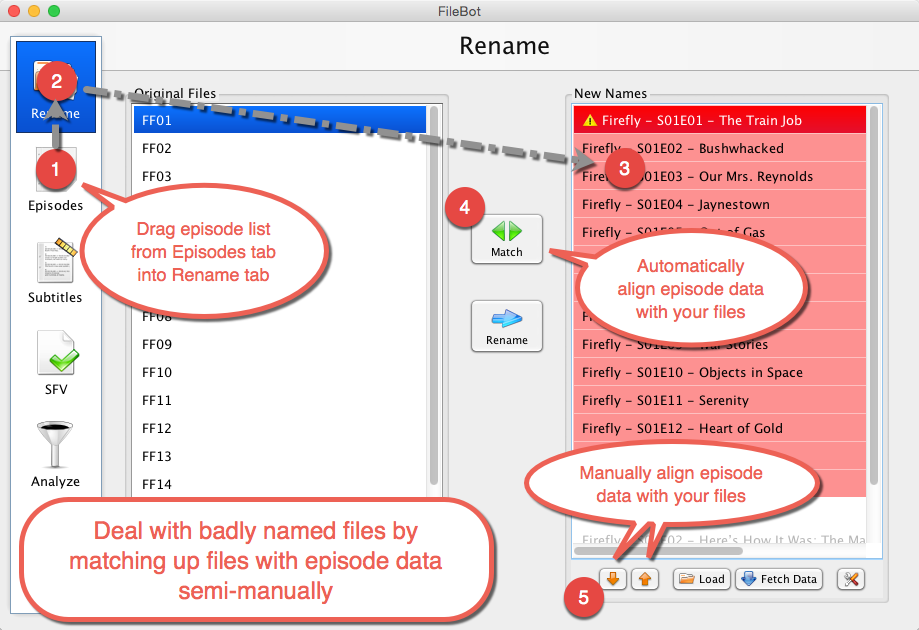
Generally speaking, you can always match files and episodes manually:
https://www.youtube.com/watch?v=btNSv7A ... nd&index=2
Re: MediaInfo Inspector
Posted: 05 Dec 2018, 08:09
by weyb06
Hi,
my expression is :
Code: Select all
{s00e00} - {t} ({resolution}_{kbps}_{vc}_{channels}_{ac}_{source}_{languages}_{lang}_{subt})
1/my 1st question is :
where does Filebot take the informations {source}, {languages}, {lang} and {subt} from ? MediaInfo for all of them ?
indeed, I have plenty of cartoons and when I look at them with MediaInfo, most of them don't have the language set, neither the source, and
when i apply the expression, i get "fra" as language --> why ?
2/I don't see how Filebot could retrieve the "source", as i never saw it in MediaInfo --> does it come from MediaInfo ??? how can i set it in the cartoons ? with which tool ?
thank you very much in advance for your reply
regards
EDIT :
I found mkvtoolnix to set the language, but i don't see how to set the "source"
Re: MediaInfo Inspector
Posted: 05 Dec 2018, 09:20
by rednoah
weyb06 wrote: 05 Dec 2018, 08:09
where does Filebot take the informations {source}, {languages}, {lang} and {subt} from ? MediaInfo for all of them ?
Does NOT use MediaInfo:
{source} is based on the file path only, matching kown patterns such as
BluRay.
{lang} and
{subt} is for subtitles, matching the subtitle language suffix from the file path, or by running statistical language detection on the file contents of text-based subtitle files.
Does use MediaInfo:
{languages} is a convenience binding for reading audio languages (via libmediainfo or ffprobe depending on your install).
weyb06 wrote: 05 Dec 2018, 08:09
I don't see how Filebot could retrieve the "source", as i never saw it in MediaInfo --> does it come from MediaInfo ??? how can i set it in the cartoons ? with which tool ?
If the filename doesn't say Bluray / DVDRip / WebDL / etc then
{source} won't work. If you just have the video file, then it's impossible to tell if it came from BD / DVD / Netflix / iTunes / etc. You could guess based on file size / resolution / bitrate / etc in your own format code but it's ultimately guesswork unless the file is explicitly tagged in some way.
Re: MediaInfo Inspector
Posted: 05 Dec 2018, 14:01
by weyb06
hi,
thank you for your reply !
i understand a little better how it works !
I found mkvtoolnix to set the language, but i don't see how to set the "source"
--> which property could i set (with mkvtoolnix) as the "source" so filebot recognizes/reads it with MediaInfo (and then afterwards i'll be able to get it), please ?
--> I mean to use a property i don't use to set the "source"...
EDIT : you should precise on
https://www.filebot.net/naming.html that {lang} is for subtitles only

Re: MediaInfo Inspector
Posted: 05 Dec 2018, 14:37
by rednoah
{source} only works if a known keyword such as BluRay appears in the file path. mkvtoolnix doesn't help you there. Presumably, you can add your own custom tags though, which will then be accessible via mediainfo.
EDIT: I'll be making changes to FileBot 4.8.5 also check the media title (e.g. from mkv title tag if available) as well for bindings such as {source} that are based on the current or original filename.
Re: MediaInfo Inspector
Posted: 05 Dec 2018, 15:01
by weyb06
If i set the Mediainfo "Encoded_Library/String" parameter with "VHS" for example, how can i retrieve/read it with filebot ?
I saw there is "media" able to get <any any general media parameter>, but how do i do that please ? {media} is enough ?
Re: MediaInfo Inspector
Posted: 05 Dec 2018, 15:53
by rednoah
You can access any media info property by name.
Object/Property style:
Map/Key style:
Re: MediaInfo Inspector
Posted: 05 Dec 2018, 16:42
by weyb06
ok i get it !
Q : i have set the language with mkvtoolnix, and i can see "Language/String: en" in the audio section of Mediainfo, so why do i get [fra] with {languages} in my expression ?
regards
Re: MediaInfo Inspector
Posted: 06 Dec 2018, 00:15
by rednoah
Correction:
{languages} is the TheTVDB language / TheMovieDB spoken languages field.
{audioLanguages} is the convenience binding for accessing audio languages (as List of Language objects).
{audio.LanguageString} is direct access for the Language/String value for each audio stream.
Re: [TAR] How to install FileBot on Linux / FreeBSD / Solaris / any Unix OS
Posted: 17 Jan 2019, 14:47
by elgallo
I am on FreeBSD 12, when trying to install filebot I get the following error
Code: Select all
~/filebot-portable# sh filebot.sh -script fn:sysinfo
filebot.sh: java: not found
which version of java should I use/search for?
Re: [TAR] How to install FileBot on Linux / FreeBSD / Solaris / any Unix OS
Posted: 17 Jan 2019, 14:49
by rednoah
The *-portable.tar.xz package is compiled for Java 8.
Re: [JDownloader] Setup for Windows, Linux and Mac OS X
Posted: 18 Jan 2019, 18:45
by chest069
Hello,
I am trying to setup and run your JDownloader script and can't seem to get it to work.
I am using Windows 10 64 bit and JDownloader2 (instead of JDownloader) to download my files to a folder and that is the folder I would then like to be processed by filebot and you AMC script.
I figured out how to install the scripting plugin in to JDownloader2 and I created a script based on what you posted here and the following web site
https://github.com/filebot/plugins/tree ... downloader .
When I test run it in the scripter it seems to work but nothing is happening when the download completes. My files are not processed by filebot or the AMC script.
I'm new to this and trying to learn, please help. Also where do I put the files I download that you created if that is the issue.
Re: [JDownloader] Setup for Windows, Linux and Mac OS X
Posted: 18 Jan 2019, 18:53
by rednoah
The first step is to figure out if JDownloader is calling your scripts at all. The JDownloader logs might give some indication. JDownloader forums might also be helpful on general JDownloader help and support.
Note that if you're on Windows, you'll need to use the *.cmd script and not the *.sh script, so you'll modify this line:
Code: Select all
var script = JD_HOME + '/jdownloader-postprocess.sh'
and replace it with the path to your *.cmd script:
Code: Select all
var script = 'C:/jdownloader-postprocess.cmd'
where script is the absolute path to the cmd script you want to execute, i.e.
jdownloader-postprocess.cmd
Re: [JDownloader] Setup for Windows, Linux and Mac OS X
Posted: 20 Jan 2019, 18:27
by chest069
Sorry for the late reply and thanks for the suggestion.
I did make a event script/trigger from other things I read and added your suggestion. Here is the event script/trigger :
Code: Select all
[{
    "eventTrigger": "ON_PACKAGE_FINISHED",
    "enabled": true,
    "name": "Execute FileBot (PackageFinished)",
    "script": "var script = 'C:/jdownloader-postprocess.cmd'\n\nvar path = package.getDownloadFolder()\nvar name = package.getName()\nvar label = package.getComment() ? package.getComment() : 'N/A'\n\nvar command = [script, path, name, label, 'PACKAGE_FINISHED']\n\nlog(command)\nlog(callSync(command))\n",
    "eventTriggerSettings": {}
}]
It shows everything is ok in the scripter gui and i get no errors on the test run i did but it doesn't seem to work still. I did as you said and asked for help in the JDownloader forum under scripting too. Thanks for your help and anymore you can give. I wasn't able to figure out the logs I found where they were but there is a ton of them and I am not sure which is for what I am doing.
Re: [JDownloader] Setup for Windows, Linux and Mac OS X
Posted: 21 Jan 2019, 02:12
by rednoah
Is your
C:/jdownloader-postprocess.cmd script called at all? That is the first step we need to clear.
If it's not called, then maybe because the JDownloader hook doesn't work, which means we simplify:
Code: Select all
var command = ['C:/Windows/System32/notepad.exe']
log(command)
log(callSync(command))
Just call that one command, nothing else, can't not work, should pop up notepad, unless it's a JDownloader bug / issue, which means we know where to start fixing things.
Re: [JDownloader] Setup for Windows, Linux and Mac OS X
Posted: 21 Jan 2019, 10:48
by chest069
Thanks for the reply.
What you gave me to try worked. (as far as executing notepad.exe)
I wasn't able to find out or figure which log was for JDownloader2 and the script I was trying though. So I don't know if it actually runs the CMD file.
Thanks again for the help.
Re: [JDownloader] Setup for Windows, Linux and Mac OS X
Posted: 21 Jan 2019, 10:54
by rednoah
1.
If
notepad.exe is called, then we know that works, so the next step is to do the same with
C:/Windows/System32/cmd.exe /c C:/script.bat.
2.
Just write a script that does something like this:
If the CMD script is called, then
C:\date.txt will be created.
Re: [JDownloader] Setup for Windows, Linux and Mac OS X
Posted: 21 Jan 2019, 11:29
by chest069
Ok so this is what I put in the scripter for my script.
var command = ['C:/Windows/System32/cmd.exe /c C:/script.bat']
log(command)
log(callSync(command))
I also created a BAT file with DATE /T > C:\date.txt inside of it and saved it to C for it to be called.
When I did a test run in the scripter in JDownloader2 it came back with an error.

Does the error mean it is not finding the cmd program?
Re: [JDownloader] Setup for Windows, Linux and Mac OS X
Posted: 21 Jan 2019, 11:44
by rednoah
Well, I don't use Windows.

Where's cmd.exe on your system?
Re: [JDownloader] Setup for Windows, Linux and Mac OS X
Posted: 21 Jan 2019, 12:07
by chest069
LOL, sorry but unfortunately it's the machine I am doing this on right now. I prefer linux myself though.
It is here :
Code: Select all
C:\Users\Chris Chester\AppData\Roaming\Microsoft\Windows\Start Menu\Programs\System Tools
Does it matter if I use single quotes vs double quotes when doing the script?
This is the script now
Code: Select all
var command = ['C:/Users/Chris Chester/AppData/Roaming/Microsoft/Windows/Start Menu/Programs/System Tools/cmd.exe /c C:/script.bat']
log(command)
log(callSync(command))
I will try that path and see if it works
Code: Select all
var command = ["C:/Users/Chris Chester/AppData/Roaming/Microsoft/Windows/Start Menu/Programs/System Tools/cmd.exe /c C:/script.bat"]
log(command)
log(callSync(command))
 https://drive.google.com/file/d/1mIZ5rb ... sp=sharing
Same results either way.
This seems very simple but I am not sure why it just is not working. I do really appreciate your help on this.
Re: [JDownloader] Setup for Windows, Linux and Mac OS X
Posted: 21 Jan 2019, 12:14
by chest069
I also tried alone to try and launch the command window by itself like notepad with this:
Code: Select all
var command = ["C:/Users/Chris Chester/AppData/Roaming/Microsoft/Windows/Start Menu/Programs/System Tools/cmd.exe"]
log(command)
log(callSync(command))

Still got errors

Wrapped org.jdownloader.extensions.eventscripter.EnvironmentException: Line 3
java.io.IOException: Cannot run program "C:/Users/Chris Chester/AppData/Roaming/Microsoft/Windows/Start Menu/Programs/System Tools/cmd.exe": CreateProcess error=2, The system cannot find the file specified
	at java.lang.ProcessBuilder.start(Unknown Source)
	at org.appwork.utils.processes.ProcessBuilderFactory.runCommand(ProcessBuilderFactory.java:215)
	at org.appwork.utils.processes.ProcessBuilderFactory.runCommand(ProcessBuilderFactory.java:201)
	at org.appwork.utils.processes.ProcessBuilderFactory.runCommand(ProcessBuilderFactory.java:196)
	at org.jdownloader.extensions.eventscripter.sandboxobjects.ScriptEnvironment.callSync(ScriptEnvironment.java:247)
	at sun.reflect.NativeMethodAccessorImpl.invoke0(Native Method)
	at sun.reflect.NativeMethodAccessorImpl.invoke(Unknown Source)
	at sun.reflect.DelegatingMethodAccessorImpl.invoke(Unknown Source)
	at java.lang.reflect.Method.invoke(Unknown Source)
	at net.sourceforge.htmlunit.corejs.javascript.MemberBox.invoke(MemberBox.java:120)
	at net.sourceforge.htmlunit.corejs.javascript.NativeJavaMethod.call(NativeJavaMethod.java:213)
	at net.sourceforge.htmlunit.corejs.javascript.Interpreter.interpretLoop(Interpreter.java:1531)
	at net.sourceforge.htmlunit.corejs.javascript.Interpreter.interpret(Interpreter.java:798)
	at net.sourceforge.htmlunit.corejs.javascript.InterpretedFunction.call(InterpretedFunction.java:105)
	at net.sourceforge.htmlunit.corejs.javascript.ContextFactory.doTopCall(ContextFactory.java:411)
	at org.jdownloader.scripting.JSHtmlUnitPermissionRestricter$SandboxContextFactory.doTopCall(JSHtmlUnitPermissionRestricter.java:119)
	at net.sourceforge.htmlunit.corejs.javascript.ScriptRuntime.doTopCall(ScriptRuntime.java:3057)
	at net.sourceforge.htmlunit.corejs.javascript.InterpretedFunction.exec(InterpretedFunction.java:115)
	at net.sourceforge.htmlunit.corejs.javascript.Context.evaluateString(Context.java:1212)
	at org.jdownloader.extensions.eventscripter.ScriptThread.evalUNtrusted(ScriptThread.java:254)
	at org.jdownloader.extensions.eventscripter.ScriptThread.executeScipt(ScriptThread.java:148)
	at org.jdownloader.extensions.eventscripter.ScriptThread.run(ScriptThread.java:128)
Caused by: java.io.IOException: CreateProcess error=2, The system cannot find the file specified
	at java.lang.ProcessImpl.create(Native Method)
	at java.lang.ProcessImpl.<init>(Unknown Source)
	at java.lang.ProcessImpl.start(Unknown Source)
	... 22 more
 (#3)
Re: [JDownloader] Setup for Windows, Linux and Mac OS X
Posted: 21 Jan 2019, 12:35
by chest069
I did go back and try just launching cmd.exe by itself in the script but got the same results even though I verified that is where cmd.exe is:
Code: Select all
var command = ['C:\Windows\System32']
log(command)
log(callSync(command))
so still no luck
Code: Select all
net.sourceforge.htmlunit.corejs.javascript.WrappedException: Wrapped org.jdownloader.extensions.eventscripter.EnvironmentException: Line 3
java.io.IOException: Cannot run program "C:Windows System32": CreateProcess error=2, The system cannot find the file specified
	at java.lang.ProcessBuilder.start(Unknown Source)
	at org.appwork.utils.processes.ProcessBuilderFactory.runCommand(ProcessBuilderFactory.java:215)
	at org.appwork.utils.processes.ProcessBuilderFactory.runCommand(ProcessBuilderFactory.java:201)
	at org.appwork.utils.processes.ProcessBuilderFactory.runCommand(ProcessBuilderFactory.java:196)
	at org.jdownloader.extensions.eventscripter.sandboxobjects.ScriptEnvironment.callSync(ScriptEnvironment.java:247)
	at sun.reflect.NativeMethodAccessorImpl.invoke0(Native Method)
	at sun.reflect.NativeMethodAccessorImpl.invoke(Unknown Source)
	at sun.reflect.DelegatingMethodAccessorImpl.invoke(Unknown Source)
	at java.lang.reflect.Method.invoke(Unknown Source)
	at net.sourceforge.htmlunit.corejs.javascript.MemberBox.invoke(MemberBox.java:120)
	at net.sourceforge.htmlunit.corejs.javascript.NativeJavaMethod.call(NativeJavaMethod.java:213)
	at net.sourceforge.htmlunit.corejs.javascript.Interpreter.interpretLoop(Interpreter.java:1531)
	at script(:3)
	at net.sourceforge.htmlunit.corejs.javascript.Interpreter.interpret(Interpreter.java:798)
	at net.sourceforge.htmlunit.corejs.javascript.InterpretedFunction.call(InterpretedFunction.java:105)
	at net.sourceforge.htmlunit.corejs.javascript.ContextFactory.doTopCall(ContextFactory.java:411)
	at org.jdownloader.scripting.JSHtmlUnitPermissionRestricter$SandboxContextFactory.doTopCall(JSHtmlUnitPermissionRestricter.java:119)
	at net.sourceforge.htmlunit.corejs.javascript.ScriptRuntime.doTopCall(ScriptRuntime.java:3057)
	at net.sourceforge.htmlunit.corejs.javascript.InterpretedFunction.exec(InterpretedFunction.java:115)
	at net.sourceforge.htmlunit.corejs.javascript.Context.evaluateString(Context.java:1212)
	at org.jdownloader.extensions.eventscripter.ScriptThread.evalUNtrusted(ScriptThread.java:254)
	at org.jdownloader.extensions.eventscripter.ScriptThread.executeScipt(ScriptThread.java:148)
	at org.jdownloader.extensions.eventscripter.ScriptThread.run(ScriptThread.java:128)
Caused by: java.io.IOException: CreateProcess error=2, The system cannot find the file specified
	at java.lang.ProcessImpl.create(Native Method)
	at java.lang.ProcessImpl.<init>(Unknown Source)
	at java.lang.ProcessImpl.start(Unknown Source)
	... 22 more
 (#3)
	at net.sourceforge.htmlunit.corejs.javascript.Context.throwAsScriptRuntimeEx(Context.java:1907)
	at net.sourceforge.htmlunit.corejs.javascript.MemberBox.invoke(MemberBox.java:146)
	at net.sourceforge.htmlunit.corejs.javascript.NativeJavaMethod.call(NativeJavaMethod.java:213)
	at net.sourceforge.htmlunit.corejs.javascript.Interpreter.interpretLoop(Interpreter.java:1531)
	at net.sourceforge.htmlunit.corejs.javascript.Interpreter.interpret(Interpreter.java:798)
	at net.sourceforge.htmlunit.corejs.javascript.InterpretedFunction.call(InterpretedFunction.java:105)
	at net.sourceforge.htmlunit.corejs.javascript.ContextFactory.doTopCall(ContextFactory.java:411)
	at org.jdownloader.scripting.JSHtmlUnitPermissionRestricter$SandboxContextFactory.doTopCall(JSHtmlUnitPermissionRestricter.java:119)
	at net.sourceforge.htmlunit.corejs.javascript.ScriptRuntime.doTopCall(ScriptRuntime.java:3057)
	at net.sourceforge.htmlunit.corejs.javascript.InterpretedFunction.exec(InterpretedFunction.java:115)
	at net.sourceforge.htmlunit.corejs.javascript.Context.evaluateString(Context.java:1212)
	at org.jdownloader.extensions.eventscripter.ScriptThread.evalUNtrusted(ScriptThread.java:254)
	at org.jdownloader.extensions.eventscripter.ScriptThread.executeScipt(ScriptThread.java:148)
	at org.jdownloader.extensions.eventscripter.ScriptThread.run(ScriptThread.java:128)
Caused by: org.jdownloader.extensions.eventscripter.EnvironmentException: Line 3
java.io.IOException: Cannot run program "C:Windows System32": CreateProcess error=2, The system cannot find the file specified
	at java.lang.ProcessBuilder.start(Unknown Source)
	at org.appwork.utils.processes.ProcessBuilderFactory.runCommand(ProcessBuilderFactory.java:215)
	at org.appwork.utils.processes.ProcessBuilderFactory.runCommand(ProcessBuilderFactory.java:201)
	at org.appwork.utils.processes.ProcessBuilderFactory.runCommand(ProcessBuilderFactory.java:196)
	at org.jdownloader.extensions.eventscripter.sandboxobjects.ScriptEnvironment.callSync(ScriptEnvironment.java:247)
	at sun.reflect.NativeMethodAccessorImpl.invoke0(Native Method)
	at sun.reflect.NativeMethodAccessorImpl.invoke(Unknown Source)
	at sun.reflect.DelegatingMethodAccessorImpl.invoke(Unknown Source)
	at java.lang.reflect.Method.invoke(Unknown Source)
	at net.sourceforge.htmlunit.corejs.javascript.MemberBox.invoke(MemberBox.java:120)
	at net.sourceforge.htmlunit.corejs.javascript.NativeJavaMethod.call(NativeJavaMethod.java:213)
	at net.sourceforge.htmlunit.corejs.javascript.Interpreter.interpretLoop(Interpreter.java:1531)
	at net.sourceforge.htmlunit.corejs.javascript.Interpreter.interpret(Interpreter.java:798)
	at net.sourceforge.htmlunit.corejs.javascript.InterpretedFunction.call(InterpretedFunction.java:105)
	at net.sourceforge.htmlunit.corejs.javascript.ContextFactory.doTopCall(ContextFactory.java:411)
	at org.jdownloader.scripting.JSHtmlUnitPermissionRestricter$SandboxContextFactory.doTopCall(JSHtmlUnitPermissionRestricter.java:119)
	at net.sourceforge.htmlunit.corejs.javascript.ScriptRuntime.doTopCall(ScriptRuntime.java:3057)
	at net.sourceforge.htmlunit.corejs.javascript.InterpretedFunction.exec(InterpretedFunction.java:115)
	at net.sourceforge.htmlunit.corejs.javascript.Context.evaluateString(Context.java:1212)
	at org.jdownloader.extensions.eventscripter.ScriptThread.evalUNtrusted(ScriptThread.java:254)
	at org.jdownloader.extensions.eventscripter.ScriptThread.executeScipt(ScriptThread.java:148)
	at org.jdownloader.extensions.eventscripter.ScriptThread.run(ScriptThread.java:128)
Caused by: java.io.IOException: CreateProcess error=2, The system cannot find the file specified
	at java.lang.ProcessImpl.create(Native Method)
	at java.lang.ProcessImpl.<init>(Unknown Source)
	at java.lang.ProcessImpl.start(Unknown Source)
	... 22 more

	at org.jdownloader.extensions.eventscripter.sandboxobjects.ScriptEnvironment.callSync(ScriptEnvironment.java:250)
	at sun.reflect.NativeMethodAccessorImpl.invoke0(Native Method)
	at sun.reflect.NativeMethodAccessorImpl.invoke(Unknown Source)
	at sun.reflect.DelegatingMethodAccessorImpl.invoke(Unknown Source)
	at java.lang.reflect.Method.invoke(Unknown Source)
	at net.sourceforge.htmlunit.corejs.javascript.MemberBox.invoke(MemberBox.java:120)
	... 12 more
Caused by: java.io.IOException: Cannot run program "C:Windows System32": CreateProcess error=2, The system cannot find the file specified
	at java.lang.ProcessBuilder.start(Unknown Source)
	at org.appwork.utils.processes.ProcessBuilderFactory.runCommand(ProcessBuilderFactory.java:215)
	at org.appwork.utils.processes.ProcessBuilderFactory.runCommand(ProcessBuilderFactory.java:201)
	at org.appwork.utils.processes.ProcessBuilderFactory.runCommand(ProcessBuilderFactory.java:196)
	at org.jdownloader.extensions.eventscripter.sandboxobjects.ScriptEnvironment.callSync(ScriptEnvironment.java:247)
	... 17 more
Caused by: java.io.IOException: CreateProcess error=2, The system cannot find the file specified
	at java.lang.ProcessImpl.create(Native Method)
	at java.lang.ProcessImpl.<init>(Unknown Source)
	at java.lang.ProcessImpl.start(Unknown Source)
	... 22 more
Re: [JDownloader] Setup for Windows, Linux and Mac OS X
Posted: 21 Jan 2019, 14:45
by chest069
If I run the command from the command line I get:
Code: Select all
C:\>jdownloader-postprocess.cmd
The syntax of the command is incorrect.
C:\><!DOCTYPE html>
I don't know if it is the correct way to try it.
Re: [JDownloader] Setup for Windows, Linux and Mac OS X
Posted: 21 Jan 2019, 14:52
by rednoah
1.
Did you just "Save as..." a web page and then run it as CMD script?

Here's what a CMD script looks like:
https://raw.githubusercontent.com/fileb ... rocess.cmd
Here's what a HTML web page looks like:
https://raw.githubusercontent.com/fileb ... index.html
2.
Now, the first step is to actually have a working cmd script, but then it'll still probably not work right away, because Windows, and then we're back to where we started.
I'm not sure if this tutorial is for you. Looks like you're gonna struggle hard every step of the way.

3.
Here's some general debugging tips. (a) You can't execute a folder. (b) Read the error message. Doesn't this look strange? No \ here? That's because in "..." the \ character almost always has special meaning, meaning that you can't use it literally.
(not your fault, Windows engineers made really really bad decisions back in the 80ies, and their mistakes are still coming back to haunt us all)
Code: Select all
Cannot run program "C:Windows System32"
Re: [JDownloader] Setup for Windows, Linux and Mac OS X
Posted: 21 Jan 2019, 15:28
by chest069
LOL, apparently that is what I did, now that I look at both of them. I assumed what was there was what i needed so yeah I copied it. Oh well. Sorry for the frustration on my user error.
I saved the file that you just posted.
I will test things but running the cmd on it's own to see if it work then move back to the scripter.
Re: [JDownloader] Setup for Windows, Linux and Mac OS X
Posted: 21 Jan 2019, 16:03
by chest069
Ok, well I tried what you suggested and I get the following when running the command file you created from the command line on it's own.
C:\>jdownloader-postprocess.cmd
Locking C:\Users\Chris Chester\AppData\Roaming\FileBot\logs\amc.log
Run script [fn:amc] at [Mon Jan 21 10:50:59 EST 2019]
Parameter: skipExtract = y
Illegal usage: no input
Failure (°_°)
I also tried the script again just to see if would at least launch it even if it failed but I get nothing. I can't seem to find the correct log either.
var command = ['/jdownloader-postprocess.cmd']
log(command)
log(callSync(command))
I will keep trying and thanks for all the help. Sorry about the mistakes.
Re: [JDownloader] Setup for Windows, Linux and Mac OS X
Posted: 21 Jan 2019, 16:05
by chest069
Ok, well I tried what you suggested and I get the following when running the command file you created from the command line on it's own.
Code: Select all
C:\>jdownloader-postprocess.cmd
Locking C:\Users\Chris Chester\AppData\Roaming\FileBot\logs\amc.log
Run script [fn:amc] at [Mon Jan 21 10:50:59 EST 2019]
Parameter: skipExtract = y
Illegal usage: no input
Failure (°_°)
I also tried the script again just to see if would at least launch it even if it failed but I get nothing. I can't seem to find the correct log either.
Code: Select all
var command = ['/jdownloader-postprocess.cmd']
log(command)
log(callSync(command))
I will keep trying and thanks for all the help. Sorry about the mistakes.
Re: Plex Naming Schemes
Posted: 21 Jan 2019, 21:57
by Gruff10
Hi,
NOOB here

Using
I find that the TV series 24 (Twenty Four) fails because the fullstops in its episode titles are being replaced (see output below).
https://ibb.co/87vTcrF
How can I get around this?
Thanks.
Re: Plex Naming Schemes
Posted: 22 Jan 2019, 05:12
by rednoah
Yes, the
{plex} format does indeed strip trailing "." characters from the Plex path. In your case, that's unnecessary, but the
{plex} binding can't know that.
e.g.
Code: Select all
$ filebot -list --q 24 --format {plex} --filter "s == 1 && e <= 3"
TV Shows/24/Season 01/24 - S01E01 - 12.00 A.M. - 1.00 A.M
TV Shows/24/Season 01/24 - S01E02 - 1.00 A.M. - 2.00 A.M
TV Shows/24/Season 01/24 - S01E03 - 2.00 A.M. - 3.00 A.M
If want to preserve the trailing "." then you can use a full custom format such as this:
Code: Select all
TV Shows/{n}/Season {s.pad 2}/{n} - {s00e00} - {t} [{vf}.{vc}.{ac}]
Re: [JDownloader] Setup for Windows, Linux and Mac OS X
Posted: 22 Jan 2019, 05:27
by rednoah
Probably more like this:
Code: Select all
var command = ['C:\\absolute\\path\\to\\cmd.exe', '-c', 'C:\\absolute\\path\\to\\jdownloader-postprocess.cmd']
Using \\ instead of \ at all times, because \ is an escape character, and \\ is the literal \ character.
Re: [JDownloader] Setup for Windows, Linux and Mac OS X
Posted: 22 Jan 2019, 06:29
by chest069
Thanks for replying
This is what I put in my script based on the info you gave and I have:
Code: Select all
var command = ['C:\\Windows\\System32\\cmd.exe', '-c', 'C:\\jdownloader-postprocess.cmd']
log(command)
log(callSync(command))
It didn't spit anything back in the JDownloader2 GUI
I found the log I think for it:
Code: Select all
------------------------Thread: 1792:ScriptEnvironment.log-----------------------
--ID:1792TS:1548138130189-1/22/19 1:22:10 AM -  [org.jdownloader.extensions.eventscripter.sandboxobjects.ScriptEnvironment(log)] -> [ "C:\\Windows\\System32\\cmd.exe", "-c", "C:\\jdownloader-postprocess.cmd" ]
--ID:1792TS:1548138132497-1/22/19 1:22:12 AM -  [org.jdownloader.extensions.eventscripter.sandboxobjects.ScriptEnvironment(log)] -> Microsoft Windows [Version 10.0.17763.253]
(c) 2018 Microsoft Corporation. All rights reserved.

C:\Users\Chris Chester\AppData\Local\JDownloader 2.0>
Not sure if it is working or not.
Re: [JDownloader] Setup for Windows, Linux and Mac OS X
Posted: 22 Jan 2019, 07:33
by chest069
Ok I think it is calling it but I am not sure because nothing else happens. This is the most recent log.
Code: Select all
C:\Users\Chris Chester\AppData\Local\JDownloader 2.0>
------------------------Thread: 2094:ScriptEnvironment.log-----------------------
--ID:2094TS:1548142207563-1/22/19 2:30:07 AM -  [org.jdownloader.extensions.eventscripter.sandboxobjects.ScriptEnvironment(log)] -> [ "C:\\Windows\\System32\\cmd.exe", "-c", "C:\\jdownloader-postprocess.cmd" ]
--ID:2094TS:1548142207651-1/22/19 2:30:07 AM -  [org.jdownloader.extensions.eventscripter.sandboxobjects.ScriptEnvironment(log)] -> Microsoft Windows [Version 10.0.17763.253]
(c) 2018 Microsoft Corporation. All rights reserved.
Re: [JDownloader] Setup for Windows, Linux and Mac OS X
Posted: 22 Jan 2019, 07:50
by chest069
Ok another update.
I changed what you gave me to this as my event script.
Code: Select all
@ECHO OFF

:: Input Parameters
set ARG_PATH=%1
set ARG_NAME=%2
set ARG_LABEL=%3

:: Configuration
set CONFIG_OUTPUT="C:/Torrent-Completed"

filebot -script fn:amc  "C:/Users/Chris Chester/Media" --output "C:/Torrent-Completed" --action duplicate --conflict skip -non-strict --log-file amc.log --def skipExtract=y unsorted=y music=y artwork=y excludeList=excludes.txt
Then I ran it in the JDownloader2 GUI and got not errors so I checked the log.
This is the log.
Code: Select all
------------------------Thread: 2152:ScriptEnvironment.log-----------------------
--ID:2152TS:1548143057335-1/22/19 2:44:17 AM -  [org.jdownloader.extensions.eventscripter.sandboxobjects.ScriptEnvironment(log)] -> C:\jdownloader-postprocess.cmd
--ID:2152TS:1548143061629-1/22/19 2:44:21 AM -  [org.jdownloader.extensions.eventscripter.sandboxobjects.ScriptEnvironment(log)] -> Locking C:\Users\Chris Chester\AppData\Roaming\FileBot\logs\amc.log
Run script [fn:amc] at [Tue Jan 22 02:44:20 EST 2019]
Parameter: skipExtract = y
Parameter: unsorted = y
Parameter: music = y
Parameter: artwork = y
Parameter: excludeList = excludes.txt
Argument[0]: C:\Users\Chris Chester\Media
Use excludes: C:\Torrent-Completed\excludes.txt (28)
No files selected for processing
Done ?(?????)?
Does this mean it works? It seems so.
Re: [JDownloader] Setup for Windows, Linux and Mac OS X
Posted: 22 Jan 2019, 08:35
by rednoah
Yep, we now know that JD is calling our script, and that our script is calling FileBot successfully. Now it's time to go back, remove all your modifications, and then set it up with JD again with only the minimum amount of modifications, that ones which are required to make it work.
1.
Start from the beginning:
viewtopic.php?f=4&t=3478#p19358
2.
Modify the JD scripts to make them work on your Windows system.
i.e. change this:
Code: Select all
var script = JD_HOME + '/jdownloader-postprocess.sh'
to that:
Code: Select all
var script = ['C:\\Windows\\System32\\cmd.exe', '-c', 'C:\\jdownloader-postprocess.cmd']
Assuming that the cmd glue logic script is saved to
C:\jdownloader-postprocess.cmd
3.
(Optional) Modify FileBot output folder if you're not happy with the default.
i.e. change this:
Code: Select all
set CONFIG_OUTPUT=%USERPROFILE%/Media
to that:
In this specific example,
X:/Media must be an existing folder. You don't need to, nor should you, make any other changes to the CMD script
(unless you spend time reading and understanding how it works, and want to customize it to your needs).
Re: Plex Naming Schemes
Posted: 22 Jan 2019, 12:06
by Gruff10
Thanks. That worked, though the ":"s in the episode titles are a pain as well. At least the Validate button clears them
Re: Plex Naming Schemes
Posted: 22 Jan 2019, 14:06
by rednoah
Additional customizations like this will do the job:
The
{plex} format does take care of these corner cases already, and if you need all of those but if you want more control, then you can start with a format such as this, and then modify it to your needs:
Code: Select all
TV Shows/{n}/{episode.special ? 'Specials' : 'Season '+s.pad(2)}/{n} - {episode.special ? 'S00E'+special.pad(2) : s00e00} - {t.replaceAll(/[`´‘’ʻ]/, /'/).replaceAll(/[!?.]+$/).replacePart(', Part $1')}{'.'+lang}
The
.replaceAll(/[!?.]+$/) bit is responsible for removing trailing
!?. so you could just cut that bit.
Re: [JDownloader] Setup for Windows, Linux and Mac OS X
Posted: 22 Jan 2019, 15:22
by chest069
Thanks again for the reply.
Ok, I started over.
So I went to the website and copied what you had in the script window for Execute FileBot (PackageFinished) and the went into JDownloader2 and created the event script.
Am I supposed to download this instead of copying the code and if so where do I store it so JDownloader2 can find it?
I changed only
var script = JD_HOME + '/jdownloader-postprocess.sh' to
var script = ['C:\\Windows\\System32\\cmd.exe', '-c', 'C:\\jdownloader-postprocess.cmd']
I then went on to do the same with the other script I went to the website and copied what you had in the script window for Execute FileBot (ArchiveExtracted) and the went into JDownloader2 and created the event script.
Am I supposed to download this instead of copying the code and if so where do I store it so JDownloader2 can find it?
I changed only
var script = JD_HOME + '/jdownloader-postprocess.sh' to
var script = ['C:\\Windows\\System32\\cmd.exe', '-c', 'C:\\jdownloader-postprocess.cmd']
I then downloaded the jdownloader-postprocess.cmd from the website.
In that file I only changed
set CONFIG_OUTPUT=%USERPROFILE%/Media to
set CONFIG_OUTPUT="F:\Media"
**** Question : Is this supposed to point to where my files I want processed are or where I want them to goto? ********
So after all of that I ran a Test Run in the Scripter in JDownloader2 and it came back with errors still.
The first picture is what I did in JDownloader2 including what my script looks like. I noticed it highlights somethings are they errors?
 https://drive.google.com/file/d/1P98dvB ... sp=sharing
The next picture is what JDownloader gives me as my error and it seems like it is the same as before.
 https://drive.google.com/file/d/1BFGiEP ... sp=sharing
I do want to get more advance with this later and I have been reading up on Filebot and AMC but I just want the basic for now.
Anymore thoughts, and again this is my first time trying this and using java to do it so I really do apologize for my ignorance.
Re: [JDownloader] Setup for Windows, Linux and Mac OS X
Posted: 22 Jan 2019, 15:31
by rednoah
1.
I think you need to copy & paste them into the UI. JD will store them in some file somewhere, but we don't need to care about that.
2.
Yes, the output option refers to the destination folder where files will end up. The input folder / file / name / label is passed in via command-line arguments 1, 2 and 3 so that's something JD will pass along to our cmd script via the JD event scripts. You don't need to worry about that.
3.
Didn't you already confirm that JD can make that call? Did you check where cmd.exe is actually located? Or did it work by just calling the *.bat file directly?
4.
Note that everything we're doing here has nothing to do with Java or FileBot specifically. We're just trying to get JD to call a command, could be any command.
Re: [JDownloader] Setup for Windows, Linux and Mac OS X
Posted: 22 Jan 2019, 15:43
by rednoah
I see an issue with the script, because it doesn't work if
var script is suddenly an array of command and arguments, instead of just the executable path.
Remove this line:
Code: Select all
var script = JD_HOME + '/jdownloader-postprocess.sh'
Change this line:
Code: Select all
var command = [script, path, name, label, 'PACKAGE_FINISHED']
to this:
Code: Select all
var command = ['C:\\Windows\\System32\\cmd.exe', '-c', 'C:\\jdownloader-postprocess.cmd', path, name, label, 'PACKAGE_FINISHED']
Because before,
var script was suddenly an array, instead of a file path, and so that didn't work at all.
Re: [JDownloader] Setup for Windows, Linux and Mac OS X
Posted: 22 Jan 2019, 16:19
by chest069
Ok, so I made the changes and it didn't give me any errors in the JDownloader2 GUI scripter but nothing seemed to happen.
Currently this is what it looks like:
Code: Select all
var path = package.getDownloadFolder()
var name = package.getName()
var label = package.getComment() ? package.getComment() : 'N/A'
var links = package.getDownloadLinks() ? package.getDownloadLinks() : []

function isReallyFinished() {
    for (var i = 0; i < links.length; i++) {
        if (links[i].getArchive() != null && links[i].getExtractionStatus() != "SUCCESSFUL" || !package.isFinished()) {
            return false
        }
    }
    return true
}

if (isReallyFinished()) {
    var command = ['C:\\Windows\\System32\\cmd.exe', '-c', 'C:\\jdownloader-postprocess.cmd', path, name, label, 'PACKAGE_FINISHED']
    log(command)
    log(callSync(command))
}
This is what the log says which still makes me feel it is calling it and working. Correct me if I am wrong.
Code: Select all
------------------------Thread: 3968:ScriptEnvironment.log-----------------------
--ID:3968TS:1548172736591-1/22/19 10:58:56 AM -  [org.jdownloader.extensions.eventscripter.sandboxobjects.ScriptEnvironment(log)] -> [ "C:\\Windows\\System32\\cmd.exe", "-c", "C:\\jdownloader-postprocess.cmd", "C:\\Users\\Chris Chester\\AppData\\Local\\JDownloader 2.0", "Example FilePackage Name", "N/A", "PACKAGE_FINISHED" ]
--ID:3968TS:1548172739263-1/22/19 10:58:59 AM -  [org.jdownloader.extensions.eventscripter.sandboxobjects.ScriptEnvironment(log)] -> Microsoft Windows [Version 10.0.17763.253]
(c) 2018 Microsoft Corporation. All rights reserved.
As far as everything else
1) Ok thats what I was thinking.
2) Ok that clears that up and what I was thinking in how it worked.
3) I thought I did confirm that JD makes the call but I could be wrong cmd.exe is located in C:\Windows\System32 which is where you are pointing it. As far as the jdownloader-postprocess.cmd file yes I did run it on its own from the command line to check to see if it ran correctly and it did before but not now. I get the following when I run it on its own:
Code: Select all
C:\>jdownloader-postprocess.cmd
Locking C:\Users\Chris Chester\AppData\Roaming\FileBot\logs\amc.log
Run script [fn:amc] at [Tue Jan 22 10:59:38 EST 2019]
Parameter: skipExtract = y
Parameter: unsorted = y
Parameter: music = y
Parameter: artwork = y
Parameter: excludeList = excludes.txt
Parameter: ut_dir =
Parameter: ut_kind = multi
Parameter: ut_title =
Parameter: ut_label =
Illegal usage: no input
Failure (°_°)
4. Ok thanks for pointing that out because I was sure.
Re: [JDownloader] Setup for Windows, Linux and Mac OS X
Posted: 22 Jan 2019, 16:54
by rednoah
Is this all? Is there no next line that shows FileBot running and saying things?
Code: Select all
------------------------Thread: 3968:ScriptEnvironment.log-----------------------
--ID:3968TS:1548172736591-1/22/19 10:58:56 AM -  [org.jdownloader.extensions.eventscripter.sandboxobjects.ScriptEnvironment(log)] -> [ "C:\\Windows\\System32\\cmd.exe", "-c", "C:\\jdownloader-postprocess.cmd", "C:\\Users\\Chris Chester\\AppData\\Local\\JDownloader 2.0", "Example FilePackage Name", "N/A", "PACKAGE_FINISHED" ]
--ID:3968TS:1548172739263-1/22/19 10:58:59 AM -  [org.jdownloader.extensions.eventscripter.sandboxobjects.ScriptEnvironment(log)] -> Microsoft Windows [Version 10.0.17763.253]
(c) 2018 Microsoft Corporation. All rights reserved.
In a previous log, you already showed that JD is calling FileBot, and that we can see FileBot console output from JD:
Code: Select all
--ID:2152TS:1548143061629-1/22/19 2:44:21 AM -  [org.jdownloader.extensions.eventscripter.sandboxobjects.ScriptEnvironment(log)] -> Locking C:\Users\Chris Chester\AppData\Roaming\FileBot\logs\amc.log
Run script [fn:amc] at [Tue Jan 22 02:44:20 EST 2019]
That's what we wanna see. How did you get there before?
Maybe this is bad?
Code: Select all
var command = ['C:\\Windows\\System32\\cmd.exe', '-c', 'C:\\jdownloader-postprocess.cmd', path, name, label, 'PACKAGE_FINISHED']
And this is good?
Code: Select all
var command = ['C:\\jdownloader-postprocess.cmd', path, name, label, 'PACKAGE_FINISHED']
IDK. Maybe. There's a reason I don't use Windows.
3.
If you call the cmd script with no arguments, i.e. no input, then this is the expected console output.
Re: [JDownloader] Setup for Windows, Linux and Mac OS X
Posted: 22 Jan 2019, 17:04
by chest069
For the first part of your question. Yes that was all it gave me. (Is there a better way to do the logs to see what is going on)
In the previous log that showed that it was working it might have been when I ran the post processing command file on its own. I don't remember at this point. I was tring test test everything to see what worked to narrow down where the issue started.
I don't understand the issue and why it is not working.
If I bring up a run dialog in windows and type "cmd" and hit enter the command window opens but no matter which way I try it with the script it wont launch it like it did with "notepad".
Since the "postprocessing cmd file" was running correctly is there not another way to tell the script to just launch that file instead of trying to go through the command program?
Re: [JDownloader] Setup for Windows, Linux and Mac OS X
Posted: 22 Jan 2019, 17:14
by rednoah
Well, this line should just call the *.cmd file, which might work?
Code: Select all
    var command = ['C:\\jdownloader-postprocess.cmd', path, name, label, 'PACKAGE_FINISHED']
    log(command)
    log(callSync(command))
Re: [JDownloader] Setup for Windows, Linux and Mac OS X
Posted: 22 Jan 2019, 17:20
by chest069
Ok, I deleted everything in the script and added what you said.
On test run it came back with the error:
net.sourceforge.htmlunit.corejs.javascript.EcmaError: ReferenceError: "path" is not defined. (#1)
at net.sourceforge.htmlunit.corejs.javascript.ScriptRuntime.constructError(ScriptRuntime.java:3629)
at net.sourceforge.htmlunit.corejs.javascript.ScriptRuntime.constructError(ScriptRuntime.java:3613)
at net.sourceforge.htmlunit.corejs.javascript.ScriptRuntime.notFoundError(ScriptRuntime.java:3683)
at net.sourceforge.htmlunit.corejs.javascript.ScriptRuntime.name(ScriptRuntime.java:1690)
at net.sourceforge.htmlunit.corejs.javascript.Interpreter.interpretLoop(Interpreter.java:1622)
at script(:1)
at net.sourceforge.htmlunit.corejs.javascript.Interpreter.interpret(Interpreter.java:798)
at net.sourceforge.htmlunit.corejs.javascript.InterpretedFunction.call(InterpretedFunction.java:105)
at net.sourceforge.htmlunit.corejs.javascript.ContextFactory.doTopCall(ContextFactory.java:411)
at org.jdownloader.scripting.JSHtmlUnitPermissionRestricter$SandboxContextFactory.doTopCall(JSHtmlUnitPermissionRestricter.java:119)
at net.sourceforge.htmlunit.corejs.javascript.ScriptRuntime.doTopCall(ScriptRuntime.java:3057)
at net.sourceforge.htmlunit.corejs.javascript.InterpretedFunction.exec(InterpretedFunction.java:115)
at net.sourceforge.htmlunit.corejs.javascript.Context.evaluateString(Context.java:1212)
at org.jdownloader.extensions.eventscripter.ScriptThread.evalUNtrusted(ScriptThread.java:254)
at org.jdownloader.extensions.eventscripter.ScriptThread.executeScipt(ScriptThread.java:148)
at org.jdownloader.extensions.eventscripter.ScriptThread.run(ScriptThread.java:128)
Re: [JDownloader] Setup for Windows, Linux and Mac OS X
Posted: 22 Jan 2019, 17:26
by rednoah
Well, that was only a snippet. It won't work with the path / name / label variables are not defined...
Anyway, let's try this:
Code: Select all
var script = 'C:\\jdownloader-postprocess.cmd'

var path = package.getDownloadFolder()
var name = package.getName()
var label = package.getComment() ? package.getComment() : 'N/A'
var links = package.getDownloadLinks() ? package.getDownloadLinks() : []

function isReallyFinished() {
	for (var i = 0; i < links.length; i++) {
		if (links[i].getArchive() != null && links[i].getExtractionStatus() != "SUCCESSFUL" || !package.isFinished()) {
			return false
		}
	}
	return true
}

if (isReallyFinished()) {
	var command = [script, path, name, label, 'PACKAGE_FINISHED']
	log(command)
	log(callSync(command))
}
Re: [JDownloader] Setup for Windows, Linux and Mac OS X
Posted: 22 Jan 2019, 17:36
by chest069
Ok I put in what you said the log file says this:
Code: Select all
------------------------Thread: 4454:ScriptEnvironment.log-----------------------
--ID:4454TS:1548178299692-1/22/19 12:31:39 PM -  [org.jdownloader.extensions.eventscripter.sandboxobjects.ScriptEnvironment(log)] -> [ "C:\\jdownloader-postprocess.cmd", "C:\\Users\\Chris Chester\\AppData\\Local\\JDownloader 2.0", "Example FilePackage Name", "N/A", "PACKAGE_FINISHED" ]
--ID:4454TS:1548178310151-1/22/19 12:31:50 PM -  [org.jdownloader.extensions.eventscripter.sandboxobjects.ScriptEnvironment(log)] -> Locking C:\Users\Chris Chester\AppData\Roaming\FileBot\logs\amc.log
Run script [fn:amc] at [Tue Jan 22 12:31:45 EST 2019]
Parameter: skipExtract = y
Parameter: unsorted = y
Parameter: music = y
Parameter: artwork = y
Parameter: excludeList = excludes.txt
Parameter: ut_dir = C:\Users\Chris Chester\AppData\Local\JDownloader 2.0
Parameter: ut_kind = multi
Parameter: ut_title = Example FilePackage Name
Parameter: ut_label = N/A
Does this mean it is working somewhat?
Re: [JDownloader] Setup for Windows, Linux and Mac OS X
Posted: 22 Jan 2019, 17:57
by rednoah
Yep, that means it's working.
Re: [JDownloader] Setup for Windows, Linux and Mac OS X
Posted: 22 Jan 2019, 20:43
by JStrach
Hi, I created the events as well as the cmd file (running on Windows 10), but am having issues getting filebot to run. I've looked at the logs, and from what I can gather, the event script for running after the package finishes is actually set up to work fine. If I test run it from the edit dialog, it actually calls the cmd file, and filebot runs according to the filebot log. The issue seems to be that the event is never actually called once a package is finished. Does anyone know why this would be?
Re: [JDownloader] Setup for Windows, Linux and Mac OS X
Posted: 22 Jan 2019, 22:06
by rednoah
JStrach wrote: 22 Jan 2019, 20:43
Hi, I created the events as well as the cmd file (running on Windows 10), but am having issues getting filebot to run. I've looked at the logs, and from what I can gather, the event script for running after the package finishes is actually set up to work fine. If I test run it from the edit dialog, it actually calls the cmd file, and filebot runs according to the filebot log. The issue seems to be that the event is never actually called once a package is finished. Does anyone know why this would be?
Presumably, the event script is called, but the
isReallyFinished() returns
false for some reason. Maybe at lots of logging for all the variables & conditions will help you figure out why:
https://github.com/filebot/plugins/blob ... inished.js
Re: [JDownloader] Setup for Windows, Linux and Mac OS X
Posted: 24 Jan 2019, 14:02
by JStrach
If that were the case, wouldn't there be a record of the event being called in the event scripter log? I don't see any instances of it being called after a package finishes, only when I perform a test run. Also, there are no logs for the archive extraction event, from test runs or real-world runs. Does it need to run first for the package finish run to be called properly? Should it be showing up in the event log?
Re: [JDownloader] Setup for Windows, Linux and Mac OS X
Posted: 24 Jan 2019, 14:45
by rednoah
You can log to the JD log in your event script like this:
The JD forums might help with details on how to debug JD issues.
Re: [JDownloader] Setup for Windows, Linux and Mac OS X
Posted: 24 Jan 2019, 17:05
by JStrach
I'm not sure what the problem was, but going into the WebUI and replacing all the code with the JSON script for package finished caused it to run smoothly. It seems like that might be all that's needed to run properly?
Re: [JDownloader] Setup for Windows, Linux and Mac OS X
Posted: 24 Jan 2019, 19:18
by JStrach
After implementing just the JSON script, I see that you were right, the problem was that it was running prior to being truly finished, as I discovered when Filebot couldn't move the file since it was still being used by JDownloader. I hadn't realized that the only way the logs would register the event scripter running was if isReallyFinished returned true (I figured the system would have some kind of logs any time a script is kicked off, that doesn't seem to be the case). I think this would be fixed by taking if(isReallyFinished()) and turning it into while(!isReallyFinished()), then taking the code that was previously inside the if statement out, and moving it to after the now-empty while loop. Am I correct in that thinking? And would that make the ArchiveExtracted.js event unnecessary?
Re: [JDownloader] Setup for Windows, Linux and Mac OS X
Posted: 24 Jan 2019, 19:46
by rednoah
Ideally, calling a tool on download complete should be straight forward. Unfortunately, JD and event script don't make it easy. The script may be called many times, before or after download complete, before or after extract.
The only thing these two event scripts are trying to do, is to just call filebot, either after download complete, or after extract complete, whichever makes sense, but not two times, and not zero times either.
If it's not working as expected, you'll just have to sprinkle in lots of log() statements, then check the log, and then figure out what's happening, and why it's doing or not doing things.
Re: [Anime] Convert Absolute to SxE numbers
Posted: 28 Jan 2019, 14:36
by Tdoc
Hi
I am interested as well but I can find only help for the windows version of filebot
I am runnning filebot node and would be curious to have the absolut to serial converter on my synology !!
I run the following format for animes:
Code: Select all
Anime/{n}/{episode.special ? 'Special' : 'Season '+s}/{n}.{episode.special ? 'S00E'+special.pad(2) : s00e00}.{t}
thats give me:
Anime/JoJo's Bizarre Adventure (2012)/Season 1/JoJo's Bizarre Adventure (2012).S01E01.Dio the Destroyer.mkv
But I have to manually researche from Absolute to SxxExx on wikies quickly add just the SxxExx numbering and then run filebot node; painful
what would be he changes from above code to have both SxxExx and #xxx in the file name ?
in advance thank you for any support you can give me

Re: [Anime] Convert Absolute to SxE numbers
Posted: 28 Jan 2019, 14:59
by rednoah
If you're using FileBot Node, then you're effectively using the amc script, which means you can force TV Show mode, set order and format options, which means you can apply the techniques mentioned in the OP.
If you have trouble with that, please make a new thread in the Synology section and include screenshots / console output with what you've tried so far.
Re: [JDownloader] Setup for Windows, Linux and Mac OS X
Posted: 31 Jan 2019, 15:22
by JStrach
I implemented the changes that I described above, taking the code that was in the if statement out and moving to after the statement, then changing the if statement to a while false statement to wait for the package to truly be finished. It worked as expected. I included a log in the while statement to see how many times it ran through before clearing, and it ran ~38k times over the course of a few seconds. Putting in a wait of one second in the while loop would limit this, but I don't think this is really an issue. Here's the revised version I'm using for the "Package Finished" trigger (I believe the only thing that would need changing would be the script path for non-Windows environments):
Code: Select all
var script = JD_HOME + '/jdownloader-postprocess.cmd'

var path = package.getDownloadFolder()
var name = package.getName()
var label = package.getComment() ? package.getComment() : 'N/A'
var links = package.getDownloadLinks() ? package.getDownloadLinks() : []

function isReallyFinished() {
    for (var i = 0; i < links.length; i++) {
        if (links[i].getArchive() != null && links[i].getExtractionStatus() != "SUCCESSFUL" || !package.isFinished()) {
            return false
        }
    }
    return true
}

while (!isReallyFinished()) {}


var command = [script, path, name, label, 'PACKAGE_FINISHED']
log(command)
log(callSync(command))
I believe that when using this script, the "Archive Extracted" trigger is unnecessary.
Re: Plex Naming Schemes
Posted: 07 Feb 2019, 14:11
by Kopernikus
Hi,
If I use:
I get
Code: Select all
/volume1/video/Movies/xXx (2002)/xXx (2002) [480p.x264.AC3].mkv
but how to I get
Code: Select all
/volume1/video/Movies/xXx (2002) [480p.x264.AC3]/xXx (2002) [480p.x264.AC3].mkv
or
Code: Select all
/volume1/video/Movies/xXx (2002) [480p.x264.AC3]/xXx (2002).mkv
I want to use the Plex format, but to now the video format so I now for example when I replace a SD by HD version of the same movie.
Thx
Re: Plex Naming Schemes
Posted: 07 Feb 2019, 14:38
by rednoah
There's no convenience method for this particular use case.
You'll either have to
(A) write your own custom format without using the
{plex} binding at all, or
(B) write your own custom format using bits and pieces of the
{plex} binding as necessary.
e.g.
Code: Select all
Movies/{plex[1]}{" [$vf.$vc.$ac]"}/{plex[2]}{" [$vf.$vc.$ac]"}
Either way, you'll no longer be strictly adhering to the Plex naming scheme, although it'll probably work.
Re: [DEB] Debian package
Posted: 09 Feb 2019, 14:31
by gkalc
APT repo problem?
Code: Select all
# bash -xu <<< "$(curl -fsSL https://raw.githubusercontent.com/filebot/plugins/master/installer/deb.sh)"
+ curl -fsSL https://raw.githubusercontent.com/filebot/plugins/master/gpg/maintainer.pub
+ sudo apt-key add -
OK
+ echo 'deb [arch=amd64] https://get.filebot.net/deb/ stable main'
+ sudo tee /etc/apt/sources.list.d/filebot.list
deb [arch=amd64] https://get.filebot.net/deb/ stable main
+ sudo apt-get update
Ign:1 https://get.filebot.net/deb stable InRelease
Hit:2 http://ftp.ca.debian.org/debian buster InRelease
Hit:3 https://get.filebot.net/deb stable Release
Hit:4 http://security.debian.org/debian-security buster/updates InRelease
Hit:5 http://ppa.launchpad.net/papirus/papirus/ubuntu bionic InRelease
Err:6 https://get.filebot.net/deb stable Release.gpg
  Signed file isn't valid, got 'NODATA' (does the network require authentication?)
Reading package lists... Done
W: An error occurred during the signature verification. The repository is not updated and the previous index files will be used. GPG error: https://get.filebot.net/deb stable Release: Signed file isn't valid, got 'NODATA' (does the network require authentication?)
W: Failed to fetch https://get.filebot.net/deb/dists/stable/Release.gpg  Signed file isn't valid, got 'NODATA' (does the network require authentication?)
W: Some index files failed to download. They have been ignored, or old ones used instead.
+ sudo apt-get install filebot
Reading package lists... Done
Building dependency tree
Reading state information... Done
0 upgraded, 0 newly installed, 0 to remove and 0 not upgraded.
Re: [DEB] Debian package
Posted: 09 Feb 2019, 15:35
by rednoah
Maybe just a temporary issue of some kind? The repository files are all there as far as I can see, and fetch works for the URLs that seem to have an issue in your log:
https://get.filebot.net/deb/dists/
Re: [DEB] Debian package
Posted: 11 Feb 2019, 18:40
by mrpengy
Just curious, will you put an arm package in the Deb repo? Would make upgrading much easier.
Thanks!
Re: [DEB] Debian package
Posted: 12 Feb 2019, 04:36
by rednoah
Yes, there will be a
noarch package:
viewtopic.php?f=6&t=9535
Re: [TAR] How to install FileBot on Linux / FreeBSD / Solaris / any Unix OS
Posted: 17 Feb 2019, 19:30
by phrak9
Can this be updated? Been wrestling with getting openjdk-11 installed and found by FIlebot on install no luck
Re: [TAR] How to install FileBot on Linux / FreeBSD / Solaris / any Unix OS
Posted: 18 Feb 2019, 06:51
by rednoah
rednoah wrote: 17 Jan 2019, 14:49
The
*-portable.tar.xz package is compiled for
Java 8.
Why would you wrestle with
Java 11 when
Java 8 is recommended and easily available?
Re: [SNAP] Grant access to /media or /mnt
Posted: 19 Feb 2019, 21:55
by harold
+1
I have NFS shares automounted to "/mount/servername/films" via NFS.
The "/mount" directory does not even show in the "Load" listing of directories.
I have enabled the removable-media and dev options. No luck.
I have has filebot installed for years. I think this used to work.
Any suggestions?
Re: [SNAP] Grant access to /media or /mnt
Posted: 20 Feb 2019, 07:28
by rednoah
I recommend using the classic APT repository if you have difficulties with the new SNAP confinement concepts:
viewtopic.php?f=11&t=6028
/mount cannot be accessed from SNAP applications due to confinement.
snap connect filebot:removable-media will only give you access to
/media and no other additional folders.
Installing with
snap install filebot --edge --devmode will completely disable confinement, and thus give you access to your entire filesystem.
Re: [SNAP] Grant access to /media or /mnt
Posted: 20 Feb 2019, 11:24
by rollingdye
snap install filebot --edge --devmode didn't work in my case unfortunately. (trying to write to /mnt/Media)
The flags seem to be correct though since snap list shows them here:
filebot 4.8.5 22 edge filebot devmode
When clicking "Rename" I still get "AccessDeniedException: /mnt/Media/....".
Edit: Fixed it. The problem was that the mounted directory's ownership was set to root. After changing the owner to my username it works now.
Re: --mode interactive
Posted: 25 Feb 2019, 15:48
by mouzzampk2014
I like it
Re: Choose Java Swing Look-and-Feel (e.g. Dark Mode)
Posted: 25 Feb 2019, 18:44
by DaVoodoo
@rednoah, more detailed windows instructions for a noob please.
Re: Choose Java Swing Look-and-Feel (e.g. Dark Mode)
Posted: 25 Feb 2019, 19:23
by rednoah
- Open Start Menu and search for Set Environment Variables
- Click on New
Name:
Value:
- Click OK and then relaunch FileBot.
Note that you'll need the
latest revision (i.e. r6135 or higher) for any of this to work. The
FileBot (platform) launcher is using the Darcula theme by default now as well.
Re: Choose Java Swing Look-and-Feel (e.g. Dark Mode)
Posted: 25 Feb 2019, 20:34
by DaVoodoo
Thanks rednoah. Much appreciated.
Re: MediaInfo Inspector
Posted: 02 Mar 2019, 13:25
by shreyas1122
I would like to use {video[0].frameRate} in an IF condition, I'm not able to figure out how to do it.
i tried printing the framerate on the gui and then comparing as float num and string, but it always returns a 'false' : {video[0].frameRate > 1.0 }
Any help ??
Thanks (Y)
Re: MediaInfo Inspector
Posted: 02 Mar 2019, 13:38
by rednoah
You'll need to convert the String value to a Number before can compare it numerically:
Code: Select all
video[0].frameRate.toFloat() > 1.0
Re: [SNAP] Grant access to /media or /mnt
Posted: 11 Mar 2019, 20:54
by jarjar
I'm having the same problem as above and I have done everything listed above but the only difference is I have Linux Mint installed with a ZFS file system attached to /Server and everything runs from that drive.
ie. Downloads, Picture, Videos ...... everything has been assigned to /Server/Download, /Server/Pictures, /Server/Videos etc
All the directories can be seen by filebot but all the files are greyed out and the /Server directory cannot be seen.
Filebot 4.7.9 still works fine and I'm not after a refund as I have used your program for years so I'm happy to pay.
Re: [SNAP] Grant access to /media or /mnt
Posted: 12 Mar 2019, 04:57
by rednoah
Just use the traditional APT repository instead if SNAP confinement is giving you trouble:
viewtopic.php?f=11&t=6028
Re: Q&A for n00bs
Posted: 21 Mar 2019, 19:08
by test8457
Hi,
I am currently switching to transmission with openvpn in a docker container on my Synology (DSM 6).
Before I used the Synology default download station and used the amc script to take care of completed downloads. That worked really well.
I tried to setup transmission in the same way, but I don't think transmission is currently able to run the filebot script at all. I can see in the transmission log file that the script is called after a download is completed, but the script is not actually running successfully.
I tried to set the right permissions for the script and changed the location of the script to the docker container, but that did not resolve my issue. When I tried to run a command inside the docker container I noticed that filebot command cannot be found: "bash: filebot: command not found".
As I am pretty new to all things regarding docker, could you guide me in any way to let the docker container access filebot? Do I have to alter the $Path settings?
Thanks and kind regards
Re: Q&A for n00bs
Posted: 21 Mar 2019, 19:16
by devster
Docker images are built with a specific set of stuff inside, think about that image as a separate machine.
It sounds like you didn't install FileBot in this particular image.
Re: Q&A for n00bs
Posted: 21 Mar 2019, 19:31
by test8457
Thanks, that makes sense.
So can I install filebot as a package into my existing docker container, or do I have to create a new docker image with filebot as a dependency?
Re: Q&A for n00bs
Posted: 21 Mar 2019, 20:44
by devster
The second option is cleaner, start FROM the first one (Dockerfile syntax) and simply install FileBot, should work then.