Page 1 of 1
Trouble with audio channels
Posted: 25 Oct 2013, 17:50
by angus
Hello I've just downloaded FileBot a few hours ago and started playing aroung with this awesome program

I was trying to rename a few movies with this expression:
{n} ({y}) [{vc} {vf}] [{ac} {af}]
and I noticed that some movies are renamed
Movie name (2013) [x264 1080p] [AAC 2ch]
but there actually are 6 audio channels...
On the Audio tab in the MediaInfo window I can see:
Channel(s): 2
Channel(s)_Original: 6
Any idea?
Thanks!
Re: Trouble with audio channels
Posted: 25 Oct 2013, 18:03
by rednoah
I guess the channels meta data has been written wrong by the application that made the file. The {af} is using the Channel(s) field for info.
You can grab specific media info like this:
Have you tried with the latest media info native library? Maybe if you update the media info library you could {af} work.
Re: Trouble with audio channels
Posted: 25 Oct 2013, 20:17
by angus
Thank you very much for your quick answer
I've tried now with:
Code: Select all
{n} ({y}) [{vc} {vf}] [{ac} {audio['Channel(s)_Original']}ch]
but some movies come out like this:
Movie name (2013) [x264 1080p] [AAC ch]
Is there a way to make a conditional expression? Something like if {audio['Channel(s)_Original']} else {af}?
Have you tried with the latest media info native library? Maybe if you update the media info library you could {af} work.
You mean the mediainfo.dll file?
Re: Trouble with audio channels
Posted: 25 Oct 2013, 20:48
by rednoah
Yep, try the latest FileBot 3.8 RC5 and see if it works better for you. Added that attribute as preferred field for channels and only fall back to the other if the _original isn't set, so {af} should work better the the latest.
Re: Trouble with audio channels
Posted: 26 Oct 2013, 12:15
by angus
rednoah wrote:Yep, try the latest FileBot 3.8 RC5
Thanks, where can I download it?
One more question, can I get the value Audio_Language_List from the tab "general" in MediaInfo?
Re: Trouble with audio channels
Posted: 26 Oct 2013, 13:06
by rednoah
1. SF downloads =>
https://sourceforge.net/projects/filebo ... ebot/HEAD/
2. media.* => {media.Audio_Language_List}
Re: Trouble with audio channels
Posted: 26 Oct 2013, 13:47
by angus
Thank you very much
Everything works like a charm!
Re: Trouble with audio channels
Posted: 23 Dec 2013, 15:13
by angus
Hello Rednoah, after upgrading I have a problem, the following error appears:
BindingError: "audio": Could not initialize class.net.sourceforge.filebot.mediainfo.MediaInfoLibrary
Any help? Thanks!
Re: Trouble with audio channels
Posted: 23 Dec 2013, 17:00
by rednoah
Most probably:
Q: Why does MediaInfo not work? Why is 7zip not working? I'm running on 64-bit Windows and installed FileBot x64?
A: If you're on 64-bit Windows but are actually running a 32-bit Java runtime, the whole java process will be in 32-bit compability mode, so the mediainfo native library also has to be the 32-bit version. If you have a 32-bit and a 64-bit Java uninstall all Java and then only install the latest 64-bit Java and latest 64-bit FileBot. If you're using 64-bit Java you must install 64-bit FileBot, if you're using 32-bit Java you must install 32-bit FileBot.
If you want to install 32-bit FileBot on an 64-bit operating system because you only have a 32-bit JRE, but the default installer will automatically install 64-bit FileBot, then you may need to directly grab the 32-bit package from sourceforge.
Re: Trouble with audio channels
Posted: 23 Dec 2013, 22:14
by angus
That was it...
Thank you very much and happy holidays!
Re: Trouble with audio channels
Posted: 10 Jul 2014, 12:51
by angus
Hello it's me again with another question, I'm using the following expression:
Code: Select all
{n} ({y}) [{vc} {vf}] [{ac} {media.Audio_Language_List} {audio['Channel(s)']}ch]
eg: American Hustle (2013) [x264 720p] [AC3 English 6ch]
But I have some movies with double languages and I'm trying to do something like that:
Code: Select all
{n} ({y}) [{vc} {vf}] [{ac} 1st language {audio['Channel(s)']}ch + 2nd language {audio['Channel(s)']}ch]
eg: American Hustle (2013) [x264 720p] [AC3 English 6ch + MP3 Italian 2ch]
How can I do that?
Re: Trouble with audio channels
Posted: 10 Jul 2014, 16:08
by rednoah
You might find this thread inspiring:
http://www.filebot.net/forums/viewtopic.php?f=5&t=1775
Think along the lines of
Code: Select all
{audios.collect{ [ac, it.language, it.channels+'ch'].join(' ') }.join(' + ')}
Re: Trouble with audio channels
Posted: 12 Jul 2014, 17:47
by angus
Thank you very much RedNoah!
This works perfectly for some movies, but unfortunately most of the movies show the error BindingException: "language": undefined.
Any idea how to fix this?
Re: Trouble with audio channels
Posted: 12 Jul 2014, 18:08
by rednoah
This is probably the most elegant way to solve this issue for all cases:
Code: Select all
{audios.collect{ aud -> allOf{ac}{aud.language}{aud.channels+'ch'} }*.join(' ').join(' + ')}
Note that in this expression
ac is always forced to the value of Audio Stream 1 whereas language and channels are actually values from Stream N.
Re: Trouble with audio channels
Posted: 13 Jul 2014, 14:20
by angus
Thanks again, but this expression doesn't work properly, some movies are renamed like this:
300 (2006) [XviD 360p] [AC3 6ch + AC3 2ch]
Instead it should be:
300 (2006) [XviD 360p] [AC3 Italian 6ch + MP3 English 2ch]
Re: Trouble with audio channels
Posted: 13 Jul 2014, 14:32
by rednoah
1.
I know. Did you not read my post?
rednoah wrote:Note that in this expression ac is always forced to the value of Audio Stream 1 whereas language and channels are actually values from Stream N.
2.
You're using
ac. Looks like you can't use
ac. I'm sure you'll figure out an alternative.

3.
As for the language, if that information is missing in the metadata, then you're simply out of luck.
Re: Trouble with audio channels
Posted: 13 Jul 2014, 15:04
by angus
Thanks for the suggestion!
I tried that now:
Code: Select all
{audios.collect{ aud -> allOf{aud.codec}{aud.language}{aud.channels+'ch'} }*.join(' ').join(' + ')}
and
Code: Select all
{audios.collect{ aud -> allOf{aud.format}{aud.language}{aud.channels+'ch'} }*.join(' ').join(' + ')}
And it kinda works.
Is there a way to estrapolate the parameter Codec/Family instead of Codec from the Audio tabs in MediaInfo?
Thanks again for your help!
Re: Trouble with audio channels
Posted: 13 Jul 2014, 15:36
by rednoah
I suppose so. It's your code.
Re: Trouble with audio channels
Posted: 13 Jul 2014, 16:47
by angus
Re: Trouble with audio channels
Posted: 10 May 2016, 10:13
by angus
Hi again.
After upgrading to FileBot 4.7 some square brackets are added and I wish them not to be there.
This is the format I use:
Code: Select all
{norm = {it.upperInitial().lowerTrail().replaceTrailingBrackets().replaceAll(/[`´‘’?""“”]/, "'").replaceAll(/[:|]/, " - ").replaceAll(/[?]/, "!").replaceAll(/[*\s]+/, " ").replaceAll(/\b[IiVvXx]+\b/, { it.upper() }).replaceAll(/\b[0-9](?i:th|nd|rd)\b/, { it.lower() })}; norm(primaryTitle)} {if (norm(n) != norm(primaryTitle)) ' ('+norm(n)+') '}({y}) [{vc} {vf}] [{audio['CodecFamily']} {media.Audio_Language_List} {audio['Channel(s)']}ch] {" #$pi"}
This the ouput:
Black Mass (2015) [x264 1080p] [[DTS] English [6]ch]
Before FileBot 4.7:
Black Mass (2015) [x264 1080p] [DTS English 6ch]
How can I remove the extra brackets?
Thanks!
Re: Trouble with audio channels
Posted: 10 May 2016, 10:30
by rednoah
Use the {af} or the {channels} binding.
Re: Trouble with audio channels
Posted: 10 May 2016, 10:50
by angus
Thank you very much, this is the new format ad it works as before:
Code: Select all
{norm = {it.upperInitial().lowerTrail().replaceTrailingBrackets().replaceAll(/[`´‘’?""“”]/, "'").replaceAll(/[:|]/, " - ").replaceAll(/[?]/, "!").replaceAll(/[*\s]+/, " ").replaceAll(/\b[IiVvXx]+\b/, { it.upper() }).replaceAll(/\b[0-9](?i:th|nd|rd)\b/, { it.lower() })}; norm(primaryTitle)} {if (norm(n) != norm(primaryTitle)) ' ('+norm(n)+') '}({y}) [{vc} {vf}] [{ac} {media.Audio_Language_List} {af}] {" #$pi"}
Re: Trouble with audio channels
Posted: 24 Jul 2017, 22:18
by Morgenstern72
I have a problem with media.Audio_Language_List on Windows 10
I use it in this syntax and it looks fine when I see how Filebot wants to rename it
../{n} aka {primarytitle} ({y}){' ['+fn.replaceAll(/(?i)directors|theatrical|ultimate/,'$0 Cut').matchAll(/UNRATED|REMASTERED|EXTENDED|UNCUT|DIRECTORS.CUT|THEATRICAL.CUT|ULTIMATE.CUT|SPECIAL.EDITION/).join('][').upperInitial().lowerTrail()+']'} [{vf}] [{ac}{fn.match("-HD.MA.")}-{af}] [{media.Audio_Language_List}]/{n} aka {primarytitle} ({y}) {vc}{" (CD$pi)"} [{media.Audio_Language_List}]
But then it creates subfolders for every language found, since they are divided by "/"
Example
M:\Filebot\movies\MovieName aka ForeignName (2008) [1080p] [AC3-6ch] [Hebrew\
English\
English]\
MovieName aka ForeignName (2008) x264 [Hebrew\
English\
English].mkv
Re: Trouble with audio channels
Posted: 25 Jul 2017, 02:48
by rednoah
media.Audio_Language_List will give you a value that contains slashes. Since you want to get rid of the slashes, you can just replace them with something else.
e.g.
PS: I'd use the new built-in
{audioLanguages} binding though.
Re: Trouble with audio channels
Posted: 25 Jul 2017, 08:57
by Morgenstern72
rednoah wrote: 25 Jul 2017, 02:48
PS: I'd use the new built-in
{audioLanguages} binding though.
This works perfect
Could you help me with the code, so that it only display the language, if its not english [eng]?
Code: Select all
../{n} aka {primarytitle} ({y}){' ['+fn.replaceAll(/(?i)directors|theatrical|ultimate/,'$0 Cut').matchAll(/UNRATED|REMASTERED|EXTENDED|UNCUT|DIRECTORS.CUT|THEATRICAL.CUT|ULTIMATE.CUT|SPECIAL.EDITION/).join('][').upperInitial().lowerTrail()+']'} [{vf}] [{ac}{fn.match("-HD.MA.")}-{af}] {audioLanguages}/{n} aka {primarytitle} ({y}) {vc}{" (CD$pi)"} {audioLanguages}
At the moment I just use two presets for it: the first is like the above, so I can check if there are multiple languages. The second has no language information and I use it, if the movie is in english. But that's not very elegant...
Re: Trouble with audio channels
Posted: 25 Jul 2017, 09:07
by rednoah
Remove "eng" from the list:
Re: Trouble with audio channels
Posted: 25 Jul 2017, 09:31
by Morgenstern72
rednoah wrote: 25 Jul 2017, 09:07
Remove "eng" from the list:
What's the ISO3 for?
So instead of
{audioLanguages}
it would be
{audioLanguages.ISO3 - 'eng'}
?
Re: Trouble with audio channels
Posted: 25 Jul 2017, 09:49
by rednoah
audioLanguages will give you a list of Language objects, so for each Language object, we get the ISO3 property, that gives use a list of String objects, from which we can remove the String object "eng".
Re: Trouble with audio channels
Posted: 25 Jul 2017, 11:36
by Morgenstern72
rednoah wrote: 25 Jul 2017, 09:49
audioLanguages will give you a list of Language objects, so for each Language object, we get the ISO3 property, that gives use a list of String objects, from which we can remove the String object "eng".
Thank you for the explanation
For the nice support and the free upgrade o the new version as an early donor I just sent you another small donation. Thank you for your dedication
Re: Trouble with audio channels
Posted: 29 Dec 2018, 21:55
by Silke79
Could use some help to get this working as it should if it's possible to fix it.
I used copy past on most of the script to put this togetter and are not that good at this typ of writing, so bare that in mind when you answer this.
- 1) First problem is when there are more then one sub fil with the same language tag and it want to give it CD1 and so on and not give it .eng and then eng.forced as it should have been.
- 2) Is that srt subs don't get the right folder name when it's a DC, TC or Remastered that I could use some help with too.
- 3) Is it possible when it's both a Remastered and DC to be able to get that in the folder name?
- 4) And fix the problem when : shows in the name and change it to - instead.
Code I use for Movie/Anime
Code: Select all
Filmer/{n} {' ['+fn.replaceAll(/(?i)directors|theatrical|ultimate/,'$0 Cut').matchAll(/UNRATED|REMASTERED|EXTENDED|UNCUT|DIRECTORS.CUT|THEATRICAL.CUT|ULTIMATE.CUT|SPECIAL.EDITION/).join('][').upperInitial().lowerTrail()+']'} ({y}) {vf} {source} {gigabytes} {audioLanguages}/{n} ({y}) {' CD'+pi} - {dim} {vf} {vc} [{ac}{fn.match("-HD.MA.")}-{af}]{'.'+lang}

Re: Trouble with audio channels
Posted: 30 Dec 2018, 07:01
by rednoah
1.
I'm not exactly sure what you try to do here. But if you have multiple subtitles for the same language for the same video file, then then accounting for that in your format is somewhat tricky.
The
{subt} binding will give you .eng or .eng-forced so it's possible to have a pair of normal / forced subtitles, but that only works if the original file already has "forced" in the subtitle filename.
2.
Have you tried using
{tags} instead? Your format explicitly checks the filename, so if the filename doesn't contain "UNRATED" then the destination path doesn't contain "UNRATED", which is the case for your badly named subtitle files.
 {tags}
 will also check accompanying video files for tags, but I'm not sure if it'll work in your particular case, since video and subtitle files have completely different names in your particular case.
3.
Yes, just add another
{tags} to your custom format, e.g.
4.
{plex} does take care of that already. But there's a built-in convenience methods for that as well, e.g.
Re: Trouble with audio channels
Posted: 31 Dec 2018, 00:17
by Silke79
Thanks rednoah
Got most of the problem fixed, but not #1 and that I can managed manually if need be.
But I stumble upon a new problem with my choice of having
{gigabytes} in the script when I get movie folders/files that have CD1, CD2 and so on and it then makes a new folder for every CD1, CD2 and so on based on the files size and I would like it to put all in the same folder instead and if possible calculate the total size at the end of the main folder?
How I changed the script
Code: Select all
Movies/{n.colon(' - ')} {tags} ({y}) {vf} {source} {gigabytes} {audioLanguages}/{ny.colon(' - ')} - [{resolution}] [{vf} & {vc}] [{ac}{fn.match("-HD.MA.")}-{af}]{' CD'+pi}{'.'+lang}
BTW are there a more elaborated page then this one that go deeper in how scripts works in Filebot and how to change and to be able to write them yourself and learn how to?
https://www.filebot.net/naming.html
I tried to use this script with
{plex.name}, but there was one problem that it put the sub files lang tag before this
[{resolution}] [{vf} & {vc}] [{ac}{fn.match("-HD.MA.")}-{af}] and I need the lang tag at the end for it to work.
Code: Select all
Filmer/{n.colon(' - ')} {tags} ({y}) {vf} {source} {gigabytes} {audioLanguages}/{plex.name} - [{resolution}] [{vf} & {vc}] [{ac}{fn.match("-HD.MA.")}-{af}]
BTW is it possible for Filebot to have more then on script for Movies, Music, Episods?
For example I got anime on one HDD, movies on another HDD and so on to make it easier for me, but I use different scripts when i'm om the HDD with anime then I do on the HDD with movies or Episodes.
So it could be nice when i'm naming on my Anime HDD it change to that script and the one I use for my Movie HDD and so on automatically.
Otherwise a great program, but a few things for the next update I would like to see would be a color setup for different file so one easy can see what typ of file it is instead of the Yellow background and Black font as it is now.
Don't know if this is with my Windows 10 or it is the program itself, but it could be nice if the pop up screen you get when going into Edit Format stay at the size I had last time and is not go back to the small one every time.
Re: Trouble with audio channels
Posted: 31 Dec 2018, 04:40
by rednoah
1.
FileBot provides the data, but the code is effectively Groovy, which runs on top of the Java runtime, so you can do anything, and any Groovy or Java skills will help you understand and write FileBot format expressions.
Unfortunately, there's no "easy advanced" tutorial for writing Groovy code with FileBot format expressions in mind specifically.
In this case,
{folder} is a FileBot binding, but everything else is just plain Groovy code and Java File API:
Code: Select all
{(folder.listFiles()*.length().sum() / 1e9).round(1) + " GB"}
2.
The
File.derive(Closure...) method takes care of adding additional information after the name but before the extension part:
Code: Select all
{plex.derive{" by $director"}{" [$vf, $vc, $ac]"}}
3.
You can make
Presets for different use cases. Alternatively, you can have your format be smart enough to just do different things depending on where the files are located. Ideally, once set up, you won't have to modify your format ever again.
Re: Trouble with audio channels
Posted: 01 Jan 2019, 00:18
by Silke79
Thanks ones more for your patience rednoah with me.

I guess i'm again doing something wrong because with the new path you posted to me and I put into the script I use I get the problem that it will give me a folder from everything with different size as can be seen on the picture I put here.
Next problem is that the Plex path will give me the sub folder
Movies that I don't like to have there.
New mod on the script
Code: Select all
Movies/{n.colon(' - ')} {tags} ({y}) {vf} {source} {(folder.listFiles()*.length().sum() / 1e9).round(1) + " GB"}/{plex.derive{" [$resolution]"}{" [$vf-$vc] [$ac-$af]"}}

Re: Trouble with audio channels
Posted: 01 Jan 2019, 06:00
by rednoah
1.
Strange indeed. My code assumes that video and subtitle files are in the same folder, which may or may not be the case for you.
You could do something like this for testing, to see the file list for each folder, which should be the same for files that are in the same folder:
If you provide more detailed information (i.e. full file paths) then I may be able to help you write code that works for you.
2.
Using standard folder names is highly recommended, however, you can pick the path tail like so:
viewtopic.php?f=5&t=4116
Re: Trouble with audio channels
Posted: 01 Jan 2019, 17:41
by Silke79
The subtitles are in a sub folder when you have media that's from RARBG, but you have it in the main folder
V:\Rocky.1976.REMASTERED.1080p.BluRay.H264.AAC-RARBG\Sub.
I tried moving the subtitle to the main folder and then the script worked with putting it all in the same main folder, but you still got the same problem with Plex path putting a \Movies\Rocky (1976)\ with the folders that I don't want.
This is what I get.
V:\Filmer\Rocky [Remastered] (1976) 1080p BluRay 2.5 GB\Movies\Rocky (1976)\Rocky (1976) [1920x1040] [1080p-x264] [AAC-6ch].MP4
V:\Filmer\Rocky [Remastered] (1976) 1080p BluRay 0.0 GB\Movies\Rocky (1976)\Rocky (1976) [1920x1040] [1080p-x264] [AAC-6ch].srt
This is what I get in the Edit Format.
Filmer/Avatar [Remastered] (2009) 1080p BluRay 0.0 GB/Movies/Avatar (2009)/Avatar (2009) CD1 [1920x1040] [1080p-x264] [AAC-6ch]
This is what I would like it to do
Filmer\Rocky [Remastered] (1976) 1080p BluRay 2.5 GB\Rocky (1976) [1920x1040] [1080p-x264] [AAC-6ch].MP4
Filmer\Rocky [Remastered] (1976) 1080p BluRay 2.5 GB\Rocky (1976) [1920x1040] [1080p-x264] [AAC-6ch].eng.srt
This is the script I need help fixing so it might do what I want in the end.
Code: Select all
Filmer/{n.colon(' - ')} {tags} ({y}) {vf} {source} {folder.listFiles()*.name}/{plex.derive{" [$resolution]"}{" [$vf-$vc] [$ac-$af]"}}
So if you could help me fixing the script to work as I want it to work I would be very happy for the help.
That it will work even if the subtitles are in a sub folder and be able to put in if it's Remastered, DC and so on when that is in the Folder/File name.
Re: Trouble with audio channels
Posted: 01 Jan 2019, 19:10
by rednoah
1.
This code will take all the matches currently loaded into FileBot, find the ones that match the current match by id, and then sum all the file sizes:
Code: Select all
model.findAll{ it.id == id }.file.length.sum()
So here's the format snippet for that, formatted as 0.0 GB value:
Code: Select all
{def size = model.findAll{ it.id == id }.file.length.sum(); (size / 1e9).round(1) + ' GB'}
2.
This snippet will give you the REMASTERED|DC value if the file path contains that value:

The obvious limitation being that this doesn't work if REMASTERED does not appear in the full path of the subtitle file (i.e. it'll work for the use case you have given, but may not work for other use cases you have not given).
3.
This snippet will give you the file name part of the Plex path:
Code: Select all
{plex.derive{" [$resolution]"}{" [$vf-$vc] [$ac-$af]"}.name}
Re: Trouble with audio channels
Posted: 02 Jan 2019, 16:20
by Silke79
Thanks for all the help I got from you rednoah
It works great for me so far after I have tested a few different typs of file and folders with DC and not and other media files.
For my Anime Movies
Code: Select all
Anime/{n.colon(' - ')} {tags} ({y}) {vf} {source} {def size = model.findAll{ it.id == id }.file.length.sum(); (size / 1e9).round(1) + ' GB'} {imdbid} {audioLanguages}/{plex.derive{" [$resolution]"}{" [$vf-$vc] [$ac-$af]"}.name}
Code: Select all
Movies/{n.colon(' - ')} {tags} ({y}) {vf} {source} {def size = model.findAll{ it.id == id }.file.length.sum(); (size / 1e9).round(1) + ' GB'} {imdbid}/{plex.derive{" [$resolution]"}{" [$vf-$vc] [$ac-$af]"}.name}
BTW are there some why when you are renaming documentaries to have the company that made it, like BCC?
Re: Trouble with audio channels
Posted: 02 Jan 2019, 21:53
by kim
only if in path name or in
Re: Trouble with audio channels
Posted: 30 Aug 2020, 21:16
by ca81
Hi,
I have a file with multiple audio tracks and each track is of a different language, has a different codec and different number of channels.
I am a noob at Groovy and after going through multiple forum posts, I am using the code
Code: Select all
{"$channels-$ac"}-{audioLanguages.ISO3B*.upper().joining('-')}
The 1st part of the above code give me the audio channels and codec only for the 1st audio track and the 2nd part gives me the languages for each of audio tracks in the file.
Can someone please help me get the channels & codec info for each of the audio tracks similar to the way I am able to get the audio language for each of the audio tracks?
I tried the code
Code: Select all
{audios.collect{it.channels} '-' {it.CodecFamily} '-' {it.language}.join(' + ')}
but unfortunately this code does not give me anything and even the information that I was getting with the prior code is lost

also, can someone please advise if I need to use ISO3B* or can I simply use ISO3
thanks,
~kg
Re: Trouble with audio channels
Posted: 31 Aug 2020, 06:46
by rednoah
1.
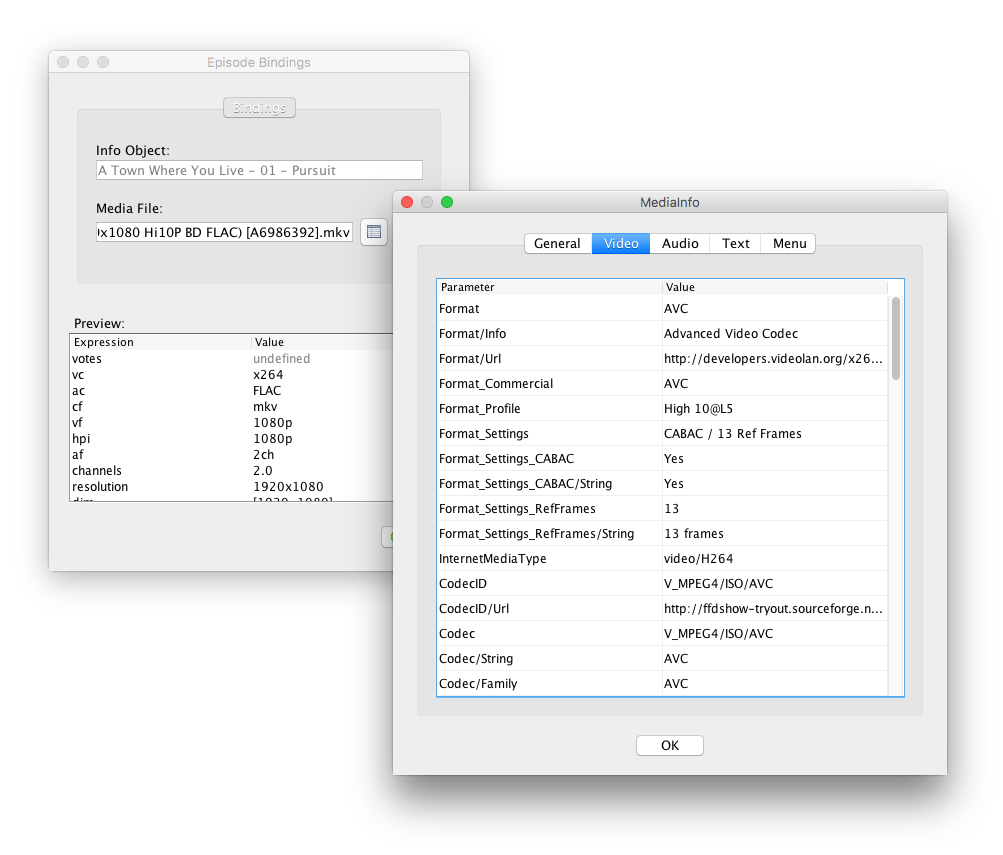
You may access arbitrary MediaInfo properties for any number of streams via the
{audio} top-level binding:
viewtopic.php?t=4285
e.g.
2.
ca81 wrote: 30 Aug 2020, 21:16
can someone please advise if I need to use ISO3B* or can I simply use ISO3
This largely depends on your preferences, and expectations of 3rd party programs that will be interpreting your file names. If you're using Plex, then ISO 639-2/B
(i.e. Language.ISO3B) is recommended. That being said, it generally doesn't matter, unless you're Dutch.
Re: Trouble with audio channels
Posted: 31 Aug 2020, 14:13
by kim
Look here:
viewtopic.php?f=5&t=5285&p=51634#p48827
you can use
but I do not recommend it as it can get very long, so maybe just use
btw:
Code: Select all
{audios.collect{it.channels} '-' {it.CodecFamily} '-' {it.language}.join(' + ')}
"FIX"
Code: Select all
{audio.collect{it.channels + '-' + it.Format + '-' + it.language}.join(' + ')}
Re: Trouble with audio channels
Posted: 01 Sep 2020, 03:45
by ca81
Thanks @rednoah / @kim for your kind suggestions.
After posting my code snippet yesterday, I have made some changes to the code as I realized that I need to get the information for only the 1st & 2nd Audio streams (only if 2nd audio stream is present) and not for any additional audio streams.
Updated code snippet below:
Code: Select all
{audioLanguages[0].ISO3.upper()}-{Channels}-{ac}
{audio.size() > 1 ? ' + ' : null}
{audio.size() > 1 ? audio[1].Language.upper() : null}
{audio.size() > 1 ? '-' : null}
{audio.size() > 1 ? audio[1].Channels : null}
{audio.size() > 1 ? '-' : null}
{audio.size() > 1 ? audio[1].Format : null},
to get the filename output as "JPN-2.0-Opus + EN-2-Opus"
I am testing this code with a media file for which the MediaInfo details are pasted below:
Audio #1
ID : 2
Format : Opus
Codec ID : A_OPUS
Duration : 24 min 29 s
Bit rate : 100 kb/s
Channel(s) : 2 channels
Channel layout : L R
Sampling rate : 48.0 kHz
Frame rate : 50.001 FPS (960 SPF)
Compression mode : Lossy
Delay relative to video : -7 ms
Stream size : 17.5 MiB (9%)
Title : Audio 1
Language : Japanese
Default : No
Forced : No
Audio #2
ID : 3
Format : Opus
Codec ID : A_OPUS
Duration : 24 min 28 s
Bit rate : 93.9 kb/s
Channel(s) : 2 channels
Channel layout : L R
Sampling rate : 48.0 kHz
Frame rate : 50.000 FPS (960 SPF)
Compression mode : Lossy
Delay relative to video : -7 ms
Stream size : 16.4 MiB (8%)
Title : Audio 2
Language : English
Default : Yes
Forced : No
Now the issues with the above code snippet:
- {audioLanguages[0].ISO3.upper()} works properly and gives me 'JPN' as the output but somehow if I use {audio[1].Language.ISO3.upper()} I get a blank output and ISO3 seems to work only when I use audioLanguages[1] and not audio[1].Language. Am I doing something wrong?
- {Channels} provides the output as '2.0' but if I use audio[0].Channels or audio[1].Channels then I get the output as '2'. Any suggestions on how I can get the full audio setup i.e. '2.0' in this case?
- As I am a noob at Groovy, I am using a crude multi-line code for the 'if' condition. If there any way to make it better?
thanks,
~kg
ps: I am using Plex but this part of the filename is not read by Plex as I've put it inside [square brackets]. I want this information in the filename mainly so that I can easily identify the important attributes of the media file without needing to open the file via MediaInfo...
Re: Trouble with audio channels
Posted: 01 Sep 2020, 04:11
by rednoah
1.
{audioLanguages} and
{channels} are top-level bindings that look at various raw MediaInfo properties from all streams to give you the structured information you likely want to see.
audioLanguages will give you structured
Language objects, as opposed to
audio.language which will give you
String objects.
Language objects have properties such as
Language.ISO3 while
String objects do not.
channels is inferred based on interpreting the
ChannelLayout properties of all streams. Replicating the code is possible but non-trivial.
2.
Keeping things simple, this will get you most of what you want with minimal effort:
Code: Select all
{
	audio.take(2).collect{ a -> allOf
		{ a.Language.upper() }
		{ a.Channels.replace(2:'2.0', 6:'5.1', 8:'7.1') }
		{ a.Format }
	}.join(' + ')
}
Result:
Re: Trouble with audio channels
Posted: 01 Sep 2020, 16:55
by kim
with Language_String3
Code: Select all
{
	audio.take(2).collect{ a -> allOf
		{ a.Language_String3.upper() }
		{ a.Channels.replace(2:'2.0', 6:'5.1', 8:'7.1') }
		{ a.Format }
	}.join(' + ')
}
Re: Trouble with audio channels
Posted: 01 Sep 2020, 18:33
by ca81
Many thanks @rednoah / @kim !!!
One small question to make this code ideal for me...
Code: Select all
{
	audio.take(2).collect{ a -> allOf
		{ a.Language_String3.upper() }
		{ a.Channels.replace(2:'2.0', 6:'5.1', 8:'7.1') }
		{ a.Format }
	}.join(' + ')
}
The output I get for my test file is [JPN, 2.0, Opus] + [ENG, 2.0, Opus].....in this output is it possible to replace the comma+space (, ) with a hyphen (-) and the [square brackets] with (round brackets) ???
thanks,
~kg
Re: Trouble with audio channels
Posted: 02 Sep 2020, 02:18
by rednoah
e.g.
Code: Select all
{
	audio.take(2).collect{ a -> allOf
		{ a.Language_String3.upper() }
		{ a.Channels.replace(2:'2.0', 6:'5.1', 8:'7.1') }
		{ a.Format }
	}*.joining('-', '(', ')').join(' + ')
}
Re: Trouble with audio channels
Posted: 02 Sep 2020, 04:19
by ca81
rednoah wrote: 02 Sep 2020, 02:18
e.g.
Code: Select all
{
	audio.take(2).collect{ a -> allOf
		{ a.Language_String3.upper() }
		{ a.Channels.replace(2:'2.0', 6:'5.1', 8:'7.1') }
		{ a.Format }
	}*.joining('-', '(', ')').join(' + ')
}
this is super awesome!!!
many thanks,
~kg
ps: Until this I did not realize join() and joining() were different...another small step for my Groovy learnings