Some questions regarding renaming

Any questions? Need some help?
Post Reply
justkidding
Posts: 38
Joined: 12 Oct 2015, 20:42

Some questions regarding renaming

Post by justkidding »

Hello,

I love Filebot and I am using it for a long time on my Synology NAS.
I would love to improve my renaming even more but I need some help for that.
At the moment I am using the following statement:

Code: Select all

/data/Movies/{az}/{collection}/{ny.UpperInitial()}/{n.upperInitial()} ({y})/{n.upperInitial()} ({y}) {fn.matchAll(/UHD|4K|MVC|framepacked|FSBS|HSBS|HOU|FOU/)} {source} {special} {tags} {vf} {vc} {hdr} {s3d} {aco} {channels} {audioLanguages} {subt}
I've deleted the seriesformat as it makes it easier to read and my questions only concern movies.

1.) I would like to integrate the dynamic localization binding ({localize[languages.first()].n : n}). But I still want to use the upperInitial()-Statement as well as the year. How would I do this?
2.) The {hdr}-Tag is working fine but I would like that all movies that are not hdr are tagged sdr. I already tried {any{hdr}{'SDR}} (gives only HDR if movie is HDR and nothing if movie is not HDR) and any{hdr}{'SDR'} (gives anyHDR if movie is HDR and any if movie is not HDR).
3.) The bindings {aco} and {channels} always give the information of the first audio stream found but I would like to get the information of the audio stream with the best quality found. Is this possible?
For example if I have a movie with the following audio streams
1.) German DTS-HD 5.1
2.) English Dolby TrueHD 7.1 Atmos
the two bindings give me "DTS-HD Master Audio 5.1" but I want "TrueHD+Atmos 7.1" as this is the best quality audio stream.

Your help is really appreciated.

Best regards,
justkidding
User avatar
rednoah
The Source
Posts: 24672
Joined: 16 Nov 2011, 08:59
Location: Taipei
Contact:

Re: Some questions regarding renaming

Post by rednoah »

1.
String.upperInitial() works for any String object:

Code: Select all

any{localize[languages[0]].ny}{ny}.upperInitial()

2.
This snippet is simple enough, so it can't not work, so if it indeed doesn't work, there's something else going on, on a higher level, making use not do what we think we're doing:

Code: Select all

any{hdr}{'SDR'}

3.
You can use {audio} to access all raw audio properties for all audio streams, but you'll have to figure out how to define "best quality" numerically in your code, to find the "best audio stream" according to your definition:
viewtopic.php?t=4285

e.g. find audio stream with the highest number of channels:

Code: Select all

{
	def a = audio.max{ it.Channels as int }
	a.Channels + 'ch.' + a.Format
}
:idea: Please read the FAQ and How to Request Help.
justkidding
Posts: 38
Joined: 12 Oct 2015, 20:42

Re: Some questions regarding renaming

Post by justkidding »

I guess I have a general problem with the statement "any".
If I do "any{localize[languages[0]].ny}{ny}.upperInitial()" or "any{hdr}{'SDR'}" it always adds the word "any" to the filename.
What could cause that?
That's my statement at the moment:
'movieFormat=/data/Movies/{az}/{collection}/{ny.UpperInitial()}/{n.upperInitial()} ({y})/any{localize[languages[0]].ny}{ny}.upperInitial() ({y}) {fn.matchAll(/UHD|4K|MVC|framepacked|FSBS|HSBS|HOU|FOU/)} {source} {special} {tags} {vf} {vc} any{hdr}{'SDR'} {s3d} {aco} {channels} {audioLanguages} {subt}'
as a result it gives the following file name:
anyGuardians of the Galaxy Vol. 2 (2017).upperInitial() [UHD, 4K] BluRay 2160p HEVC anyHDR DTS-HD High Resolution Audio 5.1 [deu, eng]
Is {localize[languages[0]]} the same as {localize[languages.first()].n}?
Or would it be "{localize[languages.first()].ny : ny}.upperInitial()" respectively "{localize[languages.first()].ny : ny}.upperInitial()"?

Regarding point 3.)
On the NAS in Filebot Node I do not find this option
:idea: Open FileBot Image ➔ Edit Format Image ➔ Change Sample Image ➔ Open MediaInfo Image
to check what possibilities I have with media info. Is it only possible with Windows?
Do i have to do the defining variable inside the movieFormat-statement or separately before the call of filebot?
For example can I just do it like this:
'movieFormat=/data/Movies/{az}/{collection}/{ny.UpperInitial()}/{n.upperInitial()} ({y})/any{localize[languages[0]].ny}{ny}.upperInitial() ({y}) {fn.matchAll(/UHD|4K|MVC|framepacked|FSBS|HSBS|HOU|FOU/)} {source} {special} {tags} {vf} {vc} any{hdr}{'SDR'} {s3d} {aco} {channels} {audioLanguages} {subt} {def a = audio.max{ it.Channels as int } a.Channels + 'ch.' + a.Format}'
Sorry, I don't get this yet.
User avatar
rednoah
The Source
Posts: 24672
Joined: 16 Nov 2011, 08:59
Location: Taipei
Contact:

Re: Some questions regarding renaming

Post by rednoah »

1.
This is a Groovy snippet:

Code: Select all

any{hdr}{'SDR'}
* This is Groovy code.

This is how you write a Format Expression that executes a given Groovy snippet:

Code: Select all

{ any{hdr}{'SDR'} }
* This is not Groovy code. The outermost {...} are interpreted away the by the Format engine.

:idea: any is just another function, just like upperInitial is just another method.


3.
You'll want to prototype your format with the FileBot Desktop application:
https://www.filebot.net/naming.html

:idea: Once you're happy with your format expression, and have sufficiently tested it on your Desktop, then and only then, would you copy & paste the format into FileBot Node. Prototyping a new format within FileBot Node would be unnecessarily difficult.
:idea: Please read the FAQ and How to Request Help.
justkidding
Posts: 38
Joined: 12 Oct 2015, 20:42

Re: Some questions regarding renaming

Post by justkidding »

Okay, understood.
I will use the desktop application to check if everything is working there.
But where do I do the defining of the variable? Where in my statement do I have to put this snippet

Code: Select all

{
	def a = audio.max{ it.Channels as int }
	a.Channels + 'ch.' + a.Format
} 
?

Can you please check if the expression {audio.Format_AdditionalFeatures} is working correctly?
Media Info gives me the following information:
Format_AdditionalFeatures XLL X
but the name of the file does not contain "XLL X". Instead it contains nothing.
According to https://github.com/MediaArea/MediaInfo/issues/286 the information "Format_AdditionalFeatures" should be used to distinguish between DTS, DTS:X as well as TrueHD with Atmos and just TrueHD.
I am just testing with this statement

Code: Select all

{ any{localize[languages[0]].ny}{ny}.upperInitial() } {audio.Format_AdditionalFeatures} {audio.language}
in the desktop application.
User avatar
rednoah
The Source
Posts: 24672
Joined: 16 Nov 2011, 08:59
Location: Taipei
Contact:

Re: Some questions regarding renaming

Post by rednoah »

1.
{...} is evaluated, and yields a value. Where do you want that value to be? You decide. That's where you put the {...} in the format.

Image


2.
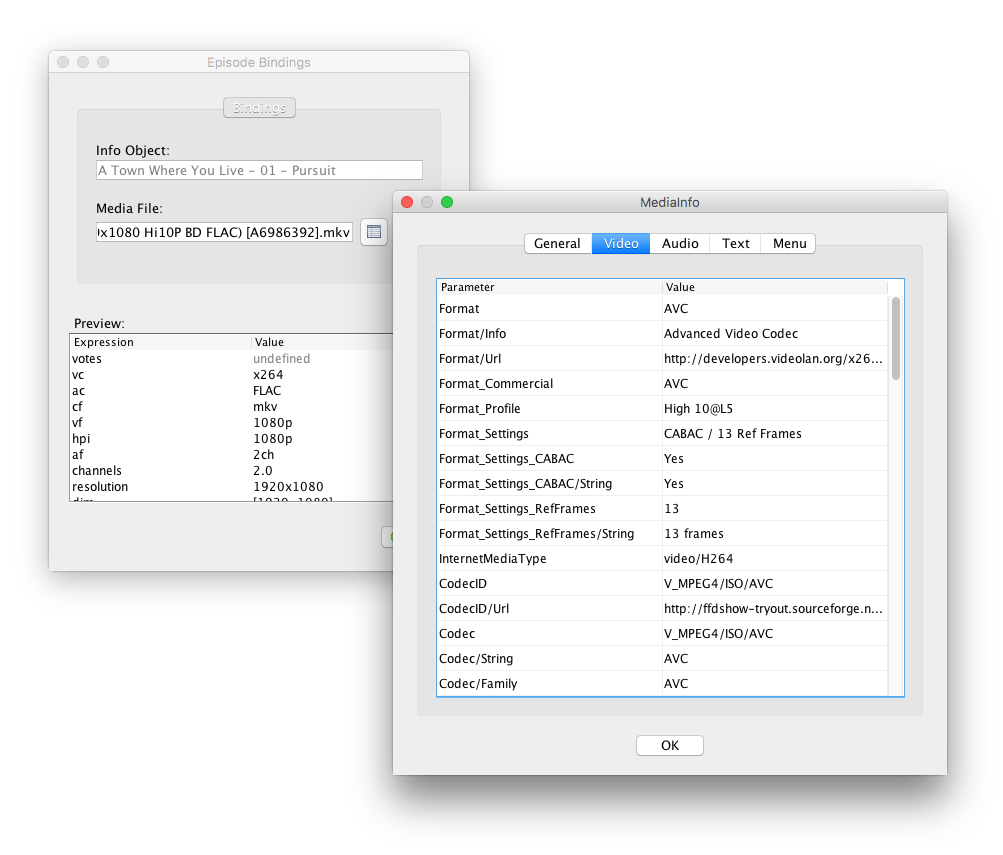
I've tried with one sample file at hand though, and {audio[0].FormatAdditionalFeatures} yields LC. Note that not all properties are going to be available for all files. Each file is different.

Please use the MediaInfo Inspector to inspect which properties are available for given file:
viewtopic.php?t=4285

Image
:idea: Please read the FAQ and How to Request Help.
justkidding
Posts: 38
Joined: 12 Oct 2015, 20:42

Re: Some questions regarding renaming

Post by justkidding »

I've used the desktop application for testing now.
With this I've build the following expression which works great:

Code: Select all

{az}/{collection}/{any{localize[languages[0]].n} {n}.upperInitial() } ({y})/{any{localize[languages[0]].ny}{ny}.upperInitial() } {tags} {source} {vc} {vf} { any{hdr}{'SDR'} }  
{ def bestaudio = audio.max{ it.Channels as int } 
  bestaudio.Format_additionalfeatures + ' ' + bestaudio.language + ' ' 
} 
{ audio.groupBy{ it.Language }.collect{ k, v-> v.size() > 1 ? v.size() + k : k } } 
{fn.matchAll(/UHD|4K|MVC|framepacked/)} {s3d} {subt}
Now I am trying to transfer this statement to my Synology NAS.
On the NAS I am using a .sh script.
My script looks like this now:

Code: Select all

/volume1/@appstore/filebot/filebot.sh -script 'fn:amc' --action 'test' '/volume1/data' --output /volume1/03_Filme -non-strict --conflict auto --lang en --def 'seriesFormat=/volume1/03_Filme/02 Serien/{az}/{n}/{episode.special ? '\''Special'\'' : '\''Staffel '\''+s}/{n} - {episode.special ? '\''S00E'\''+special.pad(2) : s00e00} - {t} {vf} { any{hdr}{'SDR'} } {aco} {channels} {audioLanguages} {subt}' 'movieFormat=/volume1/03_Filme/01 Movies/{az}/{collection}/{any{localize[languages[0]].n} {n}.upperInitial() } ({y})/{any{localize[languages[0]].ny}{ny}.upperInitial() } {tags} {source} {vc} {vf} { any{hdr}{'SDR'} }  
{ def bestaudio = audio.max{ it.Channels as int } 
  bestaudio.Format_AdditionalFeatures + ' ' + bestaudio.language + ' ' 
} 
{ audio.groupBy{ it.Language }.collect{ k, v-> v.size() > 1 ? v.size() + k : k } } 
{fn.matchAll(/UHD|4K|MVC|framepacked/)} {s3d} {subt}' 'skipExtract=y' 'subtitles=ger'  'excludeList=.excludes' --log info --log-file '/volume1/03_Filme/Filebotlogs/filebot.log'
It gives me the following error:

Code: Select all

Illegal Argument: java.nio.file.NoSuchFileException: /usr/syno/synoman/webapi/ + bestaudio.language +  ( + bestaudio.language + )
Illegal Argument: java.nio.file.NoSuchFileException: /usr/syno/synoman/webapi/ 
} 
{ audio.groupBy{ it.Language }.collect{ k, v-> v.size() > 1 ? v.size() + k : k } } 
{fn.matchAll(/UHD|4K|MVC|framepacked/)} {s3d} {subt} ( 
} 
{ audio.groupBy{ it.Language }.collect{ k, v-> v.size() > 1 ? v.size() + k : k } } 
{fn.matchAll(/UHD|4K|MVC|framepacked/)} {s3d} {subt})
Illegal Argument: java.nio.file.NoSuchFileException: /usr/syno/synoman/webapi/skipExtract=y (skipExtract=y)
Illegal Argument: java.nio.file.NoSuchFileException: /usr/syno/synoman/webapi/subtitles=ger (subtitles=ger)
Illegal Argument: java.nio.file.NoSuchFileException: /usr/syno/synoman/webapi/excludeList=.excludes (excludeList=.excludes)
Argument[1]: File does not exist:  + bestaudio.language + 
Argument[2]: File does not exist:  
} 
{ audio.groupBy{ it.Language }.collect{ k, v-> v.size() > 1 ? v.size() + k : k } } 
{fn.matchAll(/UHD|4K|MVC|framepacked/)} {s3d} {subt}
Argument[3]: File does not exist: skipExtract=y
Argument[4]: File does not exist: subtitles=ger
Argument[5]: File does not exist: excludeList=.excludes
ScriptException: SyntaxError: missing token: }
Finished without processing any files 
I guess it is because the script cannot handle the new lines / spaces. But if I write everything in one line I get this error:

Code: Select all

Illegal Argument: java.nio.file.NoSuchFileException: /usr/syno/synoman/webapi/ + bestaudio.language +  ( + bestaudio.language + )
Illegal Argument: java.nio.file.NoSuchFileException: /usr/syno/synoman/webapi/ } { audio.groupBy{ it.Language }.collect{ k, v-> v.size() > 1 ? v.size() + k : k } } {fn.matchAll(/UHD|4K|MVC|framepacked/)} {s3d} {subt} ( } { audio.groupBy{ it.Language }.collect{ k, v-> v.size() > 1 ? v.size() + k : k } } {fn.matchAll(/UHD|4K|MVC|framepacked/)} {s3d} {subt})
Illegal Argument: java.nio.file.NoSuchFileException: /usr/syno/synoman/webapi/skipExtract=y (skipExtract=y)
Illegal Argument: java.nio.file.NoSuchFileException: /usr/syno/synoman/webapi/subtitles=ger (subtitles=ger)
Illegal Argument: java.nio.file.NoSuchFileException: /usr/syno/synoman/webapi/excludeList=.excludes (excludeList=.excludes)
Argument[1]: File does not exist:  + bestaudio.language + 
Argument[2]: File does not exist:  } { audio.groupBy{ it.Language }.collect{ k, v-> v.size() > 1 ? v.size() + k : k } } {fn.matchAll(/UHD|4K|MVC|framepacked/)} {s3d} {subt}
Argument[3]: File does not exist: skipExtract=y
Argument[4]: File does not exist: subtitles=ger
Argument[5]: File does not exist: excludeList=.excludes
ScriptException: SyntaxError: missing token: }
Finished without processing any files
Are there differences in the syntax between windows and Linux?
User avatar
rednoah
The Source
Posts: 24672
Joined: 16 Nov 2011, 08:59
Location: Taipei
Contact:

Re: Some questions regarding renaming

Post by rednoah »

What happens if you use '...' to escape an argument value, but then also use '...' inside that argument value? Yes, that's what happens. The shell will pass complete gibberish on to filebot which is then rightly confused.


:arrow: Please read Cmdline and Argument Passing for details.


:idea: Use the @file syntax for reading command-line arguments from external text files so you don't have to worry about any of that. ;)
:idea: Please read the FAQ and How to Request Help.
justkidding
Posts: 38
Joined: 12 Oct 2015, 20:42

Re: Some questions regarding renaming

Post by justkidding »

@file_syntax is awesome - it really helped and solved some of my problems.
For example any{HDR}{'SDR'} is working now :D.
But I am still struggling with this part

Code: Select all

 { def bestaudio = audio.max{ it.Channels as int } 
  bestaudio.Format_AdditionalFeatures + ' ' + bestaudio.language + ' ' }  
Inside my argument file I now have the following format:

Code: Select all

 movieFormat=/volume1/03_Filme/01 Movies/{az}/{collection}/{any{localize[languages[0]].n} {n}.upperInitial() } ({y})/{any{localize[languages[0]].ny}{ny}.upperInitial() } {tags} {source} {vc} {vf} { any{hdr}{'SDR'} } 
{ 
 def bestaudio = audio.max{ it.Channels as int }
 bestaudio.Format_AdditionalFeatures + ' ' + bestaudio.language + ' ' 
} { audio.groupBy{ it.Language }.collect{ k, v-> v.size() > 1 ? v.size() + k : k } } {fn.matchAll(/UHD|4K|MVC|framepacked/)} {s3d} {subt}
Unfortunately, I am still getting the error:

Code: Select all

Illegal Argument: java.nio.file.NoSuchFileException: /usr/syno/synoman/webapi/{  ({ )
Illegal Argument: java.nio.file.NoSuchFileException: /usr/syno/synoman/webapi/ def bestaudio = audio.max{ it.Channels as int } ( def bestaudio = audio.max{ it.Channels as int })
Illegal Argument: java.nio.file.NoSuchFileException: /usr/syno/synoman/webapi/ bestaudio.Format_AdditionalFeatures + ' ' + bestaudio.language + ' '  ( bestaudio.Format_AdditionalFeatures + ' ' + bestaudio.language + ' ' )
Illegal Argument: java.nio.file.NoSuchFileException: /usr/syno/synoman/webapi/} { audio.groupBy{ it.Language }.collect{ k, v-> v.size() > 1 ? v.size() + k : k } } {fn.matchAll(/UHD|4K|MVC|framepacked/)} {s3d} {subt} (} { audio.groupBy{ it.Language }.collect{ k, v-> v.size() > 1 ? v.size() + k : k } } {fn.matchAll(/UHD|4K|MVC|framepacked/)} {s3d} {subt})
Illegal Argument: java.nio.file.NoSuchFileException: /usr/syno/synoman/webapi/skipExtract=y (skipExtract=y)
Illegal Argument: java.nio.file.NoSuchFileException: /usr/syno/synoman/webapi/subtitles=ger (subtitles=ger)
Illegal Argument: java.nio.file.NoSuchFileException: /usr/syno/synoman/webapi/excludeList=.excludes (excludeList=.excludes)
Argument[1]: File does not exist: { 
Argument[2]: File does not exist:  def bestaudio = audio.max{ it.Channels as int }
Argument[3]: File does not exist:  bestaudio.Format_AdditionalFeatures + ' ' + bestaudio.language + ' ' 
Argument[4]: File does not exist: } { audio.groupBy{ it.Language }.collect{ k, v-> v.size() > 1 ? v.size() + k : k } } {fn.matchAll(/UHD|4K|MVC|framepacked/)} {s3d} {subt}
Argument[5]: File does not exist: skipExtract=y
Argument[6]: File does not exist: subtitles=ger
Argument[7]: File does not exist: excludeList=.excludes
When I test the same statement with the desktop application I get:

A/Avatar Collection/Avatar (2009)/Avatar (2009) BluRay HEVC 2160p HDR 16-ch en [de, en] [UHD, 4K]

My .sh-script looks like this now:

Code: Select all

/volume1/@appstore/filebot/filebot.sh -script 'fn:amc' --action 'test' '/volume1/data' --output /volume1/03_Filme -non-strict --conflict auto --lang en --def '@/volume1/03_Filme/Sorting Scripts/filebotargs.txt' 'skipExtract=y' 'subtitles=ger'  'excludeList=.excludes' --log info --log-file '/volume1/03_Filme/Filebotlogs/filebot.log' 
User avatar
rednoah
The Source
Posts: 24672
Joined: 16 Nov 2011, 08:59
Location: Taipei
Contact:

Re: Some questions regarding renaming

Post by rednoah »

1. Open the FileBot Format Editor GUI and copy & paste your format.
2. Create a new text file MovieFormat.groovy and paste your format.
3. Use --def movieFormat=@/path/to/MovieFormat.groovy in your filebot call

:idea: --def name=@file syntax allows you to read a single script parameter from a text file.


:!: You are using @args syntax for arguments and not binding value, where arguments are read from a text file line by line:

Code: Select all

movieFormat=/volume1/03_Filme/01 Movies/{az}/{collection}/{any{localize[languages[0]].n} {n}.upperInitial() } ({y})/{any{localize[languages[0]].ny {ny}.upperInitial() } {tags} {source} {vc} {vf} { any{hdr}{'SDR'} }
The --def name=value sequence ends here. The rest is interpreted as input arguments, which is self-evident in the numerous console errors:

Code: Select all

{ 

Code: Select all

 def bestaudio = audio.max{ it.Channels as int }

Code: Select all

 bestaudio.Format_AdditionalFeatures + ' ' + bestaudio.language + ' ' 

Code: Select all

} { audio.groupBy{ it.Language }.collect{ k, v-> v.size() > 1 ? v.size() + k : k } } {fn.matchAll(/UHD|4K|MVC|framepacked/)} {s3d} {subt}
The errors look the same as before when you didn't use '...' correctly because both mistakes lead to random Groovy code being being passed in as input file arguments. If you use ' as separator you can't use ' in the value, if you use newline as separator, you can't use newline in the value, etc. ;)
:idea: Please read the FAQ and How to Request Help.
justkidding
Posts: 38
Joined: 12 Oct 2015, 20:42

Re: Some questions regarding renaming

Post by justkidding »

Thank you! The movieformat.groovy file works just fine :).
Is there a list what functions I can call inside the def-expression (instead of .max)?
For example I want to try to find the information of the german audio line with the most channels.
Is this also possible?
User avatar
rednoah
The Source
Posts: 24672
Joined: 16 Nov 2011, 08:59
Location: Taipei
Contact:

Re: Some questions regarding renaming

Post by rednoah »

Yes, the entire Java/Groovy runtime is at your disposal, but the docs are so complete that you will most likely find them completely useless for your specific use case. :lol:

:arrow: Iterable.max()
:arrow: Iterable.findAll()


:idea: You will probably find a general Groovy beginners tutorial more helpful than the complete technical documentation: https://docs.groovy-lang.org/next/html/ ... tions.html
:idea: Please read the FAQ and How to Request Help.
kim
Power User
Posts: 1251
Joined: 15 May 2014, 16:17

Re: Some questions regarding renaming

Post by kim »

justkidding wrote: 01 Mar 2020, 19:29 For example I want to try to find the information of the german audio line with the most channels.
Is this also possible?
I modified my code for you ;)
viewtopic.php?f=5&t=5285&p=48761#p48761
justkidding
Posts: 38
Joined: 12 Oct 2015, 20:42

Re: Some questions regarding renaming

Post by justkidding »

@rednoah thanks, this is quite some stuff to understand if you are not familiar with such things :D
@kim Wow, this looks awesome. Thank you so much. I will try as soon as I get home.
User avatar
rednoah
The Source
Posts: 24672
Joined: 16 Nov 2011, 08:59
Location: Taipei
Contact:

Re: Some questions regarding renaming

Post by rednoah »

Yes, indeed. FileBot is built on a massive general-purpose platform, so you can do absolutely anything, which makes it difficult to come up with a finite list of things that a FileBot users might be interested in.

So it's better to ask "I want to do this, how do I do it?" and then learn by example and get a feel for how things work.
:idea: Please read the FAQ and How to Request Help.
justkidding
Posts: 38
Joined: 12 Oct 2015, 20:42

Re: Some questions regarding renaming

Post by justkidding »

@rednoah I absolutely understand that. And the support from you and the other members is outstanding :).
@kim Your coding is really great. The end of my coding looks like this now.

Code: Select all

 	
	def allStreams = audioStreams.collect{ filter(it) }*.minus(null).unique()*.join(' ')
	def preferredStream = oneStream(audioStreams.findAll{ it.index == audioStreams.index.max() })
	def bestBitRate = oneStream(audioStreams.findAll{ it.bitrate == audioStreams.bitrate.max() })
	def defaultStream = oneStream(audioStreams.findAll{it.default == true})
	def bestPreferredGer = any{audioStreams.findAll{it.lang == preferredGer }.sort{it.bitrate <=> it.bitrate}.collect{ filter(it) }*.minus(null).unique().get(0).join(' ')}{null}
	def bestPreferredEng = any{audioStreams.findAll{it.lang == preferredEng }.sort{it.bitrate <=> it.bitrate}.collect{ filter(it) }*.minus(null).unique().get(0).join(' ')}{null}
	
	[bestBitRate, preferredStream, bestPreferredEng, bestPreferredGer ].unique().join(' ').space(' ')

Everything is working great. I have only one small issue. If a file has no german audio line for example it writes the value "null". How can I avoid this? If there is no such line it should just write nothing.
At the moment I get this for example:

Code: Select all

KOR TrueHD ATMOS 7 1 [11 Objs] null DEU DTS-HD MA 5 1
kim
Power User
Posts: 1251
Joined: 15 May 2014, 16:17

Re: Some questions regarding renaming

Post by kim »

Was the lang code "Deu" and not "Ger"? you need to change that part

Code: Select all

any{SOMETHING}{null}
Replace

Code: Select all

{null}
with e.g.

Code: Select all

{'nothing'}
= any{if NOT null use this}{use if first fail}

OR I used

Code: Select all

{defaultStream}
btw: edit this if you don't want some of the info

Code: Select all

def filter = { [it.codec, it.ch, it.objects, it.lang] }
EDIT: bug fix

Code: Select all

.sort{it.bitrate}.reverse()
OR

Code: Select all

.sort{a, b -> b.bitrate <=> a.bitrate}
justkidding
Posts: 38
Joined: 12 Oct 2015, 20:42

Re: Some questions regarding renaming

Post by justkidding »

kim wrote: 02 Mar 2020, 20:11 Was the lang code "Deu" and not "Ger"? you need to change that part


Yeah, the language code for German is "deu". I already changed it :). Maybe this is dependent on the installation of media info. I don't know.
kim wrote: 02 Mar 2020, 20:11

Code: Select all

any{SOMETHING}{null}
Replace

Code: Select all

{null}
with e.g.

Code: Select all

{'nothing'}
= any{if NOT null use this}{use if first fail}

OR I used

Code: Select all

{defaultStream}

Thank you - that's perfect. I just added {preferred Stream}.
kim wrote: 02 Mar 2020, 20:11 btw: edit this if you don't want some of the info

Code: Select all

def filter = { [it.codec, it.ch, it.objects, it.lang] }

Already did :)
kim wrote: 02 Mar 2020, 20:11 EDIT: bug fix

Code: Select all

.sort{it.bitrate}.reverse()
OR

Code: Select all

.sort{a, b -> b.bitrate <=> a.bitrate}
Thank you I will adapt it.

@rednoah is it possible to use filebot also for renaming jpg or png files?
In my scraped movie folders at the moment I have something like this:

Avatar (2009) Bluray 6ch.mkv
Avatar (2009) Bluray 6ch-fanart.jpg

Now I want to rename my movie files with the new script. Is it possible to rename the jpg-files with the same name but keeping the part which is behind the -? So an optimal result would be for example

Avatar (2009) Bluray 1080p HDR DEU Atmos.mkv
Avatar (2009) Bluray 1080p HDR DEU Atmos-fanart.jpg
User avatar
rednoah
The Source
Posts: 24672
Joined: 16 Nov 2011, 08:59
Location: Taipei
Contact:

Re: Some questions regarding renaming

Post by rednoah »

Yes, companion files (with the same name) are matched to the same movie object automatically and so things should work as expected out of the box.


:idea: Note that the amc script explicitly ignores non-video files. So while the answer above generally applies to GUI and CLI usage, it does not for the amc script specifically.
:idea: Please read the FAQ and How to Request Help.
kim
Power User
Posts: 1251
Joined: 15 May 2014, 16:17

Re: Some questions regarding renaming

Post by kim »

you can use something like this:

Code: Select all

{ext = 'jpg' ? '-' + fn.match(/fanart|otherword/) : ''}
justkidding
Posts: 38
Joined: 12 Oct 2015, 20:42

Re: Some questions regarding renaming

Post by justkidding »

@rednoah in the gui without doing anything I loose the "-fanart"
8 Mile (2002) 1080P X264 AAC Tt0298203-fanart.jpg
becomes to
8 Mile (2002) x264 1080p SDR.jpg

@Kim
I've included your bug fix (hope it's correct)

Code: Select all

 	def bestPreferredGer = any{audioStreams.findAll{it.lang == preferredGer }.sort{a, b -> b.bitrate <=> a.bitrate}.collect{ filter(it) }*.minus(null).unique().get(0).join(' ')}{defaultStream} 
Your statement for the .jpg-files is working quite good.
I just have the problem that it adds a space before the "-".
As a result I get
8 Mile (2002) x264 1080p SDR -fanart.jpg
How can I change it to
8 Mile (2002) x264 1080p SDR-fanart.jpg
?
I think it's because for at least one part expression it doesn't find a value.
Because if I do something like

Code: Select all

 {ny.upperInitial()} {tags}{fn.match(/-fanart|-banner|-clearart|-clearlogo|-discart|-landscape|-poster/)} 
it adds a space before the "-fanart".

Also I have a problem with one of my video files in finding the audio languages using your script. It's a .mp4-file if that matters.
MediaInfo gives me the following information for the audio line:

Code: Select all

Format	AAC
Format/String	AAC LC
Format/Info	Advanced Audio Codec Low Complexity
Format_Commercial	AAC
Format_Settings_SBR	No (Explicit)
Format_Settings_SBR/String	No (Explicit)
Format_AdditionalFeatures	LC
CodecID	mp4a-40-2
Duration	6627775
Duration/String	1 h 50 min
Duration/String1	1 h 50 min 27 s 775 ms
Duration/String2	1 h 50 min
Duration/String3	01:50:27.775
Duration/String4	01:50:10:07
Duration/String5	01:50:27.775 (01:50:10:07)
BitRate_Mode	VBR
BitRate_Mode/String	Variable
BitRate	325576
BitRate/String	326 kb/s
BitRate_Maximum	338312
BitRate_Maximum/String	338 kb/s
Channel(s)	6
Channel(s)/String	6 channels
ChannelPositions	Front: L C R, Side: L R, LFE
ChannelPositions/String2	3/2/0.1
ChannelLayout	C L R Ls Rs LFE
SamplesPerFrame	1024
SamplingRate	48000
SamplingRate/String	48.0 kHz
FrameRate	46.875
FrameRate/String	46.875 FPS (1024 SPF)
Compression_Mode	Lossy
Compression_Mode/String	Lossy
StreamSize	269732358
StreamSize/String	257 MiB (9%)
StreamSize/String1	257 MiB
StreamSize/String2	257 MiB
StreamSize/String3	257 MiB
StreamSize/String4	257.2 MiB
StreamSize/String5	257 MiB (9%)
StreamSize_Proportion	0.09182
Language	en
Language/String	English
Language/String1	English
Language/String2	en
Language/String3	eng
Language/String4	en
Encoded_Date	UTC 2014-10-12 23:50:05
Tagged_Date	UTC 2014-10-13 22:41:53
Do you see where the issue could be?
Last edited by justkidding on 03 Mar 2020, 18:45, edited 2 times in total.
User avatar
rednoah
The Source
Posts: 24672
Joined: 16 Nov 2011, 08:59
Location: Taipei
Contact:

Re: Some questions regarding renaming

Post by rednoah »

justkidding wrote: 03 Mar 2020, 17:10 @rednoah in the gui without doing anything I loose the "-fanart"
8 Mile (2002) 1080P X264 AAC Tt0298203-fanart.jpg
becomes to
8 Mile (2002) x264 1080p SDR.jpg
Yes, it'll work exactly the same as for the corresponding video file. If you want to carry over specific patterns from the original file, then you can do that via your custom format, as always, same as for video files. ;)

e.g.

Code: Select all

{fn.match(/-fanart/)}
:idea: This will add -fanart if {fn} contains -fanart, which presumably applies only to your artwork files.


You can of course expand on this as suggested by @kim in his post above:
kim wrote: 03 Mar 2020, 15:22 you can use something like this:

Code: Select all

{ext = 'jpg' ? '-' + fn.match(/fanart|otherword/) : ''}
:idea: Please read the FAQ and How to Request Help.
justkidding
Posts: 38
Joined: 12 Oct 2015, 20:42

Re: Some questions regarding renaming

Post by justkidding »

Now I get it :).
When using the GUI is there a way to change the minimum duration for video files?
I know for scripts there is --def minLengthMS=0 but I don't find any option is the windows app?
kim
Power User
Posts: 1251
Joined: 15 May 2014, 16:17

Re: Some questions regarding renaming

Post by kim »

" problem that it adds a space before the "-". "

do you use this ?

Code: Select all

/data/Movies/{az}/{collection}/{ny.UpperInitial()}/{n.upperInitial()} ({y})/{n.upperInitial()} ({y}) {fn.matchAll(/UHD|4K|MVC|framepacked|FSBS|HSBS|HOU|FOU/)} {source} {special} {tags} {vf} {vc} {hdr} {s3d} {aco} {channels} {audioLanguages} {subt}
the problem is the spaces between {}'s "{a} {b} {c}"
fix = {' '+a}... now only a space if a is not empty

so like this:

Code: Select all

/data/Movies/{az}{'/'+collection}{'/'+ny.upperInitial()}{'/'+n.upperInitial()}{' ('+y+')'}/{n.upperInitial()}{' ('+y+')'}{' '+fn.matchAll(/UHD|4K|MVC|framepacked|FSBS|HSBS|HOU|FOU/)}{' '+source}{' '+special}{' '+tags}{' '+vf}{' '+vc}{' '+hdr}{' '+s3d}{' '+aco}{' '+channels}{' '+audioLanguages}{' '+subt}

Code: Select all

{ext = 'jpg' ? fn.match(/((?:-)(?:fanart|banner|clearart|clearlogo|discart|landscape|poster)$)/) : ''}
"Also I have a problem with one of my video files in finding the audio languages using your script"
I dont see a problem
try only my format in the GUI... what is output ?
viewtopic.php?f=5&t=5285&p=48761#p48761
justkidding
Posts: 38
Joined: 12 Oct 2015, 20:42

Re: Some questions regarding renaming

Post by justkidding »

kim wrote: 03 Mar 2020, 21:10 " problem that it adds a space before the "-". "

do you use this ?

Code: Select all

/data/Movies/{az}/{collection}/{ny.UpperInitial()}/{n.upperInitial()} ({y})/{n.upperInitial()} ({y}) {fn.matchAll(/UHD|4K|MVC|framepacked|FSBS|HSBS|HOU|FOU/)} {source} {special} {tags} {vf} {vc} {hdr} {s3d} {aco} {channels} {audioLanguages} {subt}
the problem is the spaces between {}'s "{a} {b} {c}"
fix = {' '+a}... now only a space if a is not empty

so like this:

Code: Select all

/data/Movies/{az}{'/'+collection}{'/'+ny.upperInitial()}{'/'+n.upperInitial()}{' ('+y+')'}/{n.upperInitial()}{' ('+y+')'}{' '+fn.matchAll(/UHD|4K|MVC|framepacked|FSBS|HSBS|HOU|FOU/)}{' '+source}{' '+special}{' '+tags}{' '+vf}{' '+vc}{' '+hdr}{' '+s3d}{' '+aco}{' '+channels}{' '+audioLanguages}{' '+subt}
Awesome, thank you!
kim wrote: 03 Mar 2020, 21:10 "Also I have a problem with one of my video files in finding the audio languages using your script"
I dont see a problem
try only my format in the GUI... what is output ?
viewtopic.php?f=5&t=5285&p=48761#p48761
I get this:
[Expression yields empty value: Binding "default": undefined] 8 Mile (2002)
I found some other files were I have the same problem. For these I get the same message.

For one file, which is an .iso I get following error:
[Expression yields empty value: Binding "audio": java.lang.NullPointerException] The BFG (2016)
kim
Power User
Posts: 1251
Joined: 15 May 2014, 16:17

Re: Some questions regarding renaming

Post by kim »

output from ?

Code: Select all

{audio.default}
justkidding
Posts: 38
Joined: 12 Oct 2015, 20:42

Re: Some questions regarding renaming

Post by justkidding »

It gives exactly the same result
So:
[Expression yields empty value: Binding "default": undefined] 8 Mile (2002)

respectively

[Expression yields empty value: Binding "audio": java.lang.NullPointerException] The BFG (2016)
For BFG I realised there is not even an Audio Tab in Mediainfo.
I tested with another .iso with the same result. Is it possible that Mediainfo is not working with .isos at all?

Edit:
Yeah, that seems to be the case
https://mediaarea.net/Vote/Mediainfo-Is ... upport-123
So, I guess that's not possible to fix for you :) But maybe the other issue?
User avatar
rednoah
The Source
Posts: 24672
Joined: 16 Nov 2011, 08:59
Location: Taipei
Contact:

Re: Some questions regarding renaming

Post by rednoah »

ISO files are containers like ZIP archives. It's not a media file, so MediaInfo can't read media information.


:idea: FileBot can help you batch-extract all your ISO archives. This allows FileBot / MediaInfo to work because FileBot will handle disk folders as a single unit and MediaInfo bindings will be based on first video file within the disk folder.
:idea: Please read the FAQ and How to Request Help.
justkidding
Posts: 38
Joined: 12 Oct 2015, 20:42

Re: Some questions regarding renaming

Post by justkidding »

Can you give me a hint how to extract them with filebot?
But when I extract them will I loose the menu of the bluray?
This is the reason why I have some .isos in the first place.
User avatar
rednoah
The Source
Posts: 24672
Joined: 16 Nov 2011, 08:59
Location: Taipei
Contact:

Re: Some questions regarding renaming

Post by rednoah »

justkidding wrote: 04 Mar 2020, 07:11 Can you give me a hint how to extract them with filebot?
:arrow: Filter ➔ Archives ➔ Extract All

justkidding wrote: 04 Mar 2020, 07:11 But when I extract them will I loose the menu of the bluray?
Do you loose files when you extract ZIP / RAR / ISO / etc archives? No! ;)
:idea: Please read the FAQ and How to Request Help.
justkidding
Posts: 38
Joined: 12 Oct 2015, 20:42

Re: Some questions regarding renaming

Post by justkidding »

Of course I don't loose files ;)
What I meant is I loose the menu structure.
When you open an .iso-file you get into the Bluray menu from which you can select certain chapters, specials like interviews and so on.
If you extract the .iso you can't see which file is what.
User avatar
rednoah
The Source
Posts: 24672
Joined: 16 Nov 2011, 08:59
Location: Taipei
Contact:

Re: Some questions regarding renaming

Post by rednoah »

The menu structure is a file within the ISO archive. ;)


:idea: If you pass an ISO archive into a video player, it will open the archive, get the file listing within the archive, and then read files within the ISO archives according to the DVD / BD standards. Reading files from within the ISO archive is just an extract step, when we could read those files from the file system directly.


:idea: Note that you have the play the folder and not the raw video files within the folder. You can't play a disk folder by double-clicking on it for obvious reasons, but your player should have a directory chooser for that.
:idea: Please read the FAQ and How to Request Help.
justkidding
Posts: 38
Joined: 12 Oct 2015, 20:42

Re: Some questions regarding renaming

Post by justkidding »

That sounds good :D
But it seems I do something wrong.
When I go to Filter -> Load folder with .iso-file in it -> press extract all nothing happens :(

Image
User avatar
rednoah
The Source
Posts: 24672
Joined: 16 Nov 2011, 08:59
Location: Taipei
Contact:

Re: Some questions regarding renaming

Post by rednoah »

Since the File / Path table is empty, there's nothing to extract, so Extract All will do nothing. I guess FileBot just can't read those ISO files (i.e. unsupported file format) for some reason. The log will probably contain corresponding error messages.

Image
:idea: Please read the FAQ and How to Request Help.
justkidding
Posts: 38
Joined: 12 Oct 2015, 20:42

Re: Some questions regarding renaming

Post by justkidding »

rednoah wrote: 04 Mar 2020, 06:11 :idea: FileBot can help you batch-extract all your ISO archives. This allows FileBot / MediaInfo to work because FileBot will handle disk folders as a single unit and MediaInfo bindings will be based on first video file within the disk folder.
I've just unpacked one of the .iso files manually which worked well ;).
Is it possible for filebot/mediainfo to choose the biggest file in a bluray folder structure?
Otherwise I think it's possible to choose the wrong file.
https://ibb.co/DpNcTpm
As you can see in this case the movie is by far not the first file (I've sorted descending by size).
There are several video files before it. Even some with a duration much longer than 10 minutes.

@kim
I figured out that .iso respectively movies in the bluray folder structure (.m2ts) don't have any defaultstream in audio. That's why your coding is not working for these kind of files.
User avatar
rednoah
The Source
Posts: 24672
Joined: 16 Nov 2011, 08:59
Location: Taipei
Contact:

Re: Some questions regarding renaming

Post by rednoah »

justkidding wrote: 04 Mar 2020, 12:26 Is it possible for filebot/mediainfo to choose the biggest file in a bluray folder structure?
Is it not doing that by default?

:idea: Use {media.CompleteName} to see which media file MediaInfo is working with for a given disk folder / subtitle file / artwork file / etc.


EDIT:
rednoah wrote: 04 Mar 2020, 12:43 Is it not doing that by default?
Indeed, it does not. FileBot r7193 will now pick the largest file within the disk folder, and not just the first one.
:idea: Please read the FAQ and How to Request Help.
justkidding
Posts: 38
Joined: 12 Oct 2015, 20:42

Re: Some questions regarding renaming

Post by justkidding »

Awesome! Thank you. I will wait for the update :)
User avatar
rednoah
The Source
Posts: 24672
Joined: 16 Nov 2011, 08:59
Location: Taipei
Contact:

Re: Some questions regarding renaming

Post by rednoah »

Please give FileBot r7193 a spin:
https://get.filebot.net/filebot/BETA/
:idea: Please read the FAQ and How to Request Help.
justkidding
Posts: 38
Joined: 12 Oct 2015, 20:42

Re: Some questions regarding renaming

Post by justkidding »

You are insanely fast :D
It looks very good:
https://ibb.co/xDPsYCd
Thank you very much!

@kim is it possible to include a special handling for files with a .m2ts-ending?
They seem to be very different than audio-streams from .mkv-files.
It would be great to at least get the best quality stream as I don't see any language information in mediainfo.
Here is what I get from MediaInfo:

Code: Select all

MenuID	1
MenuID/String	1 (0x1)
Format	AC-3
Format/String	AC-3 MLP FBA 16-ch
Format/Info	Audio Coding 3 + Meridian Lossless Packing FBA with 16-channel presentation
Format/Url	https://en.wikipedia.org/wiki/AC3
Format_Commercial	Dolby TrueHD with Dolby Atmos
Format_Commercial_IfAny	Dolby TrueHD with Dolby Atmos
Format_Settings_Endianness	Big
Format_AdditionalFeatures	MLP FBA 16-ch
MuxingMode	Stream extension
CodecID	131
Duration	8077069
Duration/String	2 h 14 min
Duration/String1	2 h 14 min 37 s 69 ms
Duration/String2	2 h 14 min
Duration/String3	02:14:37.069
Duration/String4	02:15:42:06
Duration/String5	02:14:37.069 (02:15:42:06)
BitRate_Mode	VBR
BitRate_Mode/String	Variable
BitRate	640000
BitRate/String	640 kb/s
BitRate_Maximum	8277000
BitRate_Maximum/String	8 277 kb/s
Channel(s)	8
Channel(s)/String	8 channels
ChannelPositions	Front: L C R, Side: L R, Back: L R, LFE
ChannelPositions/String2	3/2/2.1
ChannelLayout	L R C LFE Ls Rs Lb Rb
SamplesPerFrame	1536
SamplingRate	48000
SamplingRate/String	48.0 kHz
FrameRate	31.250
FrameRate/String	31.250 FPS (1536 SPF)
Compression_Mode	Lossy
Compression_Mode/String	Lossy
Delay	11650.666667
Delay/String	11 s 651 ms
Delay/String1	11 s 651 ms
Delay/String2	11 s 651 ms
Delay/String3	00:00:11.651
Delay_Source	Container
Delay_Source/String	Container
Video_Delay	0
Video_Delay/String3	00:00:00.000
StreamSize	646165520
StreamSize/String	616 MiB (1%)
StreamSize/String1	616 MiB
StreamSize/String2	616 MiB
StreamSize/String3	616 MiB
StreamSize/String4	616.2 MiB
StreamSize/String5	616 MiB (1%)
StreamSize_Proportion	0.01169
ServiceKind	CM
ServiceKind/String	Complete Main
NumberOfDynamicObjects	13
BedChannelCount/String	1 channel
BedChannelConfiguration	LFE
bsid	6
dialnorm	-31
dialnorm/String	-31 dB
compr	6.02
compr/String	6.02 dB
dynrng	6.02
dynrng/String	6.02 dB
acmod	7
lfeon	1
dialnorm_Average	-31
dialnorm_Average/String	-31 dB
dialnorm_Minimum	-31
dialnorm_Minimum/String	-31 dB
dialnorm_Maximum	-31
dialnorm_Maximum/String	-31 dB
compr_Average	1.98
compr_Average/String	1.98 dB
compr_Minimum	-6.58
compr_Minimum/String	-6.58 dB
compr_Maximum	6.02
compr_Maximum/String	6.02 dB
dynrng_Average	2.22
dynrng_Average/String	2.22 dB
dynrng_Minimum	-2.87
dynrng_Minimum/String	-2.87 dB
dynrng_Maximum	6.02
dynrng_Maximum/String	6.02 dB
format_identifier	AC-3
Maybe StreamSize? I guess the best quality audio stream should be the biggest one shouldn't it?
kim
Power User
Posts: 1251
Joined: 15 May 2014, 16:17

Re: Some questions regarding renaming

Post by kim »

quick fix, try replace the default part with this:

Code: Select all

'default' : any{au['default'][0].toBoolean()}{audio.size == 1 ? true : ''}
if 'UNKNOWN_FORMAT' you need to add something like this to codecList

Code: Select all

AC 3 MLP FBA 16-ch : 'TrueHD Atmos'
justkidding
Posts: 38
Joined: 12 Oct 2015, 20:42

Re: Some questions regarding renaming

Post by justkidding »

Thank you! It is working but unfortunately it is not giving the result I hoped for.
It gives:

Code: Select all

Bohemian Rhapsody (2018) 2160p HDR10+ [UHD] DTS 5 1 DTS-HD MA 2 0
So it is not finding the dolby atmos audio line. Reason is my assumption was wrong unfortunately. The ATMOS-line is not the one with the biggest Streamsize.
Could you change the coding in a way that if there is no default line it not only gives the audio line with the biggest streamsize but also the one with the most NumberOfDynamicObjects or if this is not possible the one with the most channels?

If I get "UNKNOWN FORMAT" is it always due to the codec list?
I have one audio line with following information:

Code: Select all

Format	AC-3
Format/String	E-AC-3 JOC
Format/Info	Enhanced AC-3 with Joint Object Coding
Format/Url	https://en.wikipedia.org/wiki/AC3
Format_Commercial	Dolby Digital Plus with Dolby Atmos
Format_Commercial_IfAny	Dolby Digital Plus with Dolby Atmos
Format_Profile	Blu-ray Disc
Format_Settings_Endianness	Big
Format_AdditionalFeatures	Dep JOC
InternetMediaType	audio/eac3
CodecID	A_EAC3
For this one I get "UNKNOWN FORMAT" but I have already included following lines in the codec list:

Code: Select all

'E AC 3 JOC' : 'EAC3 ATMOS',
'E AC3 JOC' : 'EAC3 ATMOS',
'EAC-3-JOC' : 'EAC3 ATMOS',
'EAC3-JOC' : 'EAC3 ATMOS',
'E-AC 3 JOC' : 'EAC3 ATMOS',
'E-AC-3 JOC' : 'EAC3 ATMOS',
'E-AC-3-JOC' : 'EAC3 ATMOS',
kim
Power User
Posts: 1251
Joined: 15 May 2014, 16:17

Re: Some questions regarding renaming

Post by kim »

"If I get "UNKNOWN FORMAT" is it always due to the codec list?"
YES
it's ALWAYS a audioClean on ("CodecID/Hint" OR "Format") + "Format_AdditionalFeatures" = "combined"
so...

Code: Select all

	'AC 3 Dep' : 'EAC3',
	'E AC 3' : 'EAC3',	
	'AC 3 Dep JOC' : 'EAC3 Atmos',
	'E AC 3 JOC' : 'EAC3 Atmos',
remember if you use "preferredStream" the order matters (last = better)

using Streamsize or NumberOfDynamicObjects is not good
what is audio mediainfo output on all streams ?
justkidding
Posts: 38
Joined: 12 Oct 2015, 20:42

Re: Some questions regarding renaming

Post by justkidding »

kim wrote: 05 Mar 2020, 14:24 "If I get "UNKNOWN FORMAT" is it always due to the codec list?"
YES
it's ALWAYS a audioClean on ("CodecID/Hint" OR "Format") + "Format_AdditionalFeatures" = "combined"
so...

Code: Select all

	'AC 3 Dep' : 'EAC3',
	'E AC 3' : 'EAC3',	
	'AC 3 Dep JOC' : 'EAC3 Atmos',
	'E AC 3 JOC' : 'EAC3 Atmos',
Aaah, now I get it. And it's working perfectly thank you!
kim wrote: 05 Mar 2020, 14:24 remember if you use "preferredStream" the order matters (last = better)
Thanks - I didn't know this. So I will sort my codec order again :)
EDIT: After changing the order your code works perfectly now. Thank you so much!
kim wrote: 05 Mar 2020, 14:24 using Streamsize or NumberOfDynamicObjects is not good
what is audio mediainfo output on all streams ?
Here are the outputs:
Line 1:

Code: Select all

MenuID	1
MenuID/String	1 (0x1)
Format	AC-3
Format/String	AC-3 MLP FBA 16-ch
Format/Info	Audio Coding 3 + Meridian Lossless Packing FBA with 16-channel presentation
Format/Url	https://en.wikipedia.org/wiki/AC3
Format_Commercial	Dolby TrueHD with Dolby Atmos
Format_Commercial_IfAny	Dolby TrueHD with Dolby Atmos
Format_Settings_Endianness	Big
Format_AdditionalFeatures	MLP FBA 16-ch
MuxingMode	Stream extension
CodecID	131
Duration	8077069
Duration/String	2 h 14 min
Duration/String1	2 h 14 min 37 s 69 ms
Duration/String2	2 h 14 min
Duration/String3	02:14:37.069
Duration/String4	02:15:42:06
Duration/String5	02:14:37.069 (02:15:42:06)
BitRate_Mode	VBR
BitRate_Mode/String	Variable
BitRate	640000
BitRate/String	640 kb/s
BitRate_Maximum	8277000
BitRate_Maximum/String	8 277 kb/s
Channel(s)	8
Channel(s)/String	8 channels
ChannelPositions	Front: L C R, Side: L R, Back: L R, LFE
ChannelPositions/String2	3/2/2.1
ChannelLayout	L R C LFE Ls Rs Lb Rb
SamplesPerFrame	1536
SamplingRate	48000
SamplingRate/String	48.0 kHz
FrameRate	31.250
FrameRate/String	31.250 FPS (1536 SPF)
Compression_Mode	Lossy
Compression_Mode/String	Lossy
Delay	11650.666667
Delay/String	11 s 651 ms
Delay/String1	11 s 651 ms
Delay/String2	11 s 651 ms
Delay/String3	00:00:11.651
Delay_Source	Container
Delay_Source/String	Container
Video_Delay	0
Video_Delay/String3	00:00:00.000
StreamSize	646165520
StreamSize/String	616 MiB (1%)
StreamSize/String1	616 MiB
StreamSize/String2	616 MiB
StreamSize/String3	616 MiB
StreamSize/String4	616.2 MiB
StreamSize/String5	616 MiB (1%)
StreamSize_Proportion	0.01169
ServiceKind	CM
ServiceKind/String	Complete Main
NumberOfDynamicObjects	13
BedChannelCount/String	1 channel
BedChannelConfiguration	LFE
bsid	6
dialnorm	-31
dialnorm/String	-31 dB
compr	6.02
compr/String	6.02 dB
dynrng	6.02
dynrng/String	6.02 dB
acmod	7
lfeon	1
dialnorm_Average	-31
dialnorm_Average/String	-31 dB
dialnorm_Minimum	-31
dialnorm_Minimum/String	-31 dB
dialnorm_Maximum	-31
dialnorm_Maximum/String	-31 dB
compr_Average	1.98
compr_Average/String	1.98 dB
compr_Minimum	-6.58
compr_Minimum/String	-6.58 dB
compr_Maximum	6.02
compr_Maximum/String	6.02 dB
dynrng_Average	2.22
dynrng_Average/String	2.22 dB
dynrng_Minimum	-2.87
dynrng_Minimum/String	-2.87 dB
dynrng_Maximum	6.02
dynrng_Maximum/String	6.02 dB
format_identifier	AC-3
Line 2:

Code: Select all

MenuID	1
MenuID/String	1 (0x1)
Format	DTS
Format/String	DTS XLL
Format/Info	Digital Theater Systems
Format/Url	https://en.wikipedia.org/wiki/DTS_(sound_system)
Format_Commercial	DTS-HD Master Audio
Format_Commercial_IfAny	DTS-HD Master Audio
Format_Settings_Mode	16
Format_Settings_Endianness	Big
Format_AdditionalFeatures	XLL
MuxingMode	Stream extension
CodecID	134
Duration	8077067
Duration/String	2 h 14 min
Duration/String1	2 h 14 min 37 s 67 ms
Duration/String2	2 h 14 min
Duration/String3	02:14:37.067
Duration/String4	02:14:15:55
Duration/String5	02:14:37.067 (02:14:15:55)
BitRate_Mode	VBR
BitRate_Mode/String	Variable
Channel(s)	2
Channel(s)/String	2 channels
ChannelPositions	Front: L R
ChannelPositions/String2	2/0/0
ChannelLayout	L R
SamplesPerFrame	512
SamplingRate	48000
SamplingRate/String	48.0 kHz
FrameRate	93.750
FrameRate/String	93.750 FPS (512 SPF)
BitDepth	24
BitDepth/String	24 bits
Compression_Mode	Lossless
Compression_Mode/String	Lossless
Delay	11650.666667
Delay/String	11 s 651 ms
Delay/String1	11 s 651 ms
Delay/String2	11 s 651 ms
Delay/String3	00:00:11.651
Delay_Source	Container
Delay_Source/String	Container
Video_Delay	0
Video_Delay/String3	00:00:00.000
Line 3:

Code: Select all

MenuID	1
MenuID/String	1 (0x1)
Format	AC-3
Format/String	AC-3
Format/Info	Audio Coding 3
Format/Url	https://en.wikipedia.org/wiki/AC3
Format_Commercial	Dolby Digital
Format_Commercial_IfAny	Dolby Digital
Format_Settings_Endianness	Big
CodecID	129
Duration	8077120
Duration/String	2 h 14 min
Duration/String1	2 h 14 min 37 s 120 ms
Duration/String2	2 h 14 min
Duration/String3	02:14:37.120
Duration/String4	02:15:42:08
Duration/String5	02:14:37.120 (02:15:42:08)
BitRate_Mode	CBR
BitRate_Mode/String	Constant
BitRate	448000
BitRate/String	448 kb/s
Channel(s)	6
Channel(s)/String	6 channels
ChannelPositions	Front: L C R, Side: L R, LFE
ChannelPositions/String2	3/2/0.1
ChannelLayout	L R C LFE Ls Rs
SamplesPerFrame	1536
SamplingRate	48000
SamplingRate/String	48.0 kHz
FrameRate	31.250
FrameRate/String	31.250 FPS (1536 SPF)
Compression_Mode	Lossy
Compression_Mode/String	Lossy
Delay	11623.666667
Delay/String	11 s 624 ms
Delay/String1	11 s 624 ms
Delay/String2	11 s 624 ms
Delay/String3	00:00:11.624
Delay_Source	Container
Delay_Source/String	Container
Video_Delay	-27
Video_Delay/String	-27 ms
Video_Delay/String1	-27 ms
Video_Delay/String2	-27 ms
Video_Delay/String3	-00:00:00.027
StreamSize	452318720
StreamSize/String	431 MiB (1%)
StreamSize/String1	431 MiB
StreamSize/String2	431 MiB
StreamSize/String3	431 MiB
StreamSize/String4	431.4 MiB
StreamSize/String5	431 MiB (1%)
StreamSize_Proportion	0.00818
ServiceKind	CM
ServiceKind/String	Complete Main
bsid	6
dialnorm	-31
dialnorm/String	-31 dB
compr	6.02
compr/String	6.02 dB
dynrng	6.02
dynrng/String	6.02 dB
acmod	7
lfeon	1
dialnorm_Average	-31
dialnorm_Average/String	-31 dB
dialnorm_Minimum	-31
dialnorm_Minimum/String	-31 dB
dialnorm_Maximum	-31
dialnorm_Maximum/String	-31 dB
compr_Average	1.86
compr_Average/String	1.86 dB
compr_Minimum	-8.16
compr_Minimum/String	-8.16 dB
compr_Maximum	6.02
compr_Maximum/String	6.02 dB
dynrng_Average	2.14
dynrng_Average/String	2.14 dB
dynrng_Minimum	-3.25
dynrng_Minimum/String	-3.25 dB
dynrng_Maximum	6.02
dynrng_Maximum/String	6.02 dB
format_identifier	AC-3
Line 4:

Code: Select all

MenuID	1
MenuID/String	1 (0x1)
Format	DTS
Format/String	DTS
Format/Info	Digital Theater Systems
Format/Url	https://en.wikipedia.org/wiki/DTS_(sound_system)
Format_Commercial	DTS
Format_Settings_Mode	16
Format_Settings_Endianness	Big
CodecID	130
Duration	8077077
Duration/String	2 h 14 min
Duration/String1	2 h 14 min 37 s 77 ms
Duration/String2	2 h 14 min
Duration/String3	02:14:37.077
Duration/String4	02:14:15:56
Duration/String5	02:14:37.077 (02:14:15:56)
BitRate_Mode	CBR
BitRate_Mode/String	Constant
BitRate	768000
BitRate/String	768 kb/s
Channel(s)	6
Channel(s)/String	6 channels
ChannelPositions	Front: L C R, Side: L R, LFE
ChannelPositions/String2	3/2/0.1
ChannelLayout	C L R Ls Rs LFE
SamplesPerFrame	512
SamplingRate	48000
SamplingRate/String	48.0 kHz
FrameRate	93.750
FrameRate/String	93.750 FPS (512 SPF)
BitDepth	24
BitDepth/String	24 bits
Compression_Mode	Lossy
Compression_Mode/String	Lossy
Delay	11650.666667
Delay/String	11 s 651 ms
Delay/String1	11 s 651 ms
Delay/String2	11 s 651 ms
Delay/String3	00:00:11.651
Delay_Source	Container
Delay_Source/String	Container
Video_Delay	0
Video_Delay/String3	00:00:00.000
StreamSize	775399392
StreamSize/String	739 MiB (1%)
StreamSize/String1	739 MiB
StreamSize/String2	739 MiB
StreamSize/String3	739 MiB
StreamSize/String4	739.5 MiB
StreamSize/String5	739 MiB (1%)
StreamSize_Proportion	0.01403
Line 5:

Code: Select all

MenuID	1
MenuID/String	1 (0x1)
Format	AC-3
Format/String	AC-3
Format/Info	Audio Coding 3
Format/Url	https://en.wikipedia.org/wiki/AC3
Format_Commercial	Dolby Digital
Format_Commercial_IfAny	Dolby Digital
Format_Settings_Endianness	Big
CodecID	129
Duration	8077120
Duration/String	2 h 14 min
Duration/String1	2 h 14 min 37 s 120 ms
Duration/String2	2 h 14 min
Duration/String3	02:14:37.120
Duration/String4	02:15:42:08
Duration/String5	02:14:37.120 (02:15:42:08)
BitRate_Mode	CBR
BitRate_Mode/String	Constant
BitRate	448000
BitRate/String	448 kb/s
Channel(s)	6
Channel(s)/String	6 channels
ChannelPositions	Front: L C R, Side: L R, LFE
ChannelPositions/String2	3/2/0.1
ChannelLayout	L R C LFE Ls Rs
SamplesPerFrame	1536
SamplingRate	48000
SamplingRate/String	48.0 kHz
FrameRate	31.250
FrameRate/String	31.250 FPS (1536 SPF)
Compression_Mode	Lossy
Compression_Mode/String	Lossy
Delay	11623.666667
Delay/String	11 s 624 ms
Delay/String1	11 s 624 ms
Delay/String2	11 s 624 ms
Delay/String3	00:00:11.624
Delay_Source	Container
Delay_Source/String	Container
Video_Delay	-27
Video_Delay/String	-27 ms
Video_Delay/String1	-27 ms
Video_Delay/String2	-27 ms
Video_Delay/String3	-00:00:00.027
StreamSize	452318720
StreamSize/String	431 MiB (1%)
StreamSize/String1	431 MiB
StreamSize/String2	431 MiB
StreamSize/String3	431 MiB
StreamSize/String4	431.4 MiB
StreamSize/String5	431 MiB (1%)
StreamSize_Proportion	0.00818
ServiceKind	CM
ServiceKind/String	Complete Main
bsid	6
dialnorm	-31
dialnorm/String	-31 dB
compr	6.02
compr/String	6.02 dB
dynrng	6.02
dynrng/String	6.02 dB
acmod	7
lfeon	1
dialnorm_Average	-31
dialnorm_Average/String	-31 dB
dialnorm_Minimum	-31
dialnorm_Minimum/String	-31 dB
dialnorm_Maximum	-31
dialnorm_Maximum/String	-31 dB
compr_Average	1.86
compr_Average/String	1.86 dB
compr_Minimum	-8.16
compr_Minimum/String	-8.16 dB
compr_Maximum	6.02
compr_Maximum/String	6.02 dB
dynrng_Average	2.14
dynrng_Average/String	2.14 dB
dynrng_Minimum	-3.25
dynrng_Minimum/String	-3.25 dB
dynrng_Maximum	6.02
dynrng_Maximum/String	6.02 dB
format_identifier	AC-3

It would be great if Line 1 and Line 4 are returned (but at least line 1).
EDIT:
It already works :D
justkidding
Posts: 38
Joined: 12 Oct 2015, 20:42

Re: Some questions regarding renaming

Post by justkidding »

Thank you!
What do I influence with that part

Code: Select all

def useChFilter = false
?

Also I think the changes broke the support for the .m2ts-files. I always get "NO_AUDIO" for these files now.

Code: Select all

	any{audio.collect{ au ->
		def codec = audioClean(any{ au['CodecID/Hint'] }{ au['Format'] })
		def format_profile = any{ audioClean(au['Format_AdditionalFeatures'])}{}
		def String ch = any{ channelClean(au.ChannelPositionsString2).tokenize('\\/')*.toDouble().toString().sum() }
			{ channelClean(dString(au.ChannelsOriginal)) } { channelClean(dString(au.Channels)) }

		def chFilter =	( ( ( (ac == 'AAC'||ac == 'MP3') && ch != '2.0') || ( (ac == 'AC3'||ac == 'EAC3'||ac == 'DTS'||ac == 'TrueHD'||ac == 'MLPFBA') && ch != '5.1' ) ) ? ch : null )

		def combined = allOf{codec}{format_profile}.join(' ')

		audioStreams << ['index' : codecList.findIndexOf { it.key == combined }, 'default' : any {au['default'][0].toBoolean() }{ audio.size == 1 ? true : '' },
		'codec' : codecList.get(combined, 'Add to "' + combined + '" codecList'), 'combined' : combined, 'ch' : useChFilter ? chFilter : ch,
		'bitrate' : any{ toInt(au.BitRate) }{ toInt(au.BitRate_Maximum) }{ dString(au.FrameRate) }{null},
		'objects' : any{ '[' + au['NumberOfDynamicObjects'] + ' Objs]' }{null}, 'lang' : any{ au.'LanguageString3'.upperInitial() }{null} ]
		return audioStreams
	}

	def addToList = audioStreams.codec.findAll{ it.contains('Add to') }.unique().sort()
	def allStreams = audioStreams.collect{ filter(it) }*.minus(null).unique()*.join(' ')
	def preferredStream = oneStream(audioStreams.findAll{ it.index == audioStreams.index.max() })
	def bestBitRate = oneStream(audioStreams.findAll{ it.bitrate == audioStreams.bitrate.max() })
	def defaultStream = oneStream(audioStreams.findAll{ it.default == true })
	def bestPreferredLang = any{ audioStreams.findAll{ it.lang == preferredLang }.sort{ a, b -> b.bitrate <=> a.bitrate }.collect{ filter(it) }*.minus(null).unique().get(0).join(' ') }{}


	any{addToList}{bestPreferredLang}{bestBitRate}{preferredStream}
	}{'NO_AUDIO'}
In the old version it at least gives me "True HD ATMOS" without the language.


@rednoah Do you already have a timeline when 4.9.0 will be general available? :)
User avatar
rednoah
The Source
Posts: 24672
Joined: 16 Nov 2011, 08:59
Location: Taipei
Contact:

Re: Some questions regarding renaming

Post by rednoah »

Use the latest beta. If you can confirm everything works well, then that'll speed up the final release. ;)
:idea: Please read the FAQ and How to Request Help.
justkidding
Posts: 38
Joined: 12 Oct 2015, 20:42

Re: Some questions regarding renaming

Post by justkidding »

All right - I will :). So far it is running really well ;).
kim
Power User
Posts: 1251
Joined: 15 May 2014, 16:17

Re: Some questions regarding renaming

Post by kim »

You are missing the first part ?

Code: Select all

{
	def preferredLang = 'Eng'
	def useChFilter = false
	def filter = { [it.codec, it.ch, it.objects, it.lang] }
useChFilter = this line:

Code: Select all

def chFilter =	( ( ( (ac == 'AAC'||ac == 'MP3') && ch != '2.0') || ( (ac == 'AC3'||ac == 'EAC3'||ac == 'DTS'||ac == 'TrueHD'||ac == 'MLPFBA') && ch != '5.1' ) ) ? ch : null )
= if AAC/MP3 2.0 OR AC3/EAC3/DTS/TrueHD/MLPFBA 5.1, then don't show the 2.0/5.1 part

what is your full format?
justkidding
Posts: 38
Joined: 12 Oct 2015, 20:42

Re: Some questions regarding renaming

Post by justkidding »

kim wrote: 06 Mar 2020, 18:19 You are missing the first part ?

Code: Select all

{
	def preferredLang = 'Eng'
	def useChFilter = false
	def filter = { [it.codec, it.ch, it.objects, it.lang] }
I did change this part as well.
I've also tried to just use your script and nothing else.
So like this:

Code: Select all

{
	def preferredLang = 'Eng'
	def useChFilter = false
	def filter = { [it.codec, it.ch, it.objects, it.lang] }

	def codecList =
	[
	'MP3' : 'MP3',
	'PCM' : 'PCM',
	'AAC LC' : 'AAC',
	'AAC LC SBR' : 'AAC',
	'AAC LC SBR PS' : 'AAC',
	'AC 3' : 'AC3',
	'AC 3 Dep' : 'EAC3',
	'E AC 3' : 'EAC3',
	'E AC 3 JOC' : 'EAC3 Atmos',
	'AC 3 Dep JOC' : 'EAC3 Atmos',
	'DTS' : 'DTS',
	'DTS 96 24' : 'DTS 96-24',
	'DTS ES' : 'DTS-ES',
	'DTS ES XXCH' : 'DTS-ES',
	'DTS XBR' : 'DTS-HD HRA',
	'DTS ES XBR' : 'DTS-HD HRA',
	'DTS ES XXCH XBR' : 'DTS-HD HRA',
	'DTS XLL' : 'DTS-HD MA',
	'DTS ES XLL' : 'DTS-HD MA',
	'DTS ES XXCH XLL' : 'DTS-HD MA',
	'DTS XLL X' : 'DTS X',
	'MLP FBA' : 'TrueHD',
	'MLP FBA 16 ch' : 'TrueHD Atmos'
	]

	def audioStreams = []
	def audioClean = { it.replaceAll(/[\p{Pd}\p{Space}]/, ' ').replaceAll(/\p{Space}{2,}/, ' ').slash(' ') }
	def channelClean = { it.replaceAll(/Debug.+|Object\sBased\s?\/?|(\d+)?\sobjects\s\/\s|0.(?=\d.\d)|20/).replaceAll(/6.0/,'5.1').replaceAll(/8.0/,'7.1') }
	def oneStream = { it.collect{ filter(it) }*.minus(null).unique().flatten().join(' ') }
	def dString = { it.toDouble().toString() }
	def toInt = { it.toInteger() }

	any{audio.collect{ au ->
		def codec = audioClean(any{ au['CodecID/Hint'] }{ au['Format'] })
		def format_profile = any{ audioClean(au['Format_AdditionalFeatures'])}{}
		def String ch = any{ channelClean(au.ChannelPositionsString2).tokenize('\\/')*.toDouble().toString().sum() }
			{ channelClean(dString(au.ChannelsOriginal)) } { channelClean(dString(au.Channels)) }

		def chFilter =	( ( ( (ac == 'AAC'||ac == 'MP3') && ch != '2.0') || ( (ac == 'AC3'||ac == 'EAC3'||ac == 'DTS'||ac == 'TrueHD'||ac == 'MLPFBA') && ch != '5.1' ) ) ? ch : null )

		def combined = allOf{codec}{format_profile}.join(' ')

		audioStreams << ['index' : codecList.findIndexOf { it.key == combined }, 'default' : any {au['default'][0].toBoolean() }{ audio.size == 1 ? true : '' },
		'codec' : codecList.get(combined, 'Add to "' + combined + '" codecList'), 'combined' : combined, 'ch' : useChFilter ? chFilter : ch,
		'bitrate' : any{ toInt(au.BitRate) }{ toInt(au.BitRate_Maximum) }{ dString(au.FrameRate) }{null},
		'objects' : any{ '[' + au['NumberOfDynamicObjects'] + ' Objs]' }{null}, 'lang' : any{ au.'LanguageString3'.upperInitial() }{null} ]
		return audioStreams
	}

	def addToList = audioStreams.codec.findAll{ it.contains('Add to') }.unique().sort()
	def allStreams = audioStreams.collect{ filter(it) }*.minus(null).unique()*.join(' ')
	def preferredStream = oneStream(audioStreams.findAll{ it.index == audioStreams.index.max() })
	def bestBitRate = oneStream(audioStreams.findAll{ it.bitrate == audioStreams.bitrate.max() })
	def defaultStream = oneStream(audioStreams.findAll{ it.default == true })
	def bestPreferredLang = any{ audioStreams.findAll{ it.lang == preferredLang }.sort{ a, b -> b.bitrate <=> a.bitrate }.collect{ filter(it) }*.minus(null).unique().get(0).join(' ') }{}

	any{addToList}{bestPreferredLang}{defaultStream}{bestBitRate}{preferredStream}
	}{'NO_AUDIO'}
}
For .mkv-fies it is working perfectly fine but for BD-folder structures (.m2ts-files) it gives no audio.
kim wrote: 06 Mar 2020, 18:19 useChFilter = this line:

Code: Select all

def chFilter =	( ( ( (ac == 'AAC'||ac == 'MP3') && ch != '2.0') || ( (ac == 'AC3'||ac == 'EAC3'||ac == 'DTS'||ac == 'TrueHD'||ac == 'MLPFBA') && ch != '5.1' ) ) ? ch : null )
= if AAC/MP3 2.0 OR AC3/EAC3/DTS/TrueHD/MLPFBA 5.1, then don't show the 2.0/5.1 part

what is your full format?
Ah, I see. Thanks fot the explanation.
I am using this format at the moment:

Code: Select all

{az}/{collection}/{
 	def KIND = ( media.find{media.fileextension != 'm2ts'} ? 'NOBD' 
 		: 'BD' ) 
 	def LOCLANG = any{ (audio.find{ it.language == 'en'} ? 'LOCENG' 
 		: 'LOCGER' ) } {null}
 		( KIND == 'NOBD' ? ( ( LOCLANG == 'LOCENG' ) ? {any{localize.eng.ny.upperInitial()/localize.eng.ny.upperInitial()}{ny.upperInitial()/ny.upperInitial()}} 
 		: {any{localize.deu.ny.upperInitial().replace('Ä', 'Ae').replace('ä', 'ae').replace('Ö', 'Oe').replace('ö', 'oe').replace('Ü', 'Ue').replace('ü', 'ue').replace('ß', 'ss')/localize.deu.ny.upperInitial().replace('Ä', 'Ae').replace('ä', 'ae').replace('Ö', 'Oe').replace('ö', 'oe').replace('Ü', 'Ue').replace('ü', 'ue').replace('ß', 'ss')}{ny.upperInitial()/ny.upperInitial()}} )
 		: {any{localize.eng.ny.upperInitial()/localize.eng.ny.upperInitial()}{ny.upperInitial()/ny.upperInitial().fn.matchAll(/UHD|SBS|framepacked/)}} )	
} {
	def KIND = ( media.find{media.fileextension != 'm2ts'} ? 'NOBD' 
 		: 'BD' )
 	    ( KIND == 'BD' ? {''+fn.match(/HSBS|SBS|H-SBS/)} : {null})
}{' '+tags}{' '+vf}{' '+any{hdr}{'SDR'}}{' '+fn.matchAll(/UHD|MVC|framepacked/)}{' '+s3d}{

	def preferredGer = 'DEU'
	def preferredEng = 'ENG'
	
	def codecList =
	[
	'MP3' : 'MP3',
	'PCM' : 'PCM',
	'AAC' : 'AAC',
	'AAC LC' : 'AAC',
	'AAC LC SBR' : 'AAC',
	'AAC LC SBR PS' : 'AAC',
	'AC 3' : 'AC3',
	'AC 3 Dep' : 'EAC3',
	'E AC 3' : 'EAC3',
	'DTS' : 'DTS',
	'DTS 96 24' : 'DTS 96-24',
	'DTS ES' : 'DTS-ES',
	'DTS ES XXCH' : 'DTS-ES',
	'DTS XBR' : 'DTS-HD HRA',
	'DTS ES XBR' : 'DTS-HD HRA',
	'DTS ES XXCH XBR' : 'DTS-HD HRA',
	'DTS XLL' : 'DTS-HD MA',
	'DTS ES XLL' : 'DTS-HD MA',
	'DTS ES XXCH XLL' : 'DTS-HD MA',
	'MLP FBA' : 'TrueHD',
	'DTS XLL X' : 'DTS X',
	'E AC 3 JOC' : 'EAC3 ATMOS',
	'AC 3 Dep JOC' : 'DD+ ATMOS',
	'AC 3 MLP FBA 16 ch' : 'TrueHD ATMOS',
	'AC 3 MLP FBA 16-ch' : 'TrueHD ATMOS',
	'MLP FBA 16 ch' : 'TrueHD ATMOS'
	]
	def filter = { [it.lang, it.codec, it.ch] }

	def audioStreams = []
	def audioClean = { it.replaceAll(/[\p{Pd}\p{Space}]/, ' ').replaceAll(/\p{Space}{2,}/, ' ').slash(' ') }
	def channelClean = { it.replaceAll(/Debug.+|Object\sBased\s?\/?|(\d+)?\sobjects\s\/\s|0.(?=\d.\d)|20/).replaceAll(/6.0/,'5.1').replaceAll(/8.0/,'7.1')}
	def oneStream = { it.collect{ filter(it) }*.minus(null).unique().flatten().join(' ') }
	def dString = { it.toDouble().toString() }
	def toInt = { it.toInteger() }

	audio.collect{ au ->
		def codec = audioClean(any{ au['CodecID/Hint'] }{ au['Format'] })
		def format_profile = any{ audioClean(au['Format_AdditionalFeatures'])}{}
		def String ch = any{ channelClean(au.ChannelPositionsString2).tokenize('\\/')*.toDouble().toString().sum() }
			{ channelClean(dString(au.ChannelsOriginal)) } { channelClean(dString(au.Channels)) }

		def chFilter =	(( ( (ac == 'AAC'||ac == 'MP3') && ch != '2.0') || ( (ac == 'AC3'||ac == 'EAC3'||ac == 'DTS'||ac == 'TrueHD'||ac == 'MLPFBA') && ch != '5.1' ) ) ? ch : null)

		def combined = allOf{codec}{format_profile}.join(' ')

		audioStreams << ['index' : codecList.findIndexOf {it.key == combined}, 'default' : any{au['default'][0].toBoolean()}{audio.size == 1 ? true : ''},
		'codec' : codecList.get(combined, 'UNKNOWN_FORMAT'), 'combined' : combined, 'ch' : ch, 
		'bitrate' : any{toInt(au.BitRate)}{toInt(au.BitRate_Maximum)}{au.FrameRate.toDouble()}{null},
		'objects' : any{'[' + au['NumberOfDynamicObjects'] + ' Objs]'}{null}, 'lang' : any{au.'LanguageString3'.upper()	}{null} ]
		return audioStreams
	}


	def allStreams = audioStreams.collect{ filter(it) }*.minus(null).unique()*.join(' ')
	def preferredStream = oneStream(audioStreams.findAll{ it.index == audioStreams.index.max() })
	def bestBitRate = oneStream(audioStreams.findAll{ it.bitrate == audioStreams.bitrate.max() })
	def defaultStream = oneStream(audioStreams.findAll{it.default == true})
	def bestPreferredGer = any{audioStreams.findAll{it.lang == preferredGer }.sort{it.bitrate}.reverse().collect{ filter(it) }*.minus(null).unique().get(0).join(' ')}{preferredStream}
	def bestPreferredEng = any{audioStreams.findAll{it.lang == preferredEng }.sort{it.bitrate}.reverse().collect{ filter(it) }*.minus(null).unique().get(0).join(' ')}{bestBitRate}
	
	' '+[defaultStream, bestPreferredEng, bestPreferredGer ].unique().join(' ').space(' ')
}{ 
 def gersub = text.find{ it.language == 'de'}
 ' '+gersub.language+'-sub'
}{ 
 def engsub = text.find{ it.language == 'en'}
 ' '+engsub.language+'-sub'
}{fn.match(/-fanart|-banner|-clearart|-clearlogo|-discart|-landscape|-poster/)}{subt}
With this format for .m2ts-files it at least gives me the information "TrueHD ATMOS 7.1" e.g. (so just without the language).
It includes your script before your last changes.

@rednoah
I found an issue with 4.9.0 on windows but it may be hard to replicate.
I did create some formats yesterday with the application and I used them. Later that day I wanted to use them again but they were gone. They are not available in the preset selection anymore. I don't exactly know what happened during that time.

User avatar
rednoah
The Source
Posts: 24672
Joined: 16 Nov 2011, 08:59
Location: Taipei
Contact:

Re: Some questions regarding renaming

Post by rednoah »

justkidding wrote: 07 Mar 2020, 10:07 I found an issue with 4.9.0 on windows but it may be hard to replicate.
I did create some formats yesterday with the application and I used them. Later that day I wanted to use them again but they were gone. They are not available in the preset selection anymore. I don't exactly know what happened during that time.

Presumably, you're using the ZIP portable package for Windows? Your formats and format history will be stored in the prefs.properties file, which is persisted to the file system when you close the application.


:idea: If FileBot crashes, or if you kill the process, then settings that have changed in-memory are lost.


:idea: Similarly, if you have multiple instances of FileBot open and running at the same time, and then change settings in-memory in each open FileBot window, each will override prefs.properties on close, meaning only the last FileBot window will get to persist it's settings.


:arrow: Please make new threads for these things. As we're completely unrelated to the OP at this point. ;)
:idea: Please read the FAQ and How to Request Help.
kim
Power User
Posts: 1251
Joined: 15 May 2014, 16:17

Re: Some questions regarding renaming

Post by kim »

So you use this ? :

Code: Select all

{
	def preferredGer = 'DEU'
	def preferredEng = 'ENG'
	def useChFilter = false
	def filter = { [it.codec, it.ch, it.objects, it.lang] }

	def codecList =
	[
	'MP3' : 'MP3',
	'PCM' : 'PCM',
	'AAC LC' : 'AAC',
	'AAC LC SBR' : 'AAC',
	'AAC LC SBR PS' : 'AAC',
	'AC 3' : 'AC3',
	'AC 3 Dep' : 'EAC3',
	'E AC 3' : 'EAC3',
	'E AC 3 JOC' : 'EAC3 Atmos',
	'AC 3 Dep JOC' : 'EAC3 Atmos',
	'DTS' : 'DTS',
	'DTS 96 24' : 'DTS 96-24',
	'DTS ES' : 'DTS-ES',
	'DTS ES XXCH' : 'DTS-ES',
	'DTS XBR' : 'DTS-HD HRA',
	'DTS ES XBR' : 'DTS-HD HRA',
	'DTS ES XXCH XBR' : 'DTS-HD HRA',
	'DTS XLL' : 'DTS-HD MA',
	'DTS ES XLL' : 'DTS-HD MA',
	'DTS ES XXCH XLL' : 'DTS-HD MA',
	'DTS XLL X' : 'DTS X',
	'MLP FBA' : 'TrueHD',
	'MLP FBA 16 ch' : 'TrueHD Atmos'
	]

	def audioStreams = []
	def audioClean = { it.replaceAll(/[\p{Pd}\p{Space}]/, ' ').replaceAll(/\p{Space}{2,}/, ' ').slash(' ') }
	def channelClean = { it.replaceAll(/Debug.+|Object\sBased\s?\/?|(\d+)?\sobjects\s\/\s|0.(?=\d.\d)|20/).replaceAll(/6.0/,'5.1').replaceAll(/8.0/,'7.1') }
	def oneStream = { it.collect{ filter(it) }*.minus(null).unique().flatten().join(' ') }
	def dString = { it.toDouble().toString() }
	def toInt = { it.toInteger() }

	any{audio.collect{ au ->
		def codec = audioClean(any{ au['CodecID/Hint'] }{ au['Format'] })
		def format_profile = any{ audioClean(au['Format_AdditionalFeatures'])}{}
		def String ch = any{ channelClean(au.ChannelPositionsString2).tokenize('\\/')*.toDouble().toString().sum() }
			{ channelClean(dString(au.ChannelsOriginal)) } { channelClean(dString(au.Channels)) }

		def chFilter =	( ( ( (ac == 'AAC'||ac == 'MP3') && ch != '2.0') || ( (ac == 'AC3'||ac == 'EAC3'||ac == 'DTS'||ac == 'TrueHD'||ac == 'MLPFBA') && ch != '5.1' ) ) ? ch : null )

		def combined = allOf{codec}{format_profile}.join(' ')

		audioStreams << ['index' : codecList.findIndexOf { it.key == combined }, 'default' : any {au['default'][0].toBoolean() }{ audio.size == 1 ? true : '' },
		'codec' : codecList.get(combined, 'Add to "' + combined + '" codecList'), 'combined' : combined, 'ch' : useChFilter ? chFilter : ch,
		'bitrate' : any{ toInt(au.BitRate) }{ toInt(au.BitRate_Maximum) }{ dString(au.FrameRate) }{null},
		'objects' : any{ '[' + au['NumberOfDynamicObjects'] + ' Objs]' }{null}, 'lang' : any{ au.'LanguageString3'.upperInitial() }{null} ]
		return audioStreams
	}

	def addToList = audioStreams.codec.findAll{ it.contains('Add to') }.unique().sort()
	def allStreams = audioStreams.collect{ filter(it) }*.minus(null).unique()*.join(' ')
	def preferredStream = oneStream(audioStreams.findAll{ it.index == audioStreams.index.max() })
	def bestBitRate = oneStream(audioStreams.findAll{ it.bitrate == audioStreams.bitrate.max() })
	def defaultStream = oneStream(audioStreams.findAll{ it.default == true })
	def bestPreferredGer = any{audioStreams.findAll{it.lang == preferredGer }.sort{it.bitrate}.reverse().collect{ filter(it) }*.minus(null).unique().get(0).join(' ')}{preferredStream}
	def bestPreferredEng = any{audioStreams.findAll{it.lang == preferredEng }.sort{it.bitrate}.reverse().collect{ filter(it) }*.minus(null).unique().get(0).join(' ')}{bestBitRate}

	any{addToList}{bestPreferredLang}{defaultStream}{bestBitRate}{preferredStream}
	}{'NO_AUDIO'}
}
Wrong:

Code: Select all

	def preferredGer = 'DEU'
	def preferredEng = 'ENG'
Correct:

Code: Select all

	def preferredGer = 'Deu'
	def preferredEng = 'Eng'
or change to

Code: Select all

.findAll{it.lang.upper() == preferredGer }
else
I do not see a problem, maybe you use a dif. version of mediainfo and/or filebot
also I don't have bluray, so can't test.

Code: Select all

FileBot -script fn:sysinfo
FileBot 4.8.5 (r6224)
MediaInfo: 18.12
justkidding
Posts: 38
Joined: 12 Oct 2015, 20:42

Re: Some questions regarding renaming

Post by justkidding »

No, I tried with this:

Code: Select all

{
	def preferredLang = 'Eng'
	def useChFilter = false
	def filter = { [it.codec, it.ch, it.objects, it.lang] }

	def codecList =
	[
	'MP3' : 'MP3',
	'PCM' : 'PCM',
	'AAC LC' : 'AAC',
	'AAC LC SBR' : 'AAC',
	'AAC LC SBR PS' : 'AAC',
	'AC 3' : 'AC3',
	'AC 3 Dep' : 'EAC3',
	'E AC 3' : 'EAC3',
	'E AC 3 JOC' : 'EAC3 Atmos',
	'AC 3 Dep JOC' : 'EAC3 Atmos',
	'DTS' : 'DTS',
	'DTS 96 24' : 'DTS 96-24',
	'DTS ES' : 'DTS-ES',
	'DTS ES XXCH' : 'DTS-ES',
	'DTS XBR' : 'DTS-HD HRA',
	'DTS ES XBR' : 'DTS-HD HRA',
	'DTS ES XXCH XBR' : 'DTS-HD HRA',
	'DTS XLL' : 'DTS-HD MA',
	'DTS ES XLL' : 'DTS-HD MA',
	'DTS ES XXCH XLL' : 'DTS-HD MA',
	'DTS XLL X' : 'DTS X',
	'MLP FBA' : 'TrueHD',
	'MLP FBA 16 ch' : 'TrueHD Atmos'
	]

	def audioStreams = []
	def audioClean = { it.replaceAll(/[\p{Pd}\p{Space}]/, ' ').replaceAll(/\p{Space}{2,}/, ' ').slash(' ') }
	def channelClean = { it.replaceAll(/Debug.+|Object\sBased\s?\/?|(\d+)?\sobjects\s\/\s|0.(?=\d.\d)|20/).replaceAll(/6.0/,'5.1').replaceAll(/8.0/,'7.1') }
	def oneStream = { it.collect{ filter(it) }*.minus(null).unique().flatten().join(' ') }
	def dString = { it.toDouble().toString() }
	def toInt = { it.toInteger() }

	any{audio.collect{ au ->
		def codec = audioClean(any{ au['CodecID/Hint'] }{ au['Format'] })
		def format_profile = any{ audioClean(au['Format_AdditionalFeatures'])}{}
		def String ch = any{ channelClean(au.ChannelPositionsString2).tokenize('\\/')*.toDouble().toString().sum() }
			{ channelClean(dString(au.ChannelsOriginal)) } { channelClean(dString(au.Channels)) }

		def chFilter =	( ( ( (ac == 'AAC'||ac == 'MP3') && ch != '2.0') || ( (ac == 'AC3'||ac == 'EAC3'||ac == 'DTS'||ac == 'TrueHD'||ac == 'MLPFBA') && ch != '5.1' ) ) ? ch : null )

		def combined = allOf{codec}{format_profile}.join(' ')

		audioStreams << ['index' : codecList.findIndexOf { it.key == combined }, 'default' : any {au['default'][0].toBoolean() }{ audio.size == 1 ? true : '' },
		'codec' : codecList.get(combined, 'Add to "' + combined + '" codecList'), 'combined' : combined, 'ch' : useChFilter ? chFilter : ch,
		'bitrate' : any{ toInt(au.BitRate) }{ toInt(au.BitRate_Maximum) }{ dString(au.FrameRate) }{null},
		'objects' : any{ '[' + au['NumberOfDynamicObjects'] + ' Objs]' }{null}, 'lang' : any{ au.'LanguageString3'.upperInitial() }{null} ]
		return audioStreams
	}

	def addToList = audioStreams.codec.findAll{ it.contains('Add to') }.unique().sort()
	def allStreams = audioStreams.collect{ filter(it) }*.minus(null).unique()*.join(' ')
	def preferredStream = oneStream(audioStreams.findAll{ it.index == audioStreams.index.max() })
	def bestBitRate = oneStream(audioStreams.findAll{ it.bitrate == audioStreams.bitrate.max() })
	def defaultStream = oneStream(audioStreams.findAll{ it.default == true })
	def bestPreferredLang = any{ audioStreams.findAll{ it.lang == preferredLang }.sort{ a, b -> b.bitrate <=> a.bitrate }.collect{ filter(it) }*.minus(null).unique().get(0).join(' ') }{}

	any{addToList}{bestPreferredLang}{defaultStream}{bestBitRate}{preferredStream}
	}{'NO_AUDIO'}
}
It's your script without any changes. I wanted to make sure that it is not due that the changes I made.

The format I posted is using your old version which is working perfectly fine. In this I use

Code: Select all

{null}, 'lang' : any{au.'LanguageString3'.upper()	}
instead of

Code: Select all

{null}, 'lang' : any{au.'LanguageString3'.upperInitial()	}
The format I posted is working great for all files.

I am using the newest of filebot (4.9.0 BETA). I think it includes the newest version of mediainfo as well. I don't exactly know how to check :).
kim
Power User
Posts: 1251
Joined: 15 May 2014, 16:17

Re: Some questions regarding renaming

Post by kim »

output if you replace ?

Code: Select all

any{addToList}{bestPreferredLang}{defaultStream}{bestBitRate}{preferredStream}
with

Code: Select all

audioStreams
does it fail ?

Code: Select all

audioStreams.lang
you also try:
audioStreams.index
audioStreams.default
audioStreams.codec
audioStreams.combined
audioStreams.bitrate
audioStreams.objects


sample

Code: Select all

[{index=17, default=true, codec=DTS-HD MA, combined=DTS XLL, ch=7.1, bitrate=4094371, objects=null, lang=Eng}, {index=22, default=false, codec=TrueHD Atmos, combined=MLP FBA 16 ch, ch=7.1, bitrate=3158581, objects=[11 Objs], lang=Eng}, {index=5, default=false, codec=AC3, combined=AC 3, ch=5.1, bitrate=448000, objects=null, lang=Fra}]
justkidding
Posts: 38
Joined: 12 Oct 2015, 20:42

Re: Some questions regarding renaming

Post by justkidding »

It all returns the same value 'NO_AUDIO'.
I think it is due to the any{au.collect......}{'NO_AUDIO'} part.
For testing purpose I deleted the "any"-condition around "au.collect" and then I got the following error message:

Code: Select all

[Expression yields empty value: Cannot compare java.lang.String with value '93.75' and java.lang.Integer with value '640,000']
Does this maybe help? :)
kim
Power User
Posts: 1251
Joined: 15 May 2014, 16:17

Re: Some questions regarding renaming

Post by kim »

For now it looks like it's best to remove

Code: Select all

{ dString(au.FrameRate) }
the problem (not good to compare to different things )

Code: Select all

{def bitrate = '640000'.toInteger(); def framerate = '93.750'.toDouble().toString(); [bitrate,framerate].max()}
kim
Power User
Posts: 1251
Joined: 15 May 2014, 16:17

Re: Some questions regarding renaming

Post by kim »

Can you test this out?

Code: Select all

{
	def preferredGer = 'DEU'
	def preferredEng = 'ENG'
	def useChFilter = false
	def filter = { [it.codec, it.ch, it.objects, it.lang] }

	def codecList =
	[
	'MP3' : 'MP3',
	'PCM' : 'PCM',
	'AAC LC' : 'AAC',
	'AAC LC SBR' : 'AAC',
	'AAC LC SBR PS' : 'AAC',
	'AC 3' : 'AC3',
	'AC 3 Dep' : 'EAC3',
	'E AC 3' : 'EAC3',
	'E AC 3 JOC' : 'EAC3 Atmos',
	'AC 3 Dep JOC' : 'EAC3 Atmos',
	'DTS' : 'DTS',
	'DTS 96 24' : 'DTS 96-24',
	'DTS ES' : 'DTS-ES',
	'DTS ES XXCH' : 'DTS-ES',
	'DTS XBR' : 'DTS-HD HRA',
	'DTS ES XBR' : 'DTS-HD HRA',
	'DTS ES XXCH XBR' : 'DTS-HD HRA',
	'DTS XLL' : 'DTS-HD MA',
	'DTS ES XLL' : 'DTS-HD MA',
	'DTS ES XXCH XLL' : 'DTS-HD MA',
	'DTS XLL X' : 'DTS X',
	'MLP FBA' : 'TrueHD',
	'MLP FBA 16 ch' : 'TrueHD Atmos'
	]

	def audioStreams = []
	def audioClean = { it.replaceAll(/[\p{Pd}\p{Space}]/, ' ').replaceAll(/\p{Space}{2,}/, ' ').slash(' ') }
	def channelClean = { it.replaceAll(/Debug.+|Object\sBased\s?\/?|(\d+)?\sobjects\s\/\s|0.(?=\d.\d)|20/).replaceAll(/6.0/,'5.1').replaceAll(/8.0/,'7.1') }
	def oneStream = { it.collect{ filter(it) }*.minus(null).unique().flatten().join(' ') }
	def dString = { it.toDouble().toString() }
	def toInt = { it.toInteger() }

	any{audio.collect{ au ->
		def codec = audioClean(any{ au['CodecID/Hint'] }{ au['Format'] })
		def format_profile = any{ audioClean(au['Format_AdditionalFeatures'])}{}
		def String ch = any{ channelClean(au.ChannelPositionsString2).tokenize('\\/')*.toDouble().toString().sum() }
			{ channelClean(dString(au.ChannelsOriginal)) } { channelClean(dString(au.Channels)) }

		def chFilter =	( ( ( (ac == 'AAC'||ac == 'MP3') && ch != '2.0') || ( (ac == 'AC3'||ac == 'EAC3'||ac == 'DTS'||ac == 'TrueHD'||ac == 'MLPFBA') && ch != '5.1' ) ) ? ch : null )

		def combined = allOf{codec}{format_profile}.join(' ')
		audioStreams << ['index' : codecList.findIndexOf { it.key == combined }, 'default' : any {au['default'][0].toBoolean() }{ audio.size == 1 ? true : '' },
		'codec' : codecList.get(combined, 'Add to "' + combined + '" codecList'), 'combined' : combined, 'ch' : useChFilter ? chFilter : ch,
		'bitrate' : any{ toInt(au.BitRate) }{ toInt(au.BitRate_Maximum) }{null}, 'frameRate' : any{ au.FrameRate.toDouble() * ch.toDouble() }{null},
		'objects' : any{ '[' + au['NumberOfDynamicObjects'] + ' Objs]' }{null}, 'lang' : any{ au.'LanguageString3'.upper() }{null} ]	
		return audioStreams

	}

	def addToList = audioStreams.codec.findAll{ it.contains('Add to') }.unique().sort()
	def allStreams = audioStreams.collect{ filter(it) }*.minus(null).unique()*.join(' ')
	def preferredStream = oneStream(audioStreams.findAll{ it.index == audioStreams.index.max() })
	def bestBitRate = oneStream(audioStreams.findAll{ it.bitrate == audioStreams.bitrate.max() })
	def bestFrameRate = oneStream(audioStreams.findAll{ it.frameRate == audioStreams.frameRate.max() })
	def defaultStream = oneStream(audioStreams.findAll{ it.default == true })
	def bestPreferredGer = any{audioStreams.findAll{it.lang == preferredGer }.sort{it.bitrate}.reverse().collect{ filter(it) }*.minus(null).unique().get(0).join(' ')}{''}
	def bestPreferredEng = any{audioStreams.findAll{it.lang == preferredEng }.sort{it.bitrate}.reverse().collect{ filter(it) }*.minus(null).unique().get(0).join(' ')}{''}

	bestFrameRate
	}{'NO_AUDIO'}
}
justkidding
Posts: 38
Joined: 12 Oct 2015, 20:42

Re: Some questions regarding renaming

Post by justkidding »

This one is working great :) Thanks a lot!
nartana
Posts: 38
Joined: 02 May 2019, 22:28

Re: Some questions regarding renaming

Post by nartana »

Hi Kim. I've spent a few days w/ FAQs and forum posts, trying to learn how to implement your edited codecList script.

I used Superimpose to save a UTF-8 encoded version of your def script in a folder on my Synology.

I added [{best.Codec+'.'+best.FormatProfile.replaceAll(/\s?\/.*|E-AC-3\+/)}] to my CLI expression.

I expected this to produce a rename of the movie using the highest-bitrate, biggest-file "Stream #2" contained in the .mkv. That is the TrueHD Atmos stream (MediaInfo app confirms it's there, as Stream #2, but the renamed file always has the #1 stream, which EAC.)

My problem seems to be: I don't know where to save custom .groovy scripts. I've looked all over. I know it's me, missing something... but I can't figure out where to put them.

And I've tried renaming operations four diff. ways, hoping to see the biggest audio stream selected: Windows10 via CLI, MacMini via CLI, Windows10 via SSH to Syno DS1819+, and MacMini via SSH to Syno DS1815+. All of which produce renamed files, as always. None of which produce a rename using the TrueHD Atmos 8ch. stream, which is the biggest stream.

Wildcard: the GUI version of FileBot via Windows 10 *does* rename with the TrueHD Atmos 8ch stream. But I'd prefer to continue using FileBot via CLI. If I can find my way past this hurdle w/ custom scripts. Everything else is working great, and has been for a year, re. CLI/FileBot.

Any links or info that could lead this big dumb horse to water, would be most appreciated. I looked a lot, but that doesn't mean it's not totally obvious. Thank you...
nartana
Posts: 38
Joined: 02 May 2019, 22:28

Re: Some questions regarding renaming

Post by nartana »

tl;dr

SPECIFIC GOAL
I want to use yr codecList (def) edit as a custom script, so my CLI rename ops can include attributes like "bestStream.space('.')" etc.

SPECIFIC ISSUE
When I copy/paste yr def info into Superimpose... what's the recommended 'bin' for saving one's custom groovy scripts?

GENERAL ISSUE
When I read answers in posts (example) there may be 2-3 snippets of code, and I don't always know what goes where. If there were an example or 'this code goes here' right below the selectable snippet... I think I'd get it. I also think that's just me, most people get it as-is. Anyways, am I correct that yr longer snippet "def codecList" is what I copy/paste into Superimpose and make into a script, and save somewhere? And is it correct to say the "bestStream.space('.')" example is part of an attribute in a CLI expression for renaming?
nartana
Posts: 38
Joined: 02 May 2019, 22:28

Re: Some questions regarding renaming

Post by nartana »

After two days more trial/error, I figured out (a) where to save and (b) how to call a custom script.

I'd like to go to the next level with automation and I'm willing to do the work. Hoping for help with a couple questions.

1. Kim, is the "def codecList" code intended to be a script that defines a specific term (i.e. the "best" audio stream)?
2. Is this a particular "type" of script defining what do with a variable (i.e. "best") to modify an attribute (i.e. best.audio.stream)?
3. In short, I'd "def codecList" because I want -rename to choose the highest-bitrate audio stream for {aco}{channels}{af} attribs.
4. When I want to define a variable, this way, I always have to call the custom script I make, so the variable makes sense to FB?
5. Can I put other recurring elements of my expressions in the same "def codecList" script, to automate additional actions?

For example, this (below) is my current CLI expression, that I use via SSH from Terminal while logged into my Synology server:

Code: Select all

filebot -rename -r /volume1/Media/Unsorted/Movies --db TheMovieDB -non-strict --conflict auto --output /volume1/Media/SORTED/Movies --format "{n}  { def bestaudio = audio.max{ it.Channels as int } 
  bestaudio.Format_AdditionalFeatures + ' ' + bestaudio.language + ' ' }   ({y})/{audio.ChannelPositionsString2*.split(' / ')*.collect{ it.split('/')*.toBigDecimal().sum() }*.max().max()} {n} ({y})/ {def au = audio.ChannelPositionsString2*.split(' / ')*.collect{ it.split('/')*.toBigDecimal().sum() }*.max(); if(au[1] > au[0]) return au[1] else channels} {channels(s.'ChannelPositions/String2'.split(' / ').collect{ it.split('/')*.toBigDecimal().sum() }.max().setScale(1, java.math.RoundingMode.HALF_UP).toPlainString())}
/{n} {minutes}mins [{mbps}] ({resolution}) {aco} {channels} [{af}]/{ny} @{mbps} {tags.upper[]} {' CD'+pi}" --action move
Here's the script call (below) I need to add to my CLI expression so "best" makes sense to FileBot?

Code: Select all

filebot -script /volume1/Media/FileBot/scripts/bestAudioStream.groovy
A. Can I put any/all of the other CLI code I'm using... in the bestAudioStream script?
B. Can/should one custom script do many things (i.e. define "best" AND automate ADDT'L rename actions/attributes?)
C. Can/should a CLI expression call multiple, custom groovy scripts at a time?
D. Or should I keep definitions separate from automated actions (in scripts)?

Movies in my Sorted folder have a simple {ny} title for the actual video file.
However, the video file lives in a subfolder with more info (example below):
John Wick Chapter 2 (2017) 122mins [36.7 Mbps] (1920x1080) Dolby TrueHD with Dolby Atmos 7.1 [8ch]

FileBot does an awesome job of making all that happen — but sometimes the 'best' audio stream is #2 (thus, FileBot renames using the inferior #1 audio stream, which is not FileBot's fault, but it's also not the output I prefer.)

["May God forgive me for colonizing this thread." -me, right now]
nartana
Posts: 38
Joined: 02 May 2019, 22:28

Re: Some questions regarding renaming

Post by nartana »

I've been trying to find my own answers but the majority of scripting FAQ links here = 404s.

So, I'll leave this here and I'll stop, now. I want to learn but it's like there are pages missing.

Goal: -rename using 'best' (highest bitrate) audio.

Problem: highest bitrate isn't always default stream.

Solution: use the def codecList code Kim created.

Code: Select all

{
	def preferredLang = 'Eng'
	def useChFilter = false
	def filter = { [it.codec, it.ch, it.objects, it.lang] }

	def codecList =
	[
	'MP3' : 'MP3',
	'PCM' : 'PCM',
	'AAC LC' : 'AAC',
	'AAC LC SBR' : 'AAC',
	'AAC LC SBR PS' : 'AAC',
	'AC 3' : 'AC3',
	'AC 3 Dep' : 'EAC3',
	'E AC 3' : 'EAC3',
	'E AC 3 JOC' : 'EAC3 Atmos',
	'AC 3 Dep JOC' : 'EAC3 Atmos',
	'DTS' : 'DTS',
	'DTS 96 24' : 'DTS 96-24',
	'DTS ES' : 'DTS-ES',
	'DTS ES XXCH' : 'DTS-ES',
	'DTS XBR' : 'DTS-HD HRA',
	'DTS ES XBR' : 'DTS-HD HRA',
	'DTS ES XXCH XBR' : 'DTS-HD HRA',
	'DTS XLL' : 'DTS-HD MA',
	'DTS ES XLL' : 'DTS-HD MA',
	'DTS ES XXCH XLL' : 'DTS-HD MA',
	'DTS XLL X' : 'DTS X',
	'MLP FBA' : 'TrueHD',
	'MLP FBA 16 ch' : 'TrueHD Atmos'
	]

	def audioStreams = []
	def audioClean = { it.replaceAll(/[\p{Pd}\p{Space}]/, ' ').replaceAll(/\p{Space}{2,}/, ' ').slash(' ') }
	def channelClean = { it.replaceAll(/Debug.+|Object\sBased\s?\/?|(\d+)?\sobjects\s\/\s|0.(?=\d.\d)|20/).replaceAll(/6.0/,'5.1').replaceAll(/8.0/,'7.1') }
	def oneStream = { it.collect{ filter(it) }*.minus(null).unique().flatten().join(' ') }
	def dString = { it.toDouble().toString() }
	def toInt = { it.toInteger() }

	any{audio.collect{ au ->
		def codec = audioClean(any{ au['CodecID/Hint'] }{ au['Format'] })
		def format_profile = any{ audioClean(au['Format_AdditionalFeatures'])}{}
		def String ch = any{ channelClean(au.ChannelPositionsString2).tokenize('\\/')*.toDouble().toString().sum() }
			{ channelClean(dString(au.ChannelsOriginal)) } { channelClean(dString(au.Channels)) }

		def chFilter =	( ( ( (ac == 'AAC'||ac == 'MP3') && ch != '2.0') || ( (ac == 'AC3'||ac == 'EAC3'||ac == 'DTS'||ac == 'TrueHD'||ac == 'MLPFBA') && ch != '5.1' ) ) ? ch : null )

		def combined = allOf{codec}{format_profile}.join(' ')

		audioStreams << ['index' : codecList.findIndexOf { it.key == combined }, 'default' : any {au['default'][0].toBoolean() }{ audio.size == 1 ? true : '' },
		'codec' : codecList.get(combined, 'Add to "' + combined + '" codecList'), 'combined' : combined, 'ch' : useChFilter ? chFilter : ch,
		'bitrate' : any{ toInt(au.BitRate) }{ toInt(au.BitRate_Maximum) }{ dString(au.FrameRate) }{null},
		'objects' : any{ '[' + au['NumberOfDynamicObjects'] + ' Objs]' }{null}, 'lang' : any{ au.'LanguageString3'.upperInitial() }{null} ]
		return audioStreams
	}

	def addToList = audioStreams.codec.findAll{ it.contains('Add to') }.unique().sort()
	def allStreams = audioStreams.collect{ filter(it) }*.minus(null).unique()*.join(' ')
	def preferredStream = oneStream(audioStreams.findAll{ it.index == audioStreams.index.max() })
	def bestBitRate = oneStream(audioStreams.findAll{ it.bitrate == audioStreams.bitrate.max() })
	def defaultStream = oneStream(audioStreams.findAll{ it.default == true })
	def bestPreferredLang = any{ audioStreams.findAll{ it.lang == preferredLang }.sort{ a, b -> b.bitrate <=> a.bitrate }.collect{ filter(it) }*.minus(null).unique().get(0).join(' ') }{}

	allStreams.join(' & ').space('.')
	preferredStream.space('.')
	defaultStream.space('.')
	bestBitRate.space('.')
	[defaultStream, bestBitRate].unique().join(' & ').space('.')
	[bestBitRate, preferredStream].unique().join(' & ').space('.')
	any{addToList}{bestPreferredLang}{defaultStream}{bestBitRate}{preferredStream}
	}{'NO_AUDIO'}
}

{
a	udio.collect { s ->
	allOf
		{any
			{s.'CodecID/Hint'}
			{s.'Codec'.contains('DTS-HD') ? s.'Codec': null}
			{s.'Format'}
		}
		{s.'Format_Profile'}*.replaceAll('/ MA|/ Core|/ ES Matrix|/ TrueHD')*.replaceAll('AC-3', 'AC3').join('.')
}.flatten()*.trim().join(', ').matches(/(?i).*Atmos.*/) ? "TrueHD+Atmos" : ""
}

{
	def allAudioStringsVar = (audio.collect { s ->
	allOf
		{any
			{s.'CodecID/Hint'}
			{s.'Codec'.contains('DTS-HD') ? s.'Codec': null}
			{s.'Format'}
		}
		{s.'Format_Profile'}*.replaceAll('/ MA|/ Core|/ ES Matrix')*.replaceAll('AC-3', 'AC3')*.replaceAll('TrueHD[+]Atmos / TrueHD', 'Atmos').join('.')
}.flatten()*.trim().join(', ').replaceAll('DTS-HD.X', 'DTS-X').replaceAll('TrueHD.Atmos', 'TrueHD+Atmos'))
}
Problem: Unsure how to 'call' that def (above) in my CLI expression (below):

Code: Select all

-rename -r /volume1/Media/UNSORTED/ --db TheMovieDB -non-strict --conflict auto --output /volume1/Media/SORTED/ --format "{n} ({y})/{n} {minutes}mins [{mbps}] ({resolution}) {aco} {channels} [{af}]/{n}{bestBitRate.space('.')}[]{allAudioStringsVar.matches(/(?i).*Atmos.*/) ? "TrueHD+Atmos" : ""}]/{ny} @{mbps} {tags.upper[]}" --action move
I must have to add something (above) so "bestBitRate" means something. What do I add to that?

My local path to custom scripts: /volume1/Media/FileBot/scripts/codecList.groovy

Without defining bestBitRate my CLI (above) uses "Default" #1 audio stream, producing:
1917 118mins [18.0 Mbps] (1920x800) Dolby Digital 7.1 [8ch]

But the "Default" #1 stream isn't always the 'best' audio — in the current example, the #2 stream is TrueHD Atmos 7.1 (less lossy, more info).

So, I'd like to rename movies w/ 'best' (highest bitrate, most channels) stream:
1917 118mins [18.0 Mbps] (1920x800) Dolby TrueHD with Atmos 7.1 [8ch]

But there's a piece missing for me, between def/script and CLI, and I can't find the answer (tho I know it's obvious.)
User avatar
rednoah
The Source
Posts: 24672
Joined: 16 Nov 2011, 08:59
Location: Taipei
Contact:

Re: Some questions regarding renaming

Post by rednoah »

1.
I strongly recommend prototyping your custom format in the Format Editor GUI first, and only copy & pasting it into your command-line call once you have thoroughly tested it in the GUI.

Use the @file syntax for reading command-line arguments from external text files, because you'll want to avoid the command-line argument parser.


2.
As far as custom formats are concerned, the language is vanilla Groovy, with some additional variables and functions predefined by FileBot:
viewtopic.php?t=10824


These two links should be all you need, though the Groovy manual will probably assume that you already have some Java programming expertise:
rednoah wrote: 20 May 2019, 07:16 FileBot uses the Groovy language for format expressions, filter expressions and execute expressions:
https://groovy-lang.org/single-page-documentation.html

The most important top-level bindings are documented here:
https://www.filebot.net/naming.html
:idea: Please read the FAQ and How to Request Help.
kim
Power User
Posts: 1251
Joined: 15 May 2014, 16:17

Re: Some questions regarding renaming

Post by kim »

How you use format files:

Code: Select all

filebot -rename -r %MovieFolder% --output %ScapedFolder% --log all --log-file custom.log --action move --conflict skip -non-strict --def ut_label=Movie --def movieFormat=@"movieFormat.groovy"
save as e.g. movieFormat.groovy

Code: Select all

{ny}{'/' + n}{' ' + minutes + 'mins'}{' [' + mbps + ']'}{' (' + resolution + ')'}{'/' + n}
{
	def useChFilter = false
	def filter = { [it.codec, it.ch, it.objects, it.lang] }

	def codecList =
	[
	'MP3' : 'MP3',
	'PCM' : 'PCM',
	'AAC LC' : 'AAC',
	'AAC LC SBR' : 'AAC',
	'AAC LC SBR PS' : 'AAC',
	'AC 3' : 'AC3',
	'AC 3 Dep' : 'EAC3',
	'E AC 3' : 'EAC3',
	'E AC 3 JOC' : 'EAC3 Atmos',
	'AC 3 Dep JOC' : 'EAC3 Atmos',
	'DTS' : 'DTS',
	'DTS 96 24' : 'DTS 96-24',
	'DTS ES' : 'DTS-ES',
	'DTS ES XXCH' : 'DTS-ES',
	'DTS XBR' : 'DTS-HD HRA',
	'DTS ES XBR' : 'DTS-HD HRA',
	'DTS ES XXCH XBR' : 'DTS-HD HRA',
	'DTS XLL' : 'DTS-HD MA',
	'DTS ES XLL' : 'DTS-HD MA',
	'DTS ES XXCH XLL' : 'DTS-HD MA',
	'DTS XLL X' : 'DTS X',
	'MLP FBA' : 'TrueHD',
	'MLP FBA 16 ch' : 'TrueHD Atmos'
	]

	def audioStreams = []
	def audioClean = { it.replaceAll(/[\p{Pd}\p{Space}]/, ' ').replaceAll(/\p{Space}{2,}/, ' ').slash(' ') }
	def channelClean = { it.replaceAll(/Debug.+|Object\sBased\s?\/?|(\d+)?\sobjects\s\/\s|0.(?=\d.\d)|20/).replaceAll(/6.0/,'5.1').replaceAll(/8.0/,'7.1') }
	def oneStream = { it.collect{ filter(it) }*.minus(null).unique().flatten().join(' ') }
	def dString = { it.toDouble().toString() }
	def toInt = { it.toInteger() }

	any{audio.collect{ au ->
		def codec = audioClean(any{ au['CodecID/Hint'] }{ au['Format'] })
		def format_profile = any{ audioClean(au['Format_AdditionalFeatures'])}{}
		def String ch = any{ channelClean(au.ChannelPositionsString2).tokenize('\\/')*.toDouble().toString().sum() }
			{ channelClean(dString(au.ChannelsOriginal)) } { channelClean(dString(au.Channels)) }

		def chFilter =	( ( ( (ac == 'AAC'||ac == 'MP3') && ch != '2.0') || ( (ac == 'AC3'||ac == 'EAC3'||ac == 'DTS'||ac == 'TrueHD'||ac == 'MLPFBA') && ch != '5.1' ) ) ? ch : null )

		def combined = allOf{codec}{format_profile}.join(' ')

		audioStreams << ['index' : codecList.findIndexOf { it.key == combined }, 'default' : any {au['default'][0].toBoolean() }{ audio.size == 1 ? true : '' },
		'codec' : codecList.get(combined, 'Add to "' + combined + '" codecList'), 'combined' : combined, 'ch' : useChFilter ? chFilter : ch,
		'bitrate' : any{ toInt(au.BitRate) }{ toInt(au.BitRate_Maximum) }{null}, 'frameRate' : any{ au.FrameRate.toDouble() * ch.toDouble() }{null},
		'objects' : any{ '[' + au['NumberOfDynamicObjects'] + ' Objs]' }{null}, 'lang' : any{ au.'LanguageString3'.upperInitial() }{null} ]
		return audioStreams
	}

	def addToList = audioStreams.codec.findAll{ it.contains('Add to') }.unique().sort()
	def preferredStream = oneStream(audioStreams.findAll{ it.index == audioStreams.index.max() })
	def bestBitRate = oneStream(audioStreams.findAll{ it.bitrate == audioStreams.bitrate.max() })
	def defaultStream = oneStream(audioStreams.findAll{ it.default == true })

	' ' + any{addToList}{bestBitRate}{preferredStream}{defaultStream}
	}{'NO_AUDIO'}
}
{'/' + ny}{' @' + mbps}{' ' + tags.upper()}
btw: ALWAYS test in the GUI ;)
User avatar
rednoah
The Source
Posts: 24672
Joined: 16 Nov 2011, 08:59
Location: Taipei
Contact:

Re: Some questions regarding renaming

Post by rednoah »

Note that --def movieFormat is a script option specific to the amc script and thus has no effect on filebot -rename calls.

You can specify a format file like so:

Code: Select all

--format /path/to/file.groovy
:idea: Please read the FAQ and How to Request Help.
nartana
Posts: 38
Joined: 02 May 2019, 22:28

Re: Some questions regarding renaming

Post by nartana »

Thank you for all of this, Kim and rednoah. I've got this script/call working successfully. It's really great. Renaming entire library this weekend.

I'd like to customize rednoah's "mi.groovy" script to output the same "best" audio stream codec+channels as Kim's code does for my renames.

Below is my version of Kim's code:

Code: Select all

{any{"$collection/($y) $n"}{"$n ($y)"}}{'/' + n}{' (' + minutes + ' mins) '}{resolution}{' ['}{mbps}{']'}

{
	def useChFilter = false
	def filter = { [it.codec, it.ch] }
	def ignore = ".nfo"
	def codecList =
	[
	'MP3' : 'MP3',
	'PCM' : 'PCM',
	'AAC LC' : 'AAC',
	'AAC LC SBR' : 'AAC',
	'AAC LC SBR PS' : 'AAC',
	'AC 3' : 'AC3',
	'AC 3 Dep' : 'EAC3',
	'E AC 3' : 'EAC3',
	'E AC 3 JOC' : 'EAC3 Atmos',
	'AC 3 Dep JOC' : 'EAC3 Atmos',
	'DTS' : 'DTS',
	'DTS 96 24' : 'DTS 96-24',
	'DTS ES' : 'DTS-ES',
	'DTS ES XXCH' : 'DTS-ES',
	'DTS XBR' : 'DTS-HD HRA',
	'DTS ES XBR' : 'DTS-HD HRA',
	'DTS ES XXCH XBR' : 'DTS-HD HRA',
	'DTS XLL' : 'DTS-HD MA',
	'DTS ES XLL' : 'DTS-HD MA',
	'DTS ES XXCH XLL' : 'DTS-HD MA',
	'DTS XLL X' : 'DTS X',
	'MLP FBA' : 'TrueHD',
	'MLP FBA 16 ch' : 'TrueHD Atmos'
	]

	def audioStreams = []
	def audioClean = { it.replaceAll(/[\p{Pd}\p{Space}]/, ' ').replaceAll(/\p{Space}{2,}/, ' ').slash(' ') }
	def channelClean = { it.replaceAll(/Debug.+|Object\sBased\s?\/?|(\d+)?\sobjects\s\/\s|0.(?=\d.\d)|20/).replaceAll(/6.0/,'5.1').replaceAll(/8.0/,'7.1') }
	def oneStream = { it.collect{ filter(it) }*.minus(null).unique().flatten().join(' ') }
	def dString = { it.toDouble().toString() }
	def toInt = { it.toInteger() }

	any{audio.collect{ au ->
		def codec = audioClean(any{ au['CodecID/Hint'] }{ au['Format'] })
		def format_profile = any{ audioClean(au['Format_AdditionalFeatures'])}{}
		def String ch = any{ channelClean(au.ChannelPositionsString2).tokenize('\\/')*.toDouble().toString().sum() }
			{ channelClean(dString(au.ChannelsOriginal)) } { channelClean(dString(au.Channels)) }

		def chFilter =	( ( ( (ac == 'AAC'||ac == 'MP3') && ch != '2.0') || ( (ac == 'AC3'||ac == 'EAC3'||ac == 'DTS'||ac == 'TrueHD'||ac == 'MLPFBA') && ch != '5.1' ) ) ? ch : null )

		def combined = allOf{codec}{format_profile}.join(' ')

		audioStreams << ['index' : codecList.findIndexOf { it.key == combined }, 'default' : any {au['default'][0].toBoolean() }{ audio.size == 1 ? true : '' },
		'codec' : codecList.get(combined, 'Add to "' + combined + '" codecList'), 'combined' : combined, 'ch' : useChFilter ? chFilter : ch,
		'bitrate' : any{ toInt(au.BitRate) }{ toInt(au.BitRate_Maximum) }{null}, 'frameRate' : any{ au.FrameRate.toDouble() * ch.toDouble() }{null},
		'objects' : any{ '[' + au['NumberOfDynamicObjects'] + ' Objects]' }{null}]
		return audioStreams
	}

	def addToList = audioStreams.codec.findAll{ it.contains('Add to') }.unique().sort()
	def preferredStream = oneStream(audioStreams.findAll{ it.index == audioStreams.index.max() })
	def bestBitRate = oneStream(audioStreams.findAll{ it.bitrate == audioStreams.bitrate.max() })
	def defaultStream = oneStream(audioStreams.findAll{ it.default == true })
	' ' + any{addToList}{bestBitRate}{preferredStream}{defaultStream}
	}{'NO_AUDIO'}
}
	{'/' + ny}{' ' + tags.upper()}


If I add those definitions to the mi.groovy script, would I call any specific attributes (e.g...)

Code: Select all

def model = [
	'Name': 'fn',
	'Container': 'cf',
	'Resolution': 'resolution',
	'Video Codec': 'vc',
	'Video Format': 'vf',
	'Audio Codec': 'ac',
	'Audio Channels': 'channels',
	'Audio Languages': 'audioLanguages',
	'Subtitle Languages': 'textLanguages',
	'Duration': 'hours',
	'File Size': 'megabytes',
	'Path': 'f.canonicalPath',
	'Original Name': 'original',
	'Extended Attributes': 'json'
]
If this type of customizing (of mi.groovy) is a whole thing onto itself, no worries — you've done so much already, to help me get over this hurdle with renaming. (Thank you.)
nartana
Posts: 38
Joined: 02 May 2019, 22:28

Re: Some questions regarding renaming

Post by nartana »

To close out this question (above) re. <mi.groovy> parameters — I'll assume there's no way to customize the "generate database report" Groovy function (to make it report audio info based on the <useChFilter> definitions in Kim's script.) And I'll assume the reports generated by <mi.groovy> will become increasingly accurate as MediaInfo continues to publish version updates. I see there's a new version (20.3) of MediaInfo available now, so I'll try to generate a report with standard {af} and {aco} parameters, and I'll see how it changes over time.

Thanks again.
nartana
Posts: 38
Joined: 02 May 2019, 22:28

Re: Some questions regarding renaming

Post by nartana »

FYI, I updated the MediaInfo plugin (OSX) and used the local version of Filebot to create a report for my media database (which exists on a server) — I wanted to share the results, as I added some parameters in a custom <mi.groovy> script. Specifically, the existing "AC" column (standard in mi.groovy) vs. the custom "ACO" column, which reported codec names more similar to those generated by Kim's "def = useChFilter" script that I use for renaming.

Here's a side-by-side sample (screenshot, below) of several dozen rows of movie files, in the custom <mi.groovy> script I made:

Image
nartana
Posts: 38
Joined: 02 May 2019, 22:28

Re: Some questions regarding renaming

Post by nartana »

FWIW follow-up.

I generated a <mi.groovy> report from a directory of "Series" media files. The screenshot below represents attributes generated by {ac} (left column, below) and {aco} (right column, below).

Image

The {aco} values are closer to the attributes generated by Kim's "def = useChFilter" script. (Apples and oranges, I know.)

My <fn:sysinfo> report (below) shows MediaInfo v.19.09. My MAS version is v.20.03. (Apples and oranges, again, I know.)

Before geneating the <mi.groovy> report, I had updated homebrew and reinstalled the Filebot package via Terminal.

Code: Select all

Wilsonian@Wilsonians-Mac-mini ~ % filebot -script fn:sysinfo
FileBot 4.9.0 (r7234)
JNA Native: 6.1.0
MediaInfo: 19.09
7-Zip-JBinding: 9.20
Chromaprint: 1.4.4
Extended Attributes: OK
Unicode Filesystem: OK
Script Bundle: 2020-03-16 (r625)
Groovy: 3.0.2
JRE: OpenJDK Runtime Environment 13.0.2
JVM: 64-bit OpenJDK 64-Bit Server VM
CPU/MEM: 4 Core / 2.1 GB Max Memory / 51 MB Used Memory
OS: Mac OS X (x86_64)
HW: Darwin Wilsonians-Mac-mini.local 19.4.0 Darwin Kernel Version 19.4.0: Wed Mar  4 22:28:40 PST 2020; root:xnu-6153.101.6~15/RELEASE_X86_64 x86_64
Again, this is all "FWIW" info. Unless my MediaInfo version issue is a PICNIC error (that's my only IT joke) — if there's something I should be doing, to update <libmediainfo.dylib> to v.20, I'm happy to correct that and re-generate <mi.groovy> reports. In case the newest MediaInfo library produces further variances between attributes generated by {ac} and {aco}.
User avatar
rednoah
The Source
Posts: 24672
Joined: 16 Nov 2011, 08:59
Location: Taipei
Contact:

Re: Some questions regarding renaming

Post by rednoah »

{aco} does seem generally informativ though. I'll add that as a column in mi.groovy by default.
:idea: Please read the FAQ and How to Request Help.
Post Reply